
You may often ask, what is e-ink? This technology simulates the appearance of ink on paper by using microcapsules filled with charged pigment particles. When you explore what is e-ink?, you see that it powers popular devices like e-readers and smartwatches. The demand for energy-efficient screens has driven rapid growth in consumer electronics. The table below shows how different industries have embraced what is e-ink? over the past decade:
| Market Segment | CAGR (%) | Description |
|---|---|---|
| Consumer Electronics | 12.7 | Largest market for electronic paper displays, driven by demand for energy-efficient technologies. |
| E-Readers and Smartwatches | N/A | Leading end-user segments integrating what is e-ink? into devices. |
| Retail Sector | N/A | Utilizes Electronic Shelf Labels, ESL Gateway AP, and ESL Price Tag solutions for esl retail. |
| Healthcare | N/A | Applications include patient monitoring and electronic medical records. |
| Education | N/A | Adoption for digital textbooks and interactive learning tools. |
When you look for what is e-ink?, you find a technology that delivers crisp text, low power consumption, and a paper-like reading experience.
What is E-Ink? Understanding Electronic Ink Technology
The Origins of E Ink
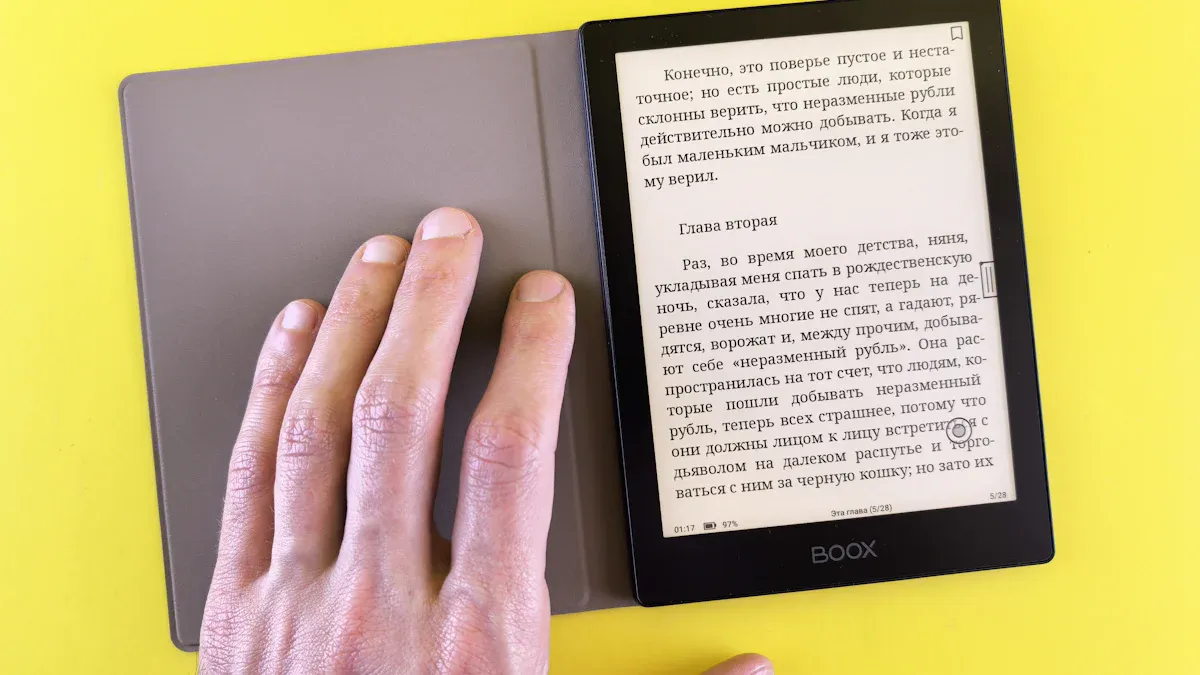
You encounter the roots of e-ink technology in the halls of the MIT Media Lab. In the late 1990s, Joseph Jacobson recruited Barrett Comiskey and J.D. Albert to create a display that mimicked the look of book pages. Their experiments focused on microcapsules filled with charged pigment particles. On January 23, 1997, they achieved a breakthrough by moving particles within a microcapsule, marking a pivotal moment for electronic paper. After graduation, they founded E Ink Corporation to commercialize their invention. This effort led to the first e-reader using e-ink technology in 2004.
The MIT Media Lab played a crucial role in the invention of e ink technology. The collaboration between students and their professor laid the foundation for the electronic paper displays you see today.
You see how e-ink technology emerged from academic research and transformed into a commercial product. This journey highlights the importance of innovation and teamwork in advancing electronic paper display technology.
Core Function and Purpose of E Ink
E-ink technology powers electronic paper by using millions of tiny microcapsules. Each microcapsule contains an oily substance and pigmented chips with a negative charge. When you apply an electrical charge, these pigments move, creating visible text and images. This process allows e ink technology to deliver a display that closely resembles traditional ink on paper.
- Microcapsules filled with ink or oil
- Pigmented chips with a negative charge
- Electrical charge moves pigments to form images
You benefit from e-ink technology because it offers low energy usage, outstanding visibility in bright environments, and reduced eye strain. These features make electronic paper ideal for reading devices and other applications where comfort and clarity matter.
| Feature | E Ink Displays | Traditional Displays |
|---|---|---|
| Appearance | Mimics ink on paper | Glows with backlight |
| Energy Efficiency | Highly energy-efficient | Generally consumes more power |
| Readability | Excellent in bright light | Can be difficult to read outdoors |
| Eye Comfort | Comfortable for long reading sessions | May cause eye strain over time |
| Application Suitability | Ideal for static content | Better for dynamic content |
You notice that e-ink technology stands out for outdoor readability, energy efficiency, eye comfort, sustainability, and flexibility. These qualities set electronic paper apart from traditional screens.
E-ink technology serves as the backbone of e-paper display technology. You experience the benefits of electronic paper in devices such as e-readers, smart notebooks, and digital signage. The primary function of e ink technology is to provide a display that looks and feels like paper, while consuming minimal power. This approach supports sustainability and enhances your reading experience.
You rely on e-ink technology for electronic paper displays that offer clarity, comfort, and efficiency. The purpose of e-paper display technology is to bridge the gap between digital convenience and the familiar feel of paper. E-ink technology continues to evolve, shaping the future of electronic paper and e-paper devices.
How E-Ink Works: The Science Behind the Display
Microcapsule and Electrophoretic Technology
Pigment Microcapsules Explained
You interact with e-ink displays that rely on millions of microcapsules embedded in a thin layer. Each microcapsule contains pigments that respond to electrical charges. The science behind these microcapsules involves the movement of charged pigment particles within an oily medium. When you use an e ink device, the display manipulates these charges to attract specific pigments to the surface, creating visible text and images.
- Microcapsules contain pigments that move when exposed to an electric field.
- The display achieves different colors by controlling which pigments reach the surface.
- Systems vary by pigment count: one-particle (black), two-particle (black and white), three-particle (black, white, red), and four-particle (adding yellow).
- In a two-particle system, black pigments drawn to the surface make the display appear black, reflecting ambient light.
This microcapsule technology gives e-ink displays their signature paper-like appearance and low power consumption.
Electrophoretic Display Mechanism
Electrophoretic technology enables e ink screens to mimic traditional ink on paper. You benefit from this process because it rearranges charged pigment particles using an electric field. The result is a comfortable reading experience with high clarity, even in bright environments.
| Step | Description |
|---|---|
| 1 | An electric charge is applied to the microcapsules. |
| 2 | Negatively charged black particles move towards the positive electrode. |
| 3 | Positively charged white particles are repelled to the top. |
| 4 | The arrangement of particles creates visible text and images. |
You see how electrophoretic ink consists of microcapsules containing charged particles. The electric field controls their movement, and the arrangement forms images and colors. This mechanism allows e-ink displays to render crisp text and graphics with minimal energy.
Components of an E Ink Display
Layers and Materials Used
You notice that e ink displays use several specialized materials to achieve their unique properties. The combination of these materials contributes to flexibility, durability, and image clarity.
| Material Type | Contribution to Properties |
|---|---|
| Microcapsules | Enable flexibility and low power consumption through electrophoretic technology. |
| Flexible Substrates | Allow the display to be lightweight and durable, enhancing usability. |
| Liquid Polymer Layer | Provides a medium for microcapsules, contributing to high reflectivity and image clarity. |
These layers work together to create a display that is thin, lightweight, and resistant to damage. You benefit from a device that is easy to carry and comfortable to use for extended periods.
Role of Electronic Signals in E Ink
You control e-ink displays through electronic signals that drive the movement of pigment particles. The display uses a thin-film transistor circuit to apply precise voltages to each pixel. This process determines which pigments appear on the surface, forming text and images.
| Component | Function |
|---|---|
| Flexible backplanes | Enable lighter, thinner, and more rugged devices, reducing breakage risk and allowing for larger screens. |
| Front lights | Provide illumination in low-light conditions by reflecting light off the display surface. |
| Touch technologies | Allow user interaction through various methods (resistive, inductive, capacitive, infrared). |
| Electronics | Control and drive the display, utilizing discrete controllers or System on Chip (SoC) controllers. |
You interact with e ink screens that respond instantly to your touch and commands, thanks to these electronic components.
Image and Text Formation on E Ink Screens
Black and White Rendering
You experience high clarity when reading on e-ink displays. The process that allows these screens to render text and images involves several steps:
| Aspect | Description |
|---|---|
| Microcapsules | Contain charged pigment particles controlled by voltage waveforms. |
| Pixel Control | Each pixel is managed by a thin-film transistor applying 12-15V to move pigments. |
| Drive Waveform | Specific sequences are calculated for each pixel based on its previous state and target shade. |
| Spatial Dithering | Groups pixels to create perceived gray shades by varying black and white pixel ratios. |
| Temporal Dithering | Rapidly switches pixel states to achieve smoother gradients, enhancing grayscale performance. |
| Refresh Rate | Full page refresh can occur in under 500 ms, crucial for maintaining image integrity. |
You notice that the refresh operation moves electronic ink particles to display new content. The speed and path of these particles depend on the electric field’s strength and direction. Effective refresh operations require precise control of the driving waveform.
- The refresh operation consumes electrical energy as it moves electronic ink particles to display new content.
- The speed and path of these particles are influenced by the electric field’s strength and direction.
- Effective refresh operations depend on the precise control of the driving waveform.
Sometimes, you may observe ghosting, which is the faint residue of previous content. This occurs when microcapsules fail to fully realign during an update, especially with grayscale elements or partial refresh cycles.
- E ink ghosting is the faint visual residue of previously displayed content that remains visible after the screen refreshes.
- This occurs when the display’s microcapsules, containing charged black and white pigment particles, fail to fully realign during an update.
- Ghosting is particularly noticeable with grayscale elements or during partial refresh cycles.
To maintain image clarity, e-ink displays use a flashing mechanism. This full-screen reset temporarily inverts the display, showing a black screen followed by a white one. The process forces every pigment particle to move through its maximum charge state, clearing any lingering residue.
- Flashing is a full-screen reset that temporarily inverts the display, showing a black screen followed by a white one.
- This process forces every pigment particle in the microcapsules to move through its maximum charge state.
- Flashing effectively clears any lingering visual residue from the previous screen, ensuring a clean slate for the next image.
Color E Ink Displays
You can now access color e ink screens that use advanced microcapsule systems. These displays add red and yellow pigments to the traditional black and white, allowing for richer color reproduction. The technology still relies on electrophoretic movement, but with more complex control of multiple pigment types.
- Color e ink displays use three-particle (black, white, red) or four-particle (adding yellow) systems.
- The display manipulates the electric field to bring different pigments to the surface, creating a range of colors.
- You benefit from improved image quality and more vibrant graphics, although color range and refresh rates remain limited compared to traditional screens.
You see that e-ink continues to evolve, offering new possibilities for reading and digital interaction.
E Ink vs. Traditional Screens: Key Differences
Eye Comfort and Readability
Glare Reduction and Paper-Like Quality
You notice a significant difference in glare reduction when comparing e-ink displays to traditional screens. E ink technology reflects ambient light, which creates a paper-like quality that enhances readability. This feature allows you to read comfortably in bright environments, such as outdoors or near windows. The absence of harsh backlighting means your eyes experience less strain, even during extended reading sessions. The static nature of e-ink displays eliminates flicker, so your eyes can relax and focus on the content.
A Harvard study found that e-ink ePaper displays are much more comfortable for your eyes than LCD screens. The research highlights that LCDs emit blue light, which can stress retinal cells, while e-ink displays, especially those with ComfortGaze™ front lights, reduce blue light exposure.
Blue Light and Eye Health
You benefit from reduced blue light exposure when using e ink devices. Conventional screens, such as LCDs and LEDs, emit high levels of blue light, which can disrupt melatonin production and affect sleep patterns. E-ink displays emit minimal blue light, especially when equipped with warmer front lights. This design supports healthier screen habits and protects your eyes during long reading periods.
| Feature | E Ink Technology | Other Displays (LCD/LED) |
|---|---|---|
| Light Emission | Reflects ambient light | Produces its own light |
| Blue Light Emission | Minimal to none | High levels of blue light |
| Flicker | Static display, no flicker | Rapid refresh rates, can cause flicker |
| Visual Comfort | Reduces glare and harsh contrast | Often causes eye strain due to brightness |
| Reading Experience | Feels like reading on paper | Feels bright and insistent |
- E ink emits no light of its own, reducing exposure to harmful blue light.
- E-ink front lights often use warmer tones, minimizing biological disruption.
Power Consumption and Battery Life
Energy Use in Static and Dynamic Content
You see a dramatic difference in energy use between e-ink and traditional screens. E ink displays consume power only when changing content, making them ideal for static images and text. LCD screens require constant backlighting, which increases power consumption, especially during dynamic content or video playback.
| Technology | Power Consumption | Battery Life |
|---|---|---|
| E Ink | Up to 99% less energy than LCD | Lasts up to six weeks on a single charge with 30 minutes of daily reading |
| LCD | Requires constant backlighting, increasing power usage | Varies, generally shorter battery life than E Ink |
- E ink screens can use up to 99% less energy than traditional LCD screens.
- LCD screens require constant backlighting, which significantly increases their power consumption.
Battery Life Benefits of E Ink
You enjoy extended battery life with e-ink devices. Many e-ink readers last for weeks on a single charge, even with regular use. This efficiency supports portability and convenience, allowing you to read without frequent charging.
| Display Type | Optimal Switching Frequency | Energy Efficiency |
|---|---|---|
| E-Paper | Less than 4 switches/day | Most power effective |
| Reflective LCD | More than 600 switches/day | Best option from a power perspective |
Display Performance and Limitations
Refresh Rates and Animation
You encounter limitations in refresh rates when using e-ink screens. E ink displays typically refresh at around 1 Hz, which means they cannot support smooth animations or rapid content changes. LCD and OLED screens refresh much faster, enabling seamless video playback and interactive applications.
| Display Type | Refresh Rate | Suitability for Dynamic Content |
|---|---|---|
| E-Ink | ~1 Hz | Limited, suitable for static images |
| LCD | 60-120 Hz | Excellent, supports video playback and real-time interactions |
E ink displays are less suitable for video playback, gaming, and interactive applications due to slow refresh rates and limited color capabilities.
Multimedia and Video Constraints
You notice that e-ink screens struggle with multimedia content. The refresh rate, usually between 1 and 2 Hz, leads to ghosting and lag. This limitation makes e-ink unsuitable for dynamic content such as video or smooth animations. The driver chip cannot update all pixels quickly, resulting in the ‘Blizzard’ phenomenon during rapid scrolling.
| Display Type | Refresh Rate (Hz) | Suitability for Video/Animation |
|---|---|---|
| E Ink | 1 – 2 | Unsuitable |
| LCD | High | Suitable |
| OLED | High | Suitable |
- The driver chip struggles to update all pixels quickly, leading to lag and ghosting.
- E ink displays excel at static content but fall short for multimedia and animation.
Advantages of E Ink for Modern Devices
Enhanced Reading Experience
Outdoor Visibility and Sunlight Readability
You gain a significant advantage when using e-ink displays outdoors. The technology reflects ambient light, which means you can read clearly even in direct sunlight. Unlike traditional screens that wash out or glare, e ink maintains crisp text and images. This paper-like quality ensures that your reading experience remains consistent, whether you sit by a window or relax in a park.
Reduced Eye Strain
You benefit from reduced eye strain when you choose e-ink devices. Research shows that reading behavior on e-readers with this technology closely matches reading printed materials. Your eyes follow similar movement patterns, including regressive saccades, on both e-readers and paper. This similarity enhances legibility and minimizes visual fatigue, making long reading sessions more comfortable.
Note: E-ink technology not only improves legibility but also supports your eye health by reducing visual fatigue during extended use.
Portability and Device Design
Lightweight and Thin Screens
You will notice that e ink devices offer exceptional portability. Their lightweight and thin construction makes them easy to carry, whether you travel or commute. The following table highlights key portability advantages compared to conventional tablets:
| Advantage | Description |
|---|---|
| Lightweight Design | E Ink devices are designed to be lightweight, making them easy to carry around. |
| Long Battery Life | They can last days or weeks on a single charge, enhancing their portability for users on the go. |
| Consolidation of Notebooks | Users can store multiple notebooks in one device, reducing the need to carry physical materials. |
Flexible and Durable Form Factors
You experience greater flexibility and durability with modern e-paper devices. Manufacturers use innovations like Mobius and Carta to create displays that withstand shocks and allow foldable designs. The table below compares these features:
| Feature | Mobius | Carta |
|---|---|---|
| Durability | Provides shock resistance | Focuses on visual clarity |
| Flexibility | Enables foldable designs | Ideal for main content display |
| Use Case | Secondary displays/extensions | Primary reading/writing area |
| Design Innovation | Supports modular layouts | Enhances user experience |
- The combination of Mobius and Carta allows you to enjoy devices that are both portable and durable.
- Mobius enables foldable and modular designs, while Carta delivers high-contrast displays for clarity.
Environmental and Energy Benefits
Lower Power Consumption
You help the environment when you use e-ink technology. These displays consume power only when updating content, unlike LCDs that require constant backlighting. This efficiency leads to substantial energy savings and lower greenhouse gas emissions. For example, operating 100,000 ePaper signs for 20 hours a day with four updates per hour can reduce CO2 emissions by 500,000 tons compared to LCD signage. E ink technology could cut emissions by about 4 million tons when compared to traditional printed posters.
Device Longevity
You also contribute to sustainability through the longevity of e-paper devices. E ink screens consume minimal energy, which extends battery life and reduces the frequency of charging cycles. The table below outlines additional environmental benefits:
| Environmental Benefit | Description |
|---|---|
| Low Energy Consumption | E Ink screens consume power only when the image changes, allowing devices like e-readers to last weeks on a single charge. |
| Recyclability | E Ink displays can recover up to 99% of their materials for reuse, promoting a circular economy. |
| Reduced Electronic Waste | The use of E Ink technology in retail reduces paper waste and electronic waste through smart price tags and dynamic updates. |
You support a greener future by choosing devices that last longer and use fewer resources.
Limitations and Challenges of E Ink Technology
Color and Multimedia Limitations
Limited Color Range
You may notice that color E Ink screens do not match the vibrancy of LCD or OLED displays. The technology offers a restricted color gamut, which results in muted and less vivid colors. If you use an E Ink device for reading comics or viewing colorful graphics, you will see that the images appear less saturated. The limited palette makes E Ink suitable mainly for static content, such as text-based documents and signage.
| Limitation | Description |
|---|---|
| Limited Color Gamut | Color E-Ink screens have a restricted color range, resulting in muted and less vibrant colors. |
| Grayscale Mode for Faster Refresh | To improve refresh rates, color E-Ink often switches to grayscale, reducing color quality. |
| Limited Use Cases | Their limitations make them suitable mainly for static content like reading and digital signage. |
Slow Refresh Rates
You experience slow refresh rates when you interact with E Ink screens. The display cannot update quickly enough to support smooth animations or video playback. If you try to watch a video or scroll rapidly, you will see lag and ghosting. E Ink technology often switches to grayscale mode to improve refresh rates, but this reduces color quality even further.
| Limitation | Description |
|---|---|
| Slower Refresh Rate | E-Ink displays are not ideal for fast-paced animations or video due to their slower refresh rates. |
Cost and Manufacturing Issues
Production Complexity
You encounter higher production complexity with E Ink displays. Manufacturing color E Ink screens requires advanced processes and specialized materials. These factors contribute to increased costs compared to traditional display technologies. Technological advancements continue to improve performance and reduce costs, but the complexity remains a challenge.
Price Compared to LCD and OLED
You may pay more for E Ink devices than for LCD or OLED screens, especially when you choose color models. The table below highlights key factors that influence pricing:
| Factor | Description |
|---|---|
| Technological Advancements | Ongoing improvements in E Ink technology enhance performance and reduce costs. |
| Energy Consumption | E Ink devices consume significantly less energy compared to other display technologies. |
| Manufacturing Costs | Lower manufacturing costs contribute to competitive pricing in the market. |
| Limitations | Issues like low refresh rates and limited color palettes can negatively impact pricing. |
You benefit from lower energy consumption, but you may face higher upfront costs due to manufacturing complexity and limited multimedia capabilities.
Durability and Lifespan Concerns
Screen Fragility
You need to handle E Ink screens with care. These displays are prone to cracking under pressure, especially larger models. Most companies do not offer repair services for broken screens, and standard warranties typically exclude screen damage. Poor battery placement and design flaws can increase the risk of breakage.
- E Ink screens are prone to cracking easily under pressure.
- Larger E Ink screens are more fragile than smaller ones, increasing the risk of damage.
- Design flaws, such as poor battery placement, can contribute to screen breakage.
- There is a lack of repair services for broken screens, with most companies not offering any options.
- Standard warranties typically do not cover screen breakages, leading to potential consumer dissatisfaction.
Wear Over Time
You may notice wear over time with frequent use. E Ink displays can develop ghosting or faded areas after thousands of refresh cycles. The longevity of the screen depends on usage patterns and environmental factors. If you use your device daily, you should expect gradual degradation in image quality.
Tip: To extend the lifespan of your E Ink device, avoid applying pressure to the screen and store it in a protective case.
Real-World Applications of E Ink

E-Readers and Digital Books
Popular Brands and Models
You see e-ink devices leading the digital reading revolution. Major brands like Amazon Kindle, Kobo, and Barnes & Noble Nook have set the standard for e-ink readers. These e-readers use advanced e-ink screens to deliver crisp text and long battery life. You can choose from a range of models, from basic entry-level devices to premium versions with waterproofing and adjustable lighting. Many e-ink readers support large digital libraries, so you can carry thousands of books in one lightweight device.
User Experience and Features
You benefit from a reading experience that feels natural and comfortable. E-ink devices offer glare-free screens, which allow you to read in bright sunlight or dim rooms. You can adjust font sizes, margins, and lighting to suit your preferences. Many e-ink readers include features like note-taking, dictionary lookup, and Wi-Fi connectivity. Some models even support audiobooks and text-to-speech. You enjoy weeks of battery life, so you spend more time reading and less time charging.
E Ink in Other Devices
Smart Notebooks and Tablets
You can use e-ink tablets and smart notebooks for digital writing and sketching. These e-ink devices combine the feel of pen and paper with the convenience of digital storage. You can organize notes, annotate documents, and sync your work to the cloud. E-ink tablets like the reMarkable and BOOX Note Air provide a distraction-free workspace. You avoid eye strain and enjoy a paper-like writing surface.
Digital Signage and Electronic Labels
You encounter e-ink devices in retail and business environments. Digital signage and electronic shelf labels use e-ink screens to display prices, promotions, and product information. These e-ink devices consume very little power and remain readable under harsh lighting. You see e-ink monitors used for meeting room schedules and public information boards. E-ink technology ensures that updates are quick and energy-efficient.
Emerging Uses of E Ink
Wearables and Smart Accessories
You find e-ink devices in wearables like smartwatches and fitness trackers. E-ink screens provide excellent visibility outdoors and extend battery life. Some smart accessories, such as digital badges and luggage tags, use e-ink displays for customizable information. You benefit from lightweight designs and displays that remain visible at all times.
E Ink in Retail and Transportation
You notice e-ink devices transforming retail and transportation. E-ink smartphones offer always-on displays and low power consumption. You can check notifications and read messages without draining your battery. E-ink monitors provide secondary screens for laptops and desktops, reducing eye fatigue during long work sessions. In transportation, e-ink devices display real-time schedules and route information at bus stops and train stations. You experience clear, reliable updates in any lighting condition.
Tip: E-ink devices excel in environments where readability, battery life, and durability matter most. You can expect to see even more innovative uses as the technology evolves.
The Future of E Ink Technology
Innovations in Display Quality
Advances in Color E Ink
You see color E Ink displays evolving rapidly. Manufacturers now develop new pigment systems that expand the color range and improve saturation. You can expect richer hues and sharper images in future devices. Researchers focus on increasing the number of pigments inside each microcapsule. This approach allows you to view more lifelike graphics and illustrations. You will notice that color E Ink screens become more suitable for magazines, comics, and educational materials.
Faster Refresh Rates and Performance
You demand smoother interactions with your devices. E Ink engineers respond by optimizing the electrophoretic process. You will experience faster page turns and quicker updates. Some prototypes already achieve refresh rates that support basic animations. You benefit from reduced ghosting and improved grayscale transitions. These enhancements make e-paper displays more versatile for note-taking and interactive applications.
Expanding Applications and Market Trends
Flexible and Foldable E Ink Screens
You want devices that adapt to your lifestyle. Flexible E Ink screens now enter the market. You can fold, bend, or roll these displays without damaging them. Manufacturers use plastic substrates to create lightweight and durable products. You may soon carry foldable e-paper tablets or rollable digital newspapers. This flexibility opens new possibilities for portable electronics and wearable technology.
Integration with Smart Devices and IoT
You rely on smart devices for daily tasks. E Ink technology integrates with the Internet of Things (IoT) to deliver real-time information. You see e-paper displays in smart home panels, connected labels, and energy-efficient signage. These screens update instantly and consume minimal power. You benefit from always-on displays that show notifications, schedules, and alerts. E Ink’s compatibility with wireless networks supports seamless communication between devices.
Consumer Preferences and Industry Adoption
Growth in New Industries
You observe E Ink technology expanding beyond e-readers. Industries such as healthcare, logistics, and retail now adopt e-paper solutions. You find electronic medical records, smart price tags, and digital badges powered by E Ink. This growth reflects your need for sustainable, low-power displays in diverse environments. You will see more companies investing in E Ink for business operations and customer engagement.
E Ink’s Role in Sustainable Technology
You care about sustainability. E Ink technology supports eco-friendly practices by reducing energy consumption and electronic waste. You help lower your carbon footprint when you choose devices with E Ink screens. Manufacturers recycle materials and design products for long-term use. You contribute to a greener future by embracing e-paper solutions in your personal and professional life.
Tip: You can expect E Ink technology to play a key role in the next generation of sustainable electronics.
You have explored how e-ink technology powers modern devices by simulating ink on paper. E-ink delivers clear text, low energy use, and comfortable reading. You benefit from excellent outdoor visibility and long battery life, though you may notice limits in color and refresh speed. E-paper continues to shape digital reading and display solutions. You can expect ongoing innovation as manufacturers improve performance and expand applications.
FAQ
What makes E Ink different from LCD or OLED screens?
You see E Ink displays reflect ambient light instead of emitting it. This design reduces glare and eye strain. You also notice that E Ink uses less power, which extends battery life compared to LCD or OLED screens.
Can you use E Ink devices in direct sunlight?
You can read E Ink screens clearly in direct sunlight. The display mimics paper and does not wash out or glare. This feature makes E Ink ideal for outdoor reading and use in bright environments.
How long does the battery last on an E Ink device?
You often enjoy weeks of battery life on a single charge. E Ink screens only use power when updating content. This efficiency means you spend less time charging and more time using your device.
Is E Ink technology safe for your eyes?
You benefit from reduced blue light exposure with E Ink. The display does not emit its own light, which helps protect your eyes during long reading sessions. Many users find E Ink more comfortable than traditional screens.
Can E Ink screens display color images?
You can view color images on some E Ink devices. However, the color range remains limited compared to LCD or OLED screens. Color E Ink works best for simple graphics, charts, and basic illustrations.
What is e-paper, and how does it relate to E Ink?
You use the term e-paper to describe digital displays that mimic traditional paper. E Ink is a leading technology behind e-paper. You experience the benefits of e-paper in e-readers, digital signage, and smart notebooks.
Are E Ink screens durable?
You should handle E Ink screens with care. While some models use flexible materials, most remain vulnerable to cracks if dropped or pressed. Using a protective case helps extend the life of your device.
Can you write or draw on E Ink devices?
You can write or draw on many E Ink tablets and smart notebooks. These devices support stylus input, allowing you to take notes or sketch. The writing experience feels similar to using pen and paper.