

You can transform your retail operations by choosing to deploy cloud platform solutions for digital price management. Electronic Shelf Labels, paired with ESL Gateway AP and ESL Price Tag technology, streamline Esl Retail workflows and enable real-time price updates. As you move forward, you must prepare for several hurdles, such as integrating with legacy systems, maintaining secure communication, and managing battery life. Staff training and reliable wireless connectivity also play a critical role in successful deployment.
Deploy Cloud Platform for Electronic Shelf Label Systems
Main Steps in Cloud Deployment
Initial Assessment and Planning
You begin your journey to deploy cloud platform solutions for electronic shelf label systems by conducting a thorough assessment. Evaluate your store’s current infrastructure, including network capabilities, hardware readiness, and compatibility with digital price tags. Identify the number of ESLs you plan to install and the types of products you want to display. Map out your goals, such as improving pricing accuracy, streamlining operations, or enhancing customer engagement.
Tip: Involve IT, operations, and store management teams early in the planning process to ensure alignment and smooth execution.
Selecting Cloud and ESL Solutions
Select a cloud platform that offers reliability, security, and scalability. Leading providers like AWS, Azure, and Google Cloud deliver robust environments for retail operations. Choose an electronic shelf label solution that supports centralized management and real-time updates. Look for features such as Bluetooth Low Energy (LE) for cost-effective communication, high durability for busy retail spaces, and compatibility with various display types. Ensure your solution can scale to thousands of ESLs and multiple store locations without performance loss.
Core Requirements for Deployment
Hardware, Software, and Network Needs
To deploy cloud platform solutions for digital price tags, you need a combination of reliable hardware, robust software, and a stable network. Your hardware should include high-quality ESLs that withstand daily retail use and require minimal maintenance. Opt for display modules that support e-ink or color displays, and ensure long battery life for cost efficiency. Your software must provide a centralized, cloud-based content management system (CMS) that enables seamless integration and local customization.
A strong network backbone is essential. Use standard-based communication protocols like Bluetooth LE or Wi-Fi to ensure interoperability and reduce infrastructure costs. Edge computing devices can process data locally, reducing reliance on constant internet connectivity and improving system reliability.
- Consistent and accurate pricing across all channels
- Centralized control with real-time updates
- Operational efficiency through automation
- Scalability to support thousands of ESLs per store
Integration with Retail Systems
Integrating your cloud platform with existing retail systems is critical for success. Connect your ESLs to your ERP, POS, and inventory management systems to enable real-time price and stock updates. Support omni-channel data unification to consolidate customer, order, and inventory information. Choose solutions that offer out-of-the-box integrations with popular retail cloud ecosystems and flexible APIs for custom needs.
Security remains a top priority. Implement user access controls, encrypted transactions, and regular security audits. Automation and AI-driven pricing intelligence can further reduce errors and optimize pricing strategies. Ensure your system supports offline operations to maintain business continuity during connectivity issues.
Electronic Shelf Label Technology Overview
What Is an Electronic Shelf Label?
Features and Capabilities
You encounter electronic shelf labels every time you see a digital display showing product prices on a retail shelf. These digital smart labels replace traditional paper tags and bring several advanced features to your store:
- Electronic shelf labels display real-time price, promotions, and product information using electronic paper or LCD screens.
- You can connect these labels wirelessly to a central server, which allows you to update prices instantly across all shelves.
- The system supports wireless communication through technologies like radio frequency, infrared, Wi-Fi, or Bluetooth.
- You reduce labor costs and human errors because you no longer need to change paper labels manually.
- The labels can show additional details such as stock levels, barcodes, or expiration dates, helping you manage inventory more efficiently.
- You support dynamic pricing strategies, adjusting prices quickly in response to demand or competition.
- By switching to digital labels, you contribute to sustainability by eliminating paper waste.
Note: Electronic shelf labels use electronic ink technology, which mimics the look of paper and consumes very little power. This feature ensures long battery life and clear visibility in various lighting conditions.
Types of ESLs Used in Retail
You can choose from several types of electronic shelf labels, each designed for specific retail needs:
- Segmented e-paper ESLs: These labels display basic price and product information using segmented electronic ink displays. They suit stores with simple pricing needs.
- Graphic e-paper ESLs: You get more flexibility with these labels, which can show graphics, barcodes, and multiple lines of text. They work well in supermarkets and electronics stores.
- LCD ESLs: These digital labels offer vibrant color displays and are ideal for highlighting promotions or premium products.
- NFC-enabled ESLs: With these, customers can tap their smartphones to access extra product information or digital coupons.
How Cloud Platforms Enhance ESL Management
Centralized Control and Automation
A cloud-based platform gives you centralized control over all your electronic shelf labels. You can manage pricing, promotions, and inventory data for multiple stores from a single dashboard. This approach streamlines your operations and reduces the need for on-site IT infrastructure. You benefit from automated device management, including base station connections and data transmission queues, which ensures stable communication and minimizes manual intervention.
| Feature/Capability | Description |
|---|---|
| Centralized Multi-User Management | Supervise all ESL operations from one console across locations. |
| Integration with Business Systems | Connects with POS, ERP, and CRM for seamless workflows. |
| Scalability | Supports thousands of ESLs across multiple stores. |
| Real-time Monitoring | Provides instant status updates for all devices. |
| Automated Base Station Management | Ensures stable wireless communication automatically. |
Real-Time Price Updates
You can update prices and product information in under a minute using a cloud platform. The system transmits new data securely to your ESLs, ensuring that every label displays accurate information. This real-time capability supports dynamic pricing and helps you respond quickly to market changes. You also reduce labor costs and improve pricing accuracy, as the process eliminates manual updates and potential errors. With app-based management, you can edit and send updates from your mobile device or computer, making the system flexible and user-friendly.
Key Components and Technologies to Deploy Cloud Platform
ESL Hardware and Infrastructure
Display Modules and Power Management
You need robust hardware to support your digital price tag deployment. Digital Label Tags, Smart-Shelf Tabs, Warehouse Electronic Labels, and Freezer Electronic Labels form the backbone of your system. Each type serves a unique purpose, from standard shelf displays to specialized environments like cold storage. You should select display modules that use e-paper or LCD technology, which ensures clear visibility and low power consumption. Power management remains critical. Most digital smart labels rely on batteries designed to last several years, reducing maintenance and operational costs. Accessories such as mounting rails help you install and secure the labels efficiently.
Wireless Communication Protocols (Wi-Fi, BLE, Zigbee)
Your cloud platform relies on stable wireless communication to connect ESLs with the central management system. You can choose from protocols like Wi-Fi, Bluetooth Low Energy (BLE), or Zigbee. Each protocol offers distinct advantages. Wi-Fi provides high bandwidth for large stores, BLE delivers energy efficiency, and Zigbee supports mesh networking for reliable coverage. Gateways bridge the connection between your ESL tags and the cloud, ensuring secure and real-time data transmission.
Cloud Platform Options for Digital Price Tags
SaaS-Based ESL Cloud Solutions
You benefit from SaaS-based solutions because they eliminate the need for local installations. These solutions offer centralized management through cloud servers, which simplifies updates and maintenance. You gain scalability, allowing you to add new stores or thousands of ESLs without major infrastructure changes. Real-time updates and secure data transmission keep your pricing accurate and your operations efficient.
Public vs. Private Cloud Considerations
You must decide between public and private cloud options for your digital price tag system. Public cloud solutions provide cost efficiency and rapid deployment. Private cloud platforms offer greater control and customization, which may suit businesses with strict security or compliance needs. Both options support centralized control and real-time updates, but your choice depends on your operational requirements and risk tolerance.
Software Integration and APIs
POS and Inventory System Integration
You should integrate your ESL system with your POS and inventory management platforms. This integration enables real-time price and stock updates, reducing errors and manual work. Start with a single use case, then expand as you validate performance and compatibility. Centralized management through retail APIs lets you automate inventory and order fulfillment, improving efficiency across your stores.
Middleware and Management Tools
Middleware bridges the gap between legacy systems and modern cloud solutions. You should use data transformation tools to ensure consistency across different formats. Incremental integration allows you to test each phase thoroughly, minimizing disruption. Ongoing support, regular updates, and performance monitoring help you adapt to changing business needs and maintain a reliable digital smart label environment.
Tip: Choose suppliers who offer strong technical support and system expandability to future-proof your investment.
Step-by-Step Guide to Deploy Cloud Platform for Digital Price Tags
Preparation and System Design
Store Requirements and Site Survey
You should start by defining your business priorities and the purpose behind adopting a cloud-based digital price tag system. Identify your main goals, such as improving pricing accuracy, reducing manual labor, or enabling dynamic pricing. Conduct a thorough site survey of your store. Assess the current network infrastructure, wireless coverage, and physical shelf layouts. Determine the number of ESLs you need and the types of products that will use digital labels.
Tip: Involve key stakeholders from IT, operations, and store management early in the process. Their input ensures your deployment aligns with business objectives and daily workflows.
Create a checklist for your site survey:
- Map wireless signal strength throughout the store.
- Identify potential sources of interference.
- Document shelf types and mounting options.
- Note power outlet locations for gateways or access points.
Hardware and Cloud Service Selection
Select hardware and cloud services that match your operational needs and long-term strategy. When choosing ESL hardware, focus on display technology (e-paper or LCD), battery life, and durability. For cloud services, evaluate reliability, performance, and disaster recovery capabilities. Review service level agreements (SLAs) to ensure they meet your uptime and support requirements.
Consider these factors when selecting your solution:
- Data privacy and backup policies.
- Support for encryption and multi-factor authentication.
- Flexibility in pricing models, such as pay-as-you-go or subscription.
- Network infrastructure costs and hidden fees.
- Vendor support availability and documentation quality.
You should also plan for organizational change. Train your staff on new workflows and ensure they understand how to use the digital system. Develop a migration strategy that allows you to phase in new technology without disrupting daily operations.
Installation and Integration
Connecting ESLs to the Cloud Platform
Begin installation by mounting ESLs in visible, accessible locations on your shelves. Use ceiling-mounted gateways or access points to provide wireless coverage throughout the store. Connect each ESL to the cloud platform using secure wireless protocols like Wi-Fi or Bluetooth Low Energy. Test each connection to confirm stable communication and real-time data transfer.
Follow these steps for a smooth installation:
- Mount ESLs and gateways according to your site survey plan.
- Power up devices and connect them to your store’s network.
- Register each ESL with the cloud management dashboard.
- Verify that each label displays the correct price and product information.
Note: ESLs typically use low-power e-paper displays, which can last several years on a single battery. This reduces maintenance and ensures long-term reliability.
Integrating with Existing Retail Systems
Integrate your ESL platform with your point-of-sale (POS), inventory, and pricing management systems. Use API-based integration for real-time syncing, or middleware solutions if your current systems lack native support. This integration enables instant price updates, automated inventory tracking, and dynamic pricing strategies.
Key integration steps include:
- Connecting the cloud platform to your POS and inventory databases.
- Configuring automated price updates and stock alerts.
- Testing data synchronization to ensure accuracy across all systems.
You can enhance the customer experience by enabling features like QR codes or NFC on ESLs, providing instant access to product details or promotions.
Configuration and Testing
Network and Security Setup
Set up your network to ensure secure, reliable operation. Segment your network to isolate ESL traffic from other store systems. Enforce strong authentication, such as multi-factor authentication and role-based access control. Use automated monitoring tools to detect misconfigurations and potential threats.
Recommended security practices:
- Automate detection and monitoring with security scanning tools.
- Enforce least privilege access and just-in-time provisioning.
- Implement network segmentation using virtual private clouds or subnets.
- Continuously monitor cloud activities with SIEM tools.
- Keep all systems updated with automated patch management.
Alert: Regularly train your staff on security best practices to reduce risks from human error or social engineering.
Functionality and Performance Validation
Test your system thoroughly before going live. Validate that each ESL displays accurate price and product information. Check that updates from the cloud platform reach all labels in real time. Simulate common scenarios, such as price changes, inventory updates, and network outages, to ensure your system responds correctly.
Create a testing checklist:
- Confirm real-time price updates on all ESLs.
- Test inventory alerts and automated reordering.
- Validate network failover and backup systems.
- Review system logs for errors or anomalies.
You should document all test results and address any issues before full deployment. Continuous monitoring and regular diagnostics help maintain system performance and reliability.
Ongoing Management and Maintenance
Monitoring, Alerts, and Updates
You need to keep your digital price tag system running smoothly after the initial deployment. Continuous monitoring forms the backbone of effective management. You should use a centralized dashboard to track the status of all electronic shelf labels (ESLs), gateways, and network connections. This dashboard gives you real-time visibility into device health, battery levels, and connectivity.
Set up automated alerts to notify you of any issues. For example, you can receive notifications if a label goes offline, a battery runs low, or a network gateway loses connection. These alerts help you respond quickly and prevent small problems from becoming major disruptions.
Tip: Schedule regular system updates to keep your ESL software and cloud platform secure and efficient. Updates often include new features, security patches, and performance improvements.
You can use the following checklist to maintain your system:
- Review device status reports daily.
- Respond to alerts as soon as possible.
- Replace batteries before they reach critical levels.
- Apply software and firmware updates according to vendor recommendations.
- Back up configuration data regularly.
A well-maintained system reduces downtime and ensures accurate pricing across your stores. You also improve customer trust by keeping information up to date.
Remote Troubleshooting
Remote troubleshooting tools allow you to resolve most issues without visiting the store. You can access the cloud management console from any location. This access lets you diagnose problems, reset devices, and push configuration changes instantly.
Common troubleshooting tasks include:
- Identifying offline ESLs and restoring their connection.
- Remotely rebooting gateways or access points.
- Updating device firmware to fix bugs or improve performance.
- Reviewing event logs to trace the source of errors.
You should document each troubleshooting step and its outcome. This documentation helps you build a knowledge base for future reference and training.
| Issue Type | Remote Action | Expected Result |
|---|---|---|
| Offline ESL | Reconnect or reset device | Device comes back online |
| Low battery alert | Schedule battery change | Prevents device failure |
| Firmware bug | Push update remotely | Resolves performance issue |
| Network outage | Check gateway status | Restores connectivity |
Note: If you cannot resolve an issue remotely, escalate it to your technical support team or vendor. Quick escalation minimizes downtime and protects your store operations.
You gain significant efficiency when you deploy cloud platform solutions that support remote management. This approach saves time, reduces travel costs, and ensures consistent performance across all locations.
Best Practices for Deploying Cloud Platform with Electronic Shelf Label
Security and Data Protection
Encryption and Access Controls
You must protect your data and systems from unauthorized access. Start by defining clear security policies and procedures so everyone understands their responsibilities. Use strong encryption to safeguard sensitive information both in transit and at rest. Role-based access controls help you limit who can view or change data. Regularly review user permissions to prevent unnecessary access. Continuous monitoring and alerting systems let you detect suspicious activity quickly.
Tip: Educate your staff about security best practices. Well-trained employees help reduce the risk of human error.
Regular Security Audits
You should conduct regular security audits to identify vulnerabilities and improve your governance framework. Align your security measures with legal and regulatory requirements. Work closely with your cloud service provider to ensure their practices match your policies. Integrate security into every phase of your cloud operations, from design to daily management. Adopting a risk-based approach helps you prioritize resources and controls based on real threats.
Scalability and Flexibility
Modular Deployment Strategies
You need a system that grows with your business. Modular and microservices architecture allows you to update or scale parts of your system without affecting the whole. Containerization lets you package applications for easy deployment and scaling. Hybrid and multi-cloud strategies give you flexibility and help you avoid vendor lock-in.
Here are some recommended approaches for scalability and flexibility:
- Use cloud elasticity to automatically adjust resources based on demand.
- Apply horizontal scaling by adding more application instances to distribute workload.
- Enable auto scaling to handle varying workloads without manual intervention.
- Implement load balancing to prevent bottlenecks and improve reliability.
- Leverage virtualization and serverless computing for efficient resource use.
Cloud Resource Optimization
Optimize your cloud resources to control costs and maintain performance. Pay-as-you-go models, reserved instances, and monitoring tools help you manage spending. Regularly review your usage and adjust resources as needed. Virtualization and container orchestration platforms, such as Kubernetes, support rapid provisioning and efficient scaling.
Note: Cost optimization ensures you only pay for what you use, making your deployment more sustainable.
Maintenance and Support
Automated Monitoring Tools
Automated monitoring tools keep your system healthy. Use a centralized dashboard to track device status, network health, and performance metrics. Set up alerts for issues like offline devices or low battery levels. Automated monitoring helps you respond quickly and maintain consistent operations.
| Monitoring Task | Benefit |
|---|---|
| Device status checks | Early issue detection |
| Battery level alerts | Prevents unexpected downtime |
| Network health reports | Ensures reliable connectivity |
Vendor and Partner Collaboration
Work closely with your vendors and partners to ensure smooth deployment and ongoing support. Regular communication helps you address challenges quickly. Make sure your partners align with your security and operational standards. Collaborate on updates, troubleshooting, and future enhancements to keep your electronic shelf label system running efficiently.
Overcoming Common Challenges in Cloud-Based Digital Price Tag Deployment
Network and Connectivity Issues
Signal Interference and Redundancy
You may encounter several network challenges when deploying cloud-based digital price tags. Wireless interference often disrupts network signals, especially in busy retail environments with many electronic devices. Loose or damaged cables can cause intermittent connectivity, while DHCP and DNS issues may lead to failures in IP assignment and name resolution. Misconfigured firewalls sometimes block legitimate traffic, and bandwidth saturation can result in network congestion and performance degradation. Device overheating, firmware bugs, duplicate IP addresses, and routing issues also contribute to connectivity problems. Power fluctuations and network congestion during peak hours further impact system reliability.
Tip: To reduce downtime, implement network redundancy. Use backup gateways and multiple wireless access points to maintain stable connections even if one component fails.
Infrastructure Upgrades
You should regularly assess your network infrastructure to support the demands of cloud-based ESL systems. Service duplication and unclear dependencies can cause outages and increase costs, especially with redundant DNS services or hidden cloud workload dependencies. Traffic hairpinning, where data routes inefficiently between cloud and legacy systems, increases latency and cloud transfer costs. Unnecessary inter-region traffic also raises expenses. Accessing cloud services over the public internet introduces avoidable egress charges and security risks. Consider endpoint services, content delivery networks (CDNs), and cloud interconnects to optimize traffic flow and minimize latency.
Integration and Compatibility
Legacy System Support
Integration with existing retail systems presents another challenge. Modern ESL platforms offer robust APIs and middleware, making it easier to connect with most retail systems. You can ensure compatibility with major ERP and POS providers, including Oracle, SAP, Microsoft Dynamics, Epicor, and Shopify. Suppliers often provide technical support or work with system integrators to ensure smooth deployment. You can schedule installations during off-hours or in phases to minimize disruption.
- Always verify compatibility with your current inventory and POS systems before investing.
- Choose scalable and flexible ESL solutions that can grow with your business.
- Opt for cloud-based platforms that update automatically with new features.
Data Synchronization Solutions
Seamless integration with POS, inventory management, and other store technologies helps you avoid data discrepancies. Evaluate installation complexity to reduce downtime. Consider battery life and maintenance features for ongoing device health. Prioritize user-friendly interfaces for easy updates and promotions. Confirm that your system can display various content types, such as pricing, promotions, and product details.
Security Risks and Mitigation
Preventing Unauthorized Access
Cloud-based digital price tag systems face risks related to Public Key Infrastructure (PKI) and Domain Name System (DNS) management. Misconfigured PKI, such as improper certificate management or expiration, can lead to data breaches and service disruptions. You should use robust key and certificate lifecycle management, including hardware security modules for secure key storage. Enforce strong access controls, multi-factor authentication, and continuous monitoring to prevent unauthorized access. Insider threats and third-party risks also require attention. Rigorous vendor management and regular security assessments help reduce these vulnerabilities.
Compliance with Industry Standards
You must comply with regulations like GDPR, HIPAA, and PCI-DSS to avoid fines and reputational damage. Implement DNS Security Extensions (DNSSEC), rate limiting, and regular configuration reviews to strengthen DNS security. Build a comprehensive cloud risk management framework and clarify security roles with your cloud provider. Use firewalls, intrusion detection systems, and Security Information and Event Management (SIEM) tools to monitor and protect your environment. These measures help you maintain compliance and safeguard sensitive data in your cloud-based digital price tag deployment.
Real-World Benefits and Applications of Deploying Cloud Platform for Digital Price Tags
Retail Store Use Cases
Dynamic Pricing and Promotions
You can transform your retail strategy with cloud-based digital price tags. These systems let you update prices instantly across all shelves, supporting real-time promotions and dynamic pricing. You respond quickly to market changes, competitor actions, or inventory levels. Leading retailers such as FRESHIPPO, Xiaomi, and Carrefour have adopted this technology to stay competitive. You also reduce paper waste, supporting a low-carbon and sustainable retail environment.
Inventory and Stock Management
Cloud platforms enable automatic inventory updates. You track stock levels in real time and receive alerts for low inventory or out-of-stock items. Intelligent picking assistance helps your staff locate products faster, improving in-store efficiency. You minimize manual errors and streamline restocking, which is essential for large supermarkets and multi-location retailers.
Market data shows over 30% adoption of digital price tags in France, with rapid growth in the US, Europe, and China.
Operational Efficiency and Cost Savings
Labor Reduction and Automation
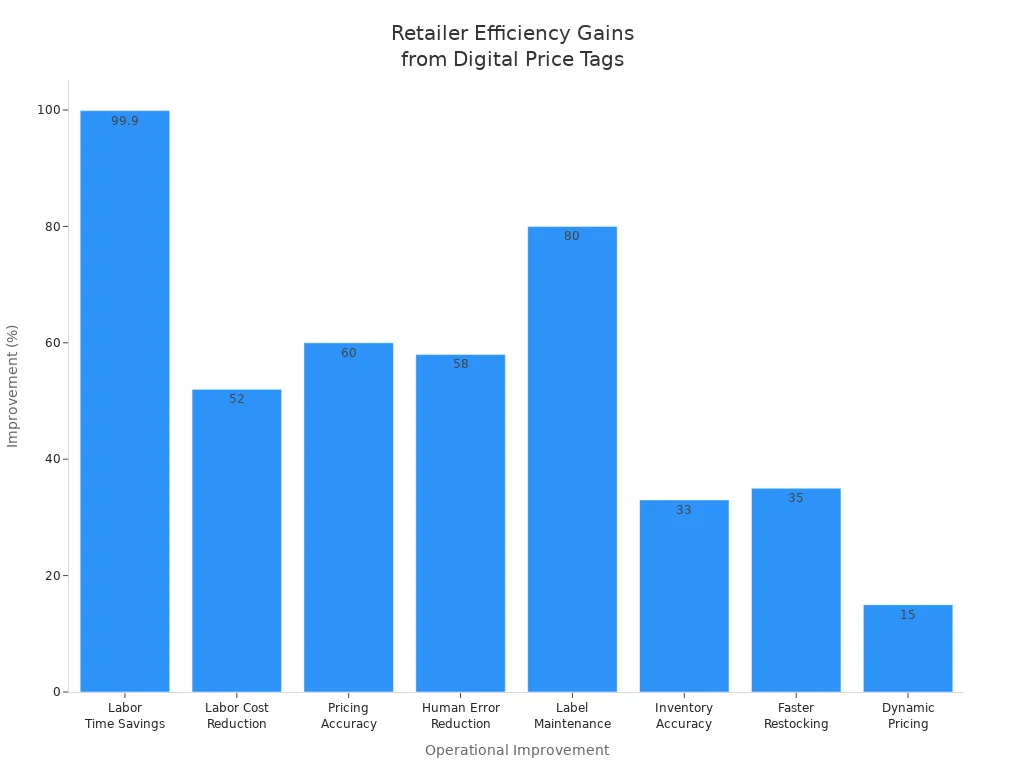
You achieve significant labor savings by automating price updates and inventory management. The table below highlights measurable improvements reported by retailers:
| Operational Improvement / Cost Saving | Evidence / Metrics | Example Retailers |
|---|---|---|
| Labor Time Savings | Up to 12 hours saved per week per store; Naifeh’s Cash Saver reduced manual price tag changes from 50 hours/week to 3 minutes for 2,000 tags | Naifeh’s Cash Saver, Carrefour |
| Labor Cost Reduction | 52% reduction in labor costs related to price updates | Multiple retailers |
| Pricing Accuracy Improvement | 60% increase in pricing accuracy; 50% fewer pricing errors | Carrefour, European supermarket chain |
| Human Error Reduction | 58% reduction in pricing and inventory errors | Multiple retailers |
| Label Maintenance Time Reduction | 80% reduction in label maintenance time | Carrefour |
| Inventory Accuracy | Improved from ~65% to over 98% | European supermarket chain |
| Faster Restocking | 35% reduction in restocking time | Multiple retailers |
| ROI Timelines | ROI within 1.5 to 3.5 years | Naifeh’s Cash Saver, Maurer’s Market IGA, Houchens Food Group |
| Dynamic Pricing & Supply Chain Efficiency | Real-time price updates reduce lead times by ~10 days; dynamic pricing increases product turnover by 15% | Carrefour, Tesco, JD.com |
| Cost Savings Beyond Labor | Reduced paper label usage lowers material costs | General retail benefit |
Enhanced Customer Experience
You enhance the customer experience by providing accurate, up-to-date information. NFC and QR code features on digital tags allow shoppers to access product details or promotions instantly. This technology supports contactless shopping, which builds consumer trust and meets modern expectations.
Business Growth and Insights
Data Analytics and Reporting
You gain valuable business insights by integrating cloud-based digital price tags with AI and analytics tools. These systems process sales, stock, and customer data, enabling predictive maintenance and workflow optimization. You use real-time analytics to identify trends, optimize pricing strategies, and improve store performance.
- The North American ESL market is projected to grow from USD 340 million in 2025 to USD 1.25 billion by 2031, with a CAGR of 24.1%.
- AI-powered analytics support dynamic pricing, automated stock updates, and deeper customer insights.
- Integration with IoT and cloud platforms enables scalable, data-driven operations.
Multi-Store Management
You manage multiple stores efficiently from a single dashboard. Cloud platforms support synchronized price updates, inventory management, and reporting across all locations. This centralized control enables you to implement omnichannel strategies and deliver a consistent shopping experience.
- ESL adoption supports omnichannel retail by bridging physical and digital shopping.
- Strategic partnerships and software integrations enhance store management and operational resilience.
Next Steps to Deploy Cloud Platform for Electronic Shelf Label Solutions
Building a Deployment Roadmap
Timeline, Milestones, and Stakeholder Roles
You need a clear roadmap to guide your deployment. Start by defining a timeline with realistic milestones. Break down the project into phases such as assessment, hardware installation, integration, testing, and go-live. Assign specific roles to stakeholders from IT, operations, and store management. Each team member should understand their responsibilities and deadlines.
A sample deployment roadmap might look like this:
| Phase | Key Activities | Responsible Stakeholders | Target Completion |
|---|---|---|---|
| Assessment | Site survey, requirements gathering | IT, Store Manager | Week 1 |
| Hardware Setup | ESL and gateway installation | IT, Vendor | Week 2-3 |
| Integration | Connect to POS and inventory systems | IT, Operations | Week 4 |
| Testing | Network, security, and functionality | IT, Store Staff | Week 5 |
| Go-Live | System launch, staff training | All | Week 6 |
Tip: Hold regular check-ins to track progress and address issues early. Clear communication keeps your project on schedule.
Evaluation and Selection of Vendors
You should evaluate vendors based on reliability, scalability, and support. Request detailed proposals and compare features, pricing, and integration capabilities. Look for vendors with proven experience in cloud-based ESL deployments. Ask about their security practices, update policies, and technical support options.
Create a checklist for vendor selection:
- Compatibility with your existing systems
- Security certifications and compliance
- Flexible pricing models
- Quality of technical support
- References from similar projects
Note: Choose a vendor who offers strong post-deployment support. This ensures your system remains reliable as your needs evolve.
Planning for Future Expansion
Scalability Considerations
You must plan for growth from the start. Select a cloud platform that supports easy scaling. Modular hardware and software let you add new stores or expand your ESL network without major changes. Use auto-scaling features to handle peak periods and seasonal demand.
Consider these factors for scalability:
- Cloud resource elasticity
- Support for multi-store management
- Flexible API integrations
- Automated device onboarding
Alert: Test your system’s scalability before full rollout. Simulate increased loads to ensure stable performance.
Continuous Improvement Strategies
Continuous improvement keeps your deployment effective. Schedule regular reviews to assess system performance and user feedback. Update your processes as technology evolves. Use analytics to identify trends and optimize pricing or inventory strategies.
You can implement these strategies:
- Monitor key performance indicators (KPIs) monthly
- Schedule quarterly system updates and training sessions
- Encourage staff to suggest workflow improvements
- Stay informed about new ESL features and cloud updates
Tip: Build a culture of innovation. Encourage your team to embrace change and seek out new efficiencies.
You gain a competitive edge when you deploy cloud platforms for digital price tags. Automated price updates save thousands in labor and material costs each year. Real-time synchronization reduces errors and supports dynamic pricing, helping you cut food waste and improve customer satisfaction.
- Centralized management streamlines operations and ensures consistent pricing.
- Cloud-based ESLs support sustainability and compliance goals.
- Best practices include balancing shelf information and using secure, scalable solutions.
Start planning your digital transformation today to unlock efficiency, cost savings, and a better shopping experience.
FAQ
What are the main benefits of using cloud-based digital price tags?
You gain real-time price updates, centralized management, and reduced labor costs. Cloud platforms also support dynamic pricing and improve inventory accuracy. These features help you streamline store operations and enhance the customer experience.
How do you ensure the security of your digital price tag system?
You should use strong encryption, role-based access controls, and regular security audits. Always update your software and monitor system activity. These steps help you protect sensitive data and prevent unauthorized access.
Can you integrate cloud-based ESLs with existing POS systems?
Yes, most cloud-based ESL solutions offer APIs and middleware for integration. You can connect your ESLs to popular POS and inventory systems. This integration enables real-time price and stock updates across your store.
What wireless technologies do digital price tags use?
You can use Wi-Fi, Bluetooth Low Energy (BLE), or Zigbee. Each technology offers unique advantages. Wi-Fi provides high bandwidth, BLE saves energy, and Zigbee supports mesh networking for reliable coverage.
How long do digital price tag batteries last?
Most digital price tags use e-paper displays and energy-efficient communication. You can expect battery life to last three to five years under normal retail conditions. Regular monitoring helps you plan timely replacements.
What should you consider when scaling to multiple stores?
You need a cloud platform that supports multi-store management and automated device onboarding. Look for solutions with centralized dashboards, flexible APIs, and robust support. Test scalability before expanding your deployment.
How do you handle network outages with cloud-based ESLs?
Many systems use edge computing or local gateways. These features allow ESLs to operate and display prices even if the internet connection drops. You maintain business continuity and accurate pricing during outages.
Are cloud-based digital price tags suitable for all retail environments?
You can deploy cloud-based ESLs in supermarkets, electronics stores, pharmacies, and specialty shops. Assess your store’s size, network infrastructure, and integration needs before choosing a solution.