
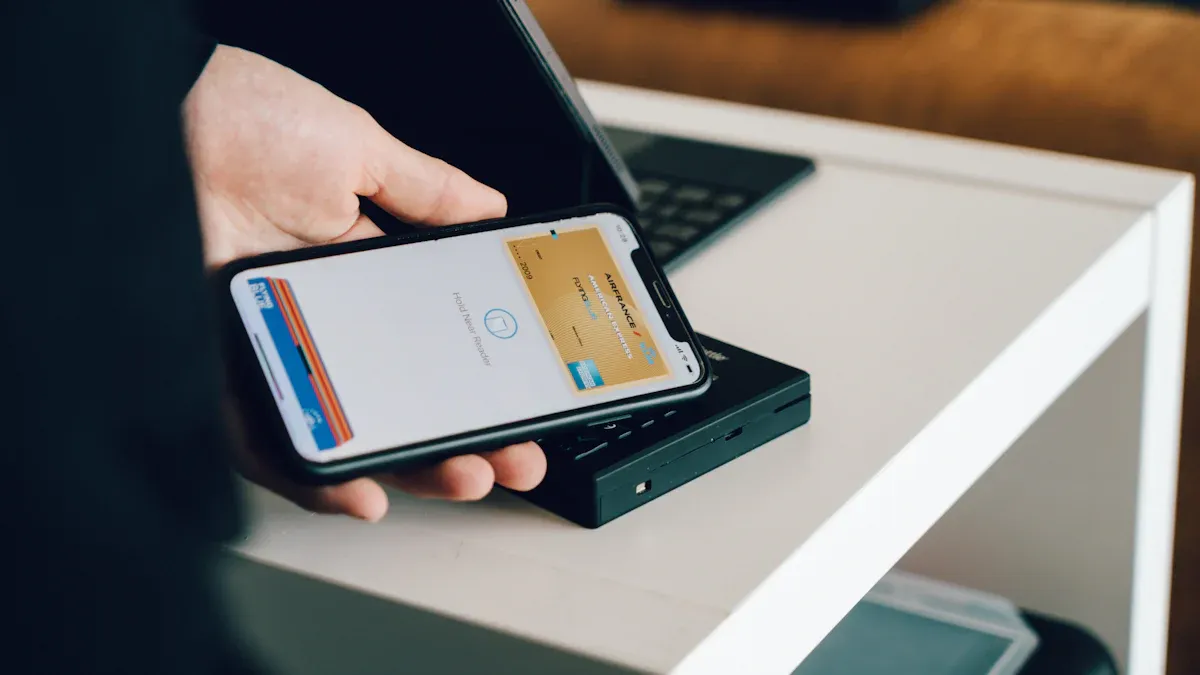
You see digital price tags transforming the way you manage pricing in Esl Retail. Over 68% of large retailers now use Electronic Shelf Labels, which connect seamlessly with mobile POS devices through an ESL Gateway AP. This integration provides real-time updates, ensuring every ESL Price Tag displays accurate pricing. You benefit from reduced labor, nearly perfect pricing accuracy, and faster promotions.
- AI-powered digital price tags synchronize instantly with your POS, eliminating errors and freeing staff for customer service.
- Dynamic pricing and inventory synchronization help you optimize sales and margins, while customers enjoy consistent prices and personalized promotions.
How Digital Price Tags Connect with Mobile POS Devices
Integration Process Overview
Wireless communication and real-time synchronization
You can connect digital price tags to mobile POS devices using wireless technologies like Wi-Fi, Bluetooth, or proprietary radio frequency protocols. These wireless connections allow for real-time synchronization, so every price update you make in your POS system instantly appears on the shelf. This process eliminates manual price changes and ensures that your customers always see accurate pricing.
Tip: Real-time synchronization helps you avoid pricing discrepancies and supports dynamic pricing strategies, such as flash sales or competitor price matching.
Linking digital price tags to mobile POS systems
To achieve a successful integration, you need to follow a series of steps that ensure both systems work together smoothly:
- Assess your store’s needs. Define your objectives, such as reducing pricing errors or enabling demand-based pricing.
- Choose your integration method. Decide if you will use API-based integration for cloud POS systems or middleware solutions if your POS lacks native support.
- Install and configure your digital price tags. Mount the labels for visibility, set up stable wireless connections, and test for real-time price accuracy.
- Verify compatibility. Check if your POS supports connectivity with digital price tags, including software/API access and hardware requirements.
- Select the right provider. Look for vendors that offer seamless integration, long battery life, and scalable solutions.
- Plan for scalability. Choose systems that can grow with your business and support future innovations. 7. Train your employees and establish maintenance procedures. Include battery replacements, software updates, and troubleshooting protocols.
By following these steps, you create a foundation for efficient integration that enhances both operational efficiency and customer experience.
System Architecture
Centralized management platforms
Centralized management platforms play a crucial role in the integration of digital price tags and mobile POS devices. These platforms allow you to update prices across all store locations with just a few clicks, reducing manual labor and minimizing errors. You can manage thousands of price tags from a single dashboard, ensuring that every update remains consistent with your sales data.
- Centralized cloud-based control enables chain-wide price updates, maintaining pricing accuracy and consistency.
- Integration with existing store infrastructure allows for faster deployment and easier IT management.
- Centralized dashboards give you quick control over pricing, promotions, and shopper-facing content, improving operational speed and precision.
- The ESL Cloud Platform supports scalability and integrates with POS, ERP, and CRM systems for seamless workflow coherence.
Note: Centralized management platforms automate price updates, reduce errors, and help you maintain customer trust.
Data flow between devices
The architecture supporting integration relies on several key components that ensure secure, efficient, and scalable data flow. Here is a summary of the main elements:
| Component | Description |
|---|---|
| Scalable Architecture | Use scalable databases and microservices to handle growing data and store needs. |
| Security Measures | Implement end-to-end encryption and strict access controls to protect sensitive data. |
| ACID Properties | Ensure transaction integrity with atomicity, consistency, isolation, and durability. |
| Integration with External Services | Use secure APIs for payment processors, accounting, and inventory systems. |
| Modular System Design | Design modular components with well-defined APIs for easy integration and system evolution. |
| Real-Time Updates | Employ WebSockets or server-sent events to push immediate updates for inventory and sales data. |
You benefit from a modular system that supports real-time updates and secure data exchange between your digital price tags and mobile POS devices. This architecture allows you to scale your operations and adapt to new retail technologies as they emerge.
What Are Digital Price Tags and Electronic Price Tags?
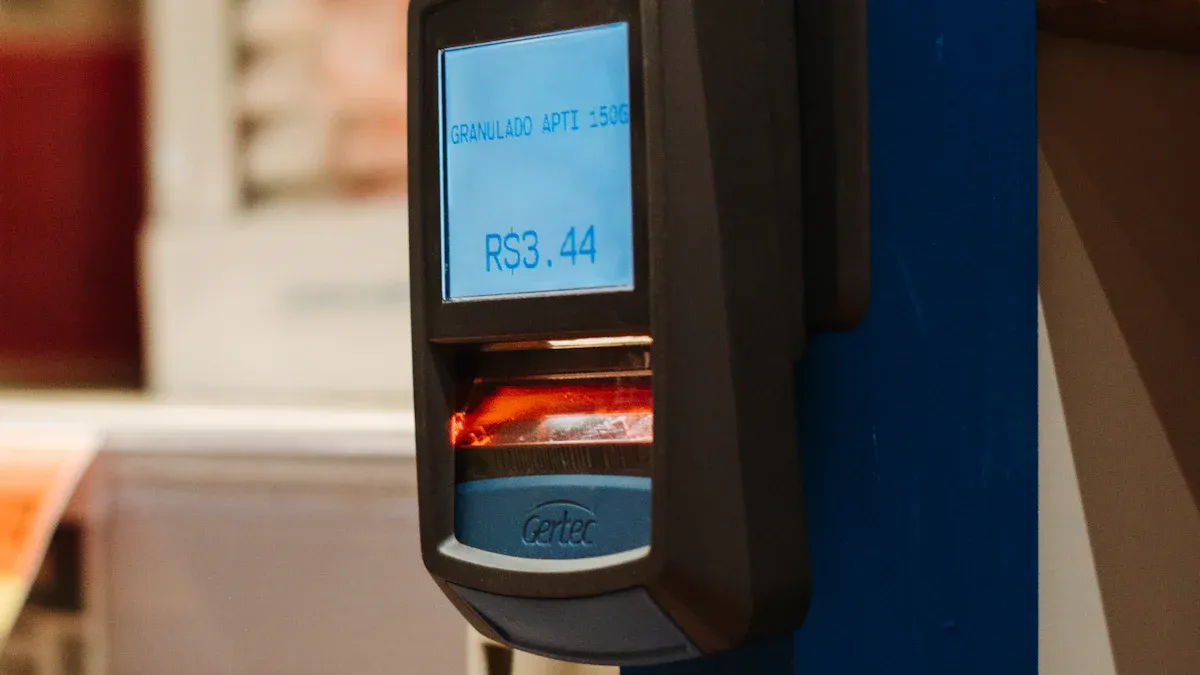
Digital Price Tags Explained
How digital price tags work in retail
You use digital price tags, also called electronic shelf labels, to display product prices and information on small digital screens. These devices connect wirelessly to your store’s backend system, allowing you to update prices instantly across all shelves. You can push new prices, promotions, or product details from a central dashboard, and the changes appear in real time on every digital shelf label. This process eliminates the need for manual price changes, saving you time and reducing errors.
Digital price tags support dynamic pricing, so you can adjust prices quickly for flash sales or respond to competitor pricing. You also improve operational efficiency by reducing labor hours spent on manual updates.
To help you understand the difference between digital price displays and traditional paper tags, see the table below:
| Aspect | Digital Price Tags (ESLs) | Traditional Paper Price Tags |
|---|---|---|
| Definition | Small digital displays that update prices wirelessly and in real-time | Printed labels showing static prices and product info |
| Update Method | Automated, wireless updates via backend systems | Manual replacement of printed tags |
| Display Capabilities | Can show text, numbers, images, QR codes, promotions, flashing indicators | Limited to printed text and static images |
| Labor & Efficiency | Instant updates save labor hours; reduce errors and operational costs | Labor-intensive; time-consuming; prone to human error |
| Customer Experience | Adjustable brightness; can highlight promotions dynamically; some find screens less readable | Familiar, easy to read in all lighting; no screen glare |
| Environmental Impact | Long lifespan (5+ years), reduces paper/plastic waste, supports sustainability | Frequent replacements cause paper/plastic waste; less eco-friendly |
| Cost | Higher upfront investment ($5-$10 per label), but long-term savings on labor and errors | Low upfront cost, but ongoing printing and labor costs |
| Integration with Retail | Syncs with POS and inventory systems; enables dynamic pricing and real-time stock display | No integration; static pricing; no real-time data connection |
Types of electronic price tags
You can choose from several types of electronic price tags, each designed for specific retail needs:
- E-Paper ESLs: These electronic shelf labels use e-paper technology for high readability and low power consumption. You often see them in supermarkets and pharmacies because they look like paper and last for years.
- LCD ESLs: These electronic price labels display high-resolution images and detailed product information. They work well in electronics or fashion stores where you need to show more than just a price.
- LED ESLs: These digital shelf labels use bright LEDs to attract attention to special offers or featured products, making them ideal for high-traffic areas.
- RFID-Integrated ESLs: These electronic price tags combine RFID with digital price displays, enabling real-time inventory tracking and theft prevention. You find them in large stores and warehouses.
Key Features of Electronic Price Tags
Display technology and battery life
You benefit from advanced display technology in electronic price tags. Most electronic shelf labels use e-ink or e-paper displays, which consume very little power and remain visible without a constant energy supply. This technology gives you wide viewing angles and clear readability in different lighting conditions. Some electronic price labels use LCDs or LEDs for more dynamic content, but these may require more frequent battery changes.
Battery life is a key advantage. Many digital shelf labels operate for three to five years on a single battery, even with multiple updates each day. Some models, like Vusion electronic shelf labels, can last up to 15 years, depending on usage and environmental factors. Long battery life means you spend less time on maintenance and more time serving customers.
Tip: Choose electronic price tags with efficient battery management and schedule regular updates to maximize lifespan and reduce operational costs.
Update mechanisms
You can update electronic price tags wirelessly through your store’s backend system. These updates happen in real time, allowing you to change prices, promotions, or product information instantly. Electronic shelf labels connect to your POS and inventory systems, so you always display accurate pricing and stock levels. This integration supports dynamic pricing strategies, such as flash deals or limited-time offers, and helps you automate inventory management.
- Real-time updates reduce human error and ensure pricing accuracy.
- Integration with inventory systems improves stock control and automates reorder notifications.
- Flexible update mechanisms allow you to display QR codes, countdowns, and special offers, enhancing the customer experience.
Understanding Mobile POS Devices in Retail
Mobile POS Device Capabilities
Transaction processing and inventory management
You gain significant advantages when you use a mobile POS device in your retail environment. These devices allow you to process transactions anywhere in the store, which reduces wait times and increases sales throughput. You can accept multiple payment types, including credit cards, mobile wallets, and contactless payments. Security features like encryption and tokenization protect customer data during every transaction.
A mobile POS device also streamlines inventory management. You receive real-time stock updates with each sale, which helps prevent overselling and stockouts. Automated reordering and stock alerts keep your shelves full and your customers satisfied. Barcode scanning and cloud integration make inventory tracking accurate and accessible across all your store locations. You can generate detailed sales and inventory reports, giving you insights to optimize your business decisions.
Tip: Real-time inventory syncing across physical, online, and mobile channels ensures you always have accurate stock data, supporting efficient operations and better customer service.
Integration with digital price tags
When you integrate your mobile POS device with digital price tags, you unlock even more efficiency. Price changes made at the POS reflect instantly on the shelf, eliminating manual updates and reducing errors. This integration supports dynamic pricing strategies and ensures that customers always see the correct price. Your staff can check inventory, update prices, and process sales from anywhere in the store, creating a seamless experience for both employees and shoppers.
Common Use Cases
In-aisle checkout
In-aisle checkout transforms the way you serve customers. Staff equipped with a mobile POS device can scan items and complete transactions right where the customer stands. This approach eliminates long lines at traditional registers and speeds up the entire shopping process. Retailers have reported up to a 30% reduction in transaction times and a 20% increase in customer satisfaction after adopting in-aisle checkout.
| Retailer / Study | Benefit of Mobile POS Deployment | Evidence / Impact |
|---|---|---|
| Small Business Study | Reduced transaction times by ~30% | Faster checkout allows handling more customers with same staff; satisfaction +20% |
| Home Depot | Queue busting and inventory lookup | Reduced queue times, on-the-spot inventory checks, 6.1% same-store sales increase |
| Nordstrom | Enhanced service and sales uplift | Serve customers anywhere, reduced lines, 15% sales increase in one quarter |
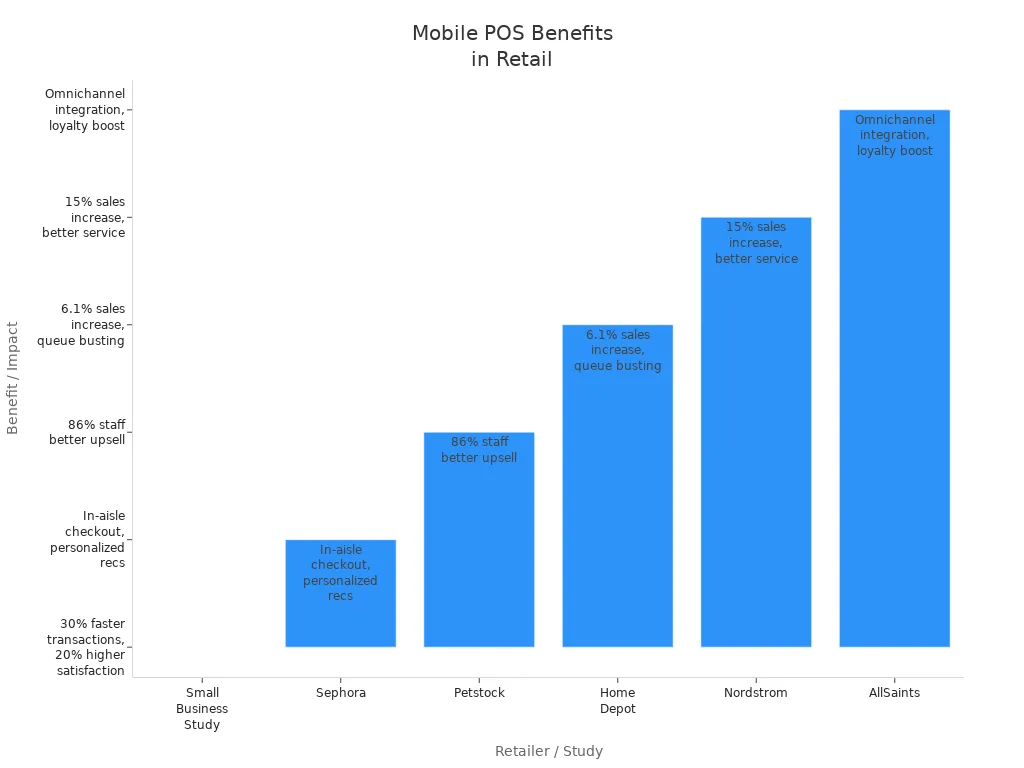
You can see how in-aisle checkout not only improves speed but also empowers staff to assist more customers during peak times.
Assisted selling and promotions
Assisted selling becomes more effective with a mobile POS device. Your staff can access real-time inventory and customer data, enabling them to make personalized recommendations and upsell products. For example, beauty advisors at Sephora use mobile POS to check out customers on the spot and access loyalty profiles, which boosts engagement and conversion rates. At Petstock, 86% of staff reported better upselling ability with mobile POS access to product and customer information.
Mobile POS also supports promotions by allowing instant price adjustments and digital receipt delivery. Staff can highlight special offers and process discounts immediately, creating a frictionless shopping experience. This approach bridges online and offline channels, supporting omnichannel retail strategies and enhancing customer loyalty.
Note: Mobile POS devices empower your team to deliver personalized service, reduce wait times, and drive higher sales through real-time data and flexible checkout options.
Technologies Enabling Digital Price Tag and Mobile POS Integration
Wireless Communication Methods
Bluetooth Low Energy (BLE)
You gain reliable, low-power connectivity with Bluetooth Low Energy (BLE), which stands out as the preferred method for connecting electronic shelf labels and mobile POS devices. BLE5.0 offers extended range—up to 30 meters indoors—covering most retail aisles. Its low power consumption supports battery life of up to five years for electronic price tags. BLE uses adaptive frequency hopping to avoid interference and supports mesh networking, so your network remains robust even if one device fails. Security features like encryption and quick reconnection protect your data and keep your system running smoothly.
Wi-Fi connectivity
Wi-Fi provides strong, high-speed connections in environments with robust wireless infrastructure. You can use Wi-Fi to support real-time updates and cloud-based management for electronic shelf labeling. However, Wi-Fi consumes more power than BLE, making it less suitable for low-power electronic price tags. In stores with reliable Wi-Fi, you benefit from fast data transfer and easy integration with existing IT systems.
NFC (Near Field Communication)
NFC enables secure, close-range communication—ideal for interactive promotions and contactless transactions. You can use NFC to pair devices or authenticate users by simply tapping a mobile POS device to an electronic price tag. The short range (up to 10 centimeters) makes NFC highly secure, reducing the risk of interception. NFC also complements BLE by providing a secure channel for device setup and authentication.
Radio frequency protocols
Proprietary RF protocols and Sub-GHz/LoRa technologies offer customizable solutions for large or complex retail environments. You can cover extended ranges—up to two kilometers in open spaces—making these protocols suitable for warehouses or multi-floor stores. Mesh networking and repeaters further enhance reliability, allowing thousands of electronic shelf labels to communicate efficiently.
Tip: BLE5.0 is generally the most effective wireless communication method for typical retail settings, while NFC and Sub-GHz/LoRa serve specialized roles.
| Technology | Advantages | Disadvantages |
|---|---|---|
| BLE5.0 | Low power, long battery life, strong security, extended range, stable connection | None significant |
| BLE4.2 | International standard, better stability and security than older RF | Lower performance than BLE5.0 |
| NFC | Secure, ideal for promotions and contactless transactions | Limited to a few centimeters |
| Proprietary RF | Customizable, optimized for specific needs | May lack broad compatibility |
| Wi-Fi | Suitable for robust infrastructure, fast data transfer | High power consumption, complex for low-power tags |
| Sub-GHz/LoRa | Extended range, useful for large environments | Lower data rates, may need extra infrastructure |
System Integration and Data Management
Cloud-based synchronization
Cloud-based synchronization centralizes management of electronic price tags and mobile POS devices. You can push updates to all stores at once, ensuring consistent pricing and reducing manual effort. Real-time updates flow instantly to every device, so your electronic shelf labels and POS systems always display accurate information. Secure communication channels, such as VPN tunnels and end-to-end encryption, protect your data during transfer. Enterprise-grade wireless infrastructure and automatic failover keep your system reliable, even during network disruptions.
API and software integration
APIs and middleware simplify integration between your POS, inventory, and electronic shelf labeling systems. You can scale easily by adding new stores or devices without rewriting code. SDKs and APIs allow you to customize workflows and connect with third-party retail solutions. Data management tools validate and synchronize product and inventory data, reducing errors and supporting dynamic pricing. Role-based access controls and strong encryption protect sensitive information, ensuring compliance and security.
Real-time integration between electronic price tags, mobile POS devices, and backend systems improves operational efficiency and customer experience by automating updates and reducing errors.
Step-by-Step Guide to Linking Digital Price Tags with Mobile POS Devices
Preparing Your Retail Environment
Assessing infrastructure and compatibility
You must start by evaluating your current technology landscape. Conduct a thorough technology needs assessment to identify your infrastructure requirements and business goals. Map out your existing workflows and pinpoint areas for improvement. Check if your POS system supports API connectivity for smooth integration with digital price tags. Review all hardware, including computers, tablets, and smartphones, to ensure they meet the necessary specifications for software compatibility. Confirm that your network infrastructure—routers, switches, and gateways—can handle the required bandwidth and protocols such as Wi-Fi, Bluetooth, or Ethernet. Security remains critical. Implement firewalls, strong passwords, encryption, and multi-factor authentication to protect your data. Test your system under real-world conditions to simulate transaction volumes and network reliability. This step helps you identify and resolve potential issues before full deployment.
Selecting suitable digital price tags and POS devices
Choose digital price tags and mobile POS devices that align with your operational needs. Consider display technology, battery life, and compatibility with your POS software. Look for devices certified by vendors for seamless integration with your ERP and inventory systems. Evaluate hardware components such as touch screen monitors, card readers, receipt printers, and mobile POS terminals. Ensure your selection supports omni-channel integration, allowing you to unify the customer experience across platforms. Plan for scalability by selecting modular solutions that can grow with your business. Run a pilot test to validate your choices and make adjustments as needed.
Setting Up the Connection
Installing and configuring software
Install management software for both digital price tags and mobile POS devices. Configure the software to pair each price tag with the correct product in your inventory. Use secure protocols and schedule updates during off-peak hours to minimize disruption. Map data flows between your ERP, POS, and digital price tags to enable real-time synchronization. Automate data validation and monitor for latency or errors. Confirm vendor certifications for compatibility and use RESTful APIs or middleware for flexible integration.
Pairing devices and testing connectivity
Inventory all devices before installation. Mount digital price tags using appropriate fixtures and ensure gateways and access points are centrally located for optimal coverage. Pair each device using the management software, then test connectivity by updating prices and checking for real-time changes on the shelf. Use Wi-Fi analyzer apps to detect signal strength and interference. Address any connectivity issues by adjusting device placement or replacing faulty tags. Conduct initial system tests to monitor response times and error rates, ensuring reliable operation.
Staff Training and Go-Live
Training staff on new workflows
Develop training modules tailored to each staff role. Provide hands-on demonstrations and quick reference guides. Simulate real transactions, including scanning items, applying discounts, and processing returns. Teach employees how to use all POS features, such as payment processing and inventory lookups. Implement shadowing programs to help new users gain practical experience.
Monitoring and troubleshooting
Assign a dedicated support technician and implementation manager for the go-live phase. Monitor system performance closely and offer ongoing support through accessible channels. Set up automated sales and inventory reports to track performance. Gather user feedback and conduct periodic assessments to identify areas for additional training. Manage user permissions carefully to enhance security and reduce errors.
Benefits of Integrating Digital Price Tags with Mobile POS Devices
Operational Efficiency for Retailers
Real-time price updates and automation
You gain a significant advantage when you combine digital price tags with mobile POS devices. This integration brings retail automation to the forefront, allowing you to update prices, promotions, and product details instantly across your entire store. You no longer need to spend hours on manual price changes. Instead, you can push updates from your back-office system, and every shelf reflects the new information in seconds. This process ensures real-time pricing accuracy and reduces the risk of human error.
- Price automation lets you implement changes efficiently and accurately, adapting quickly to market trends.
- You maintain price consistency across all channels, supporting a seamless omnichannel experience.
- Automation frees your staff from repetitive tasks, allowing them to focus on customer engagement and sales.
With real-time data, you can detect shopping trends faster than your competitors. You can also optimize prices based on consumer behavior, which helps you stay competitive and increase profits. Retail automation powered by this integration means your team spends less time on routine updates and more time on strategic activities.
Streamlined inventory management
You streamline inventory management by linking digital price tags and mobile POS devices. Associates can perform inventory lookups, order out-of-stock items, and monitor stock levels in real time. This integration enables you to detect out-of-stocks much more effectively than manual audits. Automated systems generate prioritized actions based on current sales patterns and store traffic, so your staff always focuses on the most impactful tasks.
- Mobile POS devices allow transactions anywhere in the store, making checkout flexible and fast.
- Staff can reduce wait times by assisting customers directly in the aisles.
- You optimize store layout by reducing the need for fixed checkout counters, freeing up space for merchandising.
- Inventory visibility helps you clear slow-moving stock and reduce losses.
Retailers who adopt this approach report higher on-shelf availability and improved labor allocation. Predictive analytics let you adjust replenishment schedules proactively, ensuring your shelves stay stocked and your operations run smoothly.
Enhanced Customer Experience
Accurate pricing and faster checkout
You deliver a superior customer experience when you ensure accurate pricing and quick checkout. Digital price tags eliminate manual errors, so customers always see the correct price. Mobile POS devices speed up transactions, reducing wait times and preventing long lines. This reliability builds customer trust and confidence in your store.
| Factor | Effect on Customer Satisfaction | Significance Level | Summary |
|---|---|---|---|
| Speed of Service | Positive | p < 0.01 | Faster checkout increases satisfaction by reducing wait times and improving convenience. |
| Technology Aspect | Positive | p = 0.003 | Reliable, easy-to-use technology enhances perceptions of service quality. |
| Shorter Queues | Positive | p < 0.01 | Shorter queues lead to higher satisfaction by minimizing wait times. |
| Customer Experience | Strongly Positive | p < 0.01 | Ease of use and system reliability are critical for satisfaction. |
You create a seamless shopping journey by combining accurate pricing with fast, reliable service.
Personalized promotions and product information
You can use this integration to deliver personalized promotions and detailed product information directly at the shelf. Mobile POS devices give your staff access to real-time inventory and customer data, enabling them to recommend products and sign up shoppers for loyalty programs on the spot. Digital price tags can display targeted offers, QR codes, or product highlights, making it easy for customers to discover new deals.
- Automated pricing tools analyze buying patterns and tailor promotions, increasing satisfaction and profitability.
- Unified systems provide real-time data access, speeding up transactions and improving service quality.
Retailers who leverage retail automation and real-time pricing see higher engagement and loyalty. You empower your team to deliver a modern, efficient, and enjoyable customer experience.
Addressing Challenges with Digital Price Tags and Mobile POS Integration
Compatibility and System Integration
Ensuring device and software compatibility
You need to ensure that your digital price tags and mobile POS devices work together seamlessly. Start by checking that both systems support the same communication protocols, such as Bluetooth or Wi-Fi. Review your POS software to confirm it can integrate with your chosen electronic shelf labels. Many retailers face issues when devices use different standards or outdated firmware. You can avoid these problems by selecting products from vendors who offer certified compatibility and regular updates. Test all devices in your store environment before full deployment. This step helps you identify and resolve any integration issues early.
Working with legacy systems
Many retailers still rely on legacy POS systems. Integrating new digital price tags with older technology can present challenges. You may need middleware or custom APIs to bridge the gap between old and new systems. Evaluate your current infrastructure and identify which components require upgrades. Sometimes, a phased approach works best. You can start by updating one section of your store, then expand as you resolve compatibility issues. This strategy minimizes disruption and allows your team to adapt gradually.
Security and Data Protection
Securing wireless connections
Security remains a top priority when you deploy digital price tags and mobile POS devices. You must protect your wireless network from unauthorized access. Use strong encryption protocols, such as WPA3 for Wi-Fi and secure pairing for Bluetooth devices. Set up access controls to limit who can make changes to pricing information. Many retailers also choose tamper-proof designs for their electronic shelf labels. These features help prevent hackers from intercepting data or altering prices.
Tip: Regularly update your network passwords and monitor for unusual activity to keep your system secure.
Protecting pricing and customer data
You handle sensitive information every day, from product prices to customer payment details. Protect this data by using encrypted communication between devices and your central management platform. Implement strict access controls so only authorized staff can view or change pricing. Regular security audits help you identify vulnerabilities and keep your system compliant with industry standards. By taking these steps, you reduce the risk of data breaches and maintain customer trust.
Maintenance and Ongoing Support
Regular updates and troubleshooting
Ongoing maintenance keeps your digital price tags and mobile POS devices running smoothly. Schedule regular hardware and software checkups to catch issues early. Keep your POS software updated with the latest patches to guard against vulnerabilities. Back up your data frequently to prevent loss from hardware failure or cyberattacks. Continuous monitoring helps you detect slowdowns or unusual activity before they affect your business.
- Schedule routine checkups for all devices.
- Update software and firmware regularly.
- Back up data to secure locations.
- Monitor system performance and address issues promptly.
Staff support and training
Your staff plays a key role in system reliability. Train employees on proper device use and basic troubleshooting. Provide quick reference guides and hands-on demonstrations. Encourage staff to report issues as soon as they arise. Partner with professional support providers for 24/7 assistance and tailored maintenance plans. These strategies ensure your system operates at peak performance and your team feels confident using the technology.
Note: Consistent maintenance and staff training not only extend the lifespan of your devices but also improve customer experience by enabling faster, more accurate transactions.
Practical Steps for Retailers to Implement Digital Price Tags and Mobile POS
Evaluating Business Needs and Goals
Identifying objectives and budget
You should start by defining clear objectives for your digital price tag and mobile POS project. Decide if your main goal is to improve pricing accuracy, speed up checkout, or enhance inventory management. Set measurable targets, such as reducing manual price changes or increasing transaction speed. Establish a realistic budget that covers hardware, software, training, and ongoing support. Consider both upfront costs and long-term savings from automation and reduced labor.
A well-planned budget helps you avoid unexpected expenses. Include costs for staff training, technical support, and future upgrades. You also need to account for software subscriptions and transaction fees. By setting clear objectives and a detailed budget, you create a strong foundation for a successful rollout.
Assessing store requirements
Evaluate your store’s unique needs before selecting any technology. Review your current hardware to check compatibility with new devices. Assess the physical layout to plan device placement for optimal customer flow and connectivity. Consider the durability and battery life of devices, especially in high-traffic areas.
You should also look at integration capabilities. Make sure your new system connects seamlessly with accounting, inventory, and CRM platforms. Plan for scalability so your solution grows with your business. The table below summarizes the most important factors to consider:
| Factor Category | Key Considerations |
|---|---|
| Staff Training & Onboarding | Comprehensive training, hands-on sessions, quick-reference guides |
| System Management & Maintenance | Regular upkeep, scheduled updates, data backup, controlled testing |
| Technical Support | 24/7 support, basic troubleshooting, backup power, device management |
| Hardware Compatibility | Compatibility, durability, battery life, peripheral accessories |
| Payment Processing | Multiple payment methods, secure transactions, competitive fees |
| Integration Capabilities | Seamless connection with accounting, inventory, CRM, online ordering |
| Scalability & Pricing | Growth-ready software, transparent pricing, subscription and transaction fees |
| Physical Layout & Deployment | Device placement, connectivity, pilot testing, security measures |
| Operational Benefits | Real-time inventory, improved sales tracking, AI-powered analytics |
| Device Durability & Battery | Rugged devices, full-day battery life |
| Future Trends & Innovations | AI, biometric authentication, sustainability, emerging technologies |
Choosing the Right Solution
Comparing vendors and features
You need to compare vendors carefully to find the best fit for your store. Review each provider’s track record and support options. Look for solutions that offer robust integration with your existing systems. Evaluate device durability, battery life, and ease of use. Check if the vendor provides comprehensive training materials and ongoing technical support.
Create a checklist of must-have features, such as support for multiple payment methods, secure encrypted transactions, and real-time inventory updates. Ask about software update schedules and backup procedures. Consider scalability and transparent pricing structures, including any subscription or transaction fees.
Tip: Pilot test your top choices in a controlled environment before committing to a full rollout.
Planning rollout and measuring success
Develop a step-by-step rollout plan to minimize disruption. Start with a pilot phase in one department or location. Train staff thoroughly and gather feedback during this phase. Monitor system performance, transaction speed, and customer flow. Use AI-powered analytics to track sales trends and inventory accuracy.
Set clear metrics to measure success, such as reduced pricing errors, faster checkouts, and improved customer satisfaction. Adjust your plan based on pilot results before expanding to other locations. Regularly review your objectives and update your system as new technologies emerge.
You now understand how digital price tags and mobile POS devices work together to streamline retail operations. This integration gives you real-time pricing, faster checkouts, and improved inventory control. Customers benefit from accurate prices and a smoother shopping experience. To get started, assess your current systems, choose compatible solutions, and train your staff. For more guidance, consult your technology provider or visit industry forums for expert advice.
Tip: Stay updated on new retail technologies to keep your store competitive.
FAQ
What is the main benefit of integrating digital price tags with mobile POS devices?
You gain real-time price updates and inventory synchronization. This integration reduces manual errors, speeds up checkout, and improves operational efficiency. Customers see accurate prices and enjoy a smoother shopping experience.
How secure are digital price tags and mobile POS systems?
You benefit from strong security features, including encrypted wireless communication and strict access controls. Regular software updates and secure device pairing help protect your pricing and customer data.
Can you use digital price tags with any POS system?
You need to check compatibility. Many modern POS systems support integration through APIs or middleware. Always confirm with your vendor that your POS and digital price tags can connect seamlessly.
How long do digital price tag batteries last?
Most digital price tags use e-paper displays and energy-efficient components. You can expect battery life to range from three to five years, depending on update frequency and store conditions.
What happens if your wireless network goes down?
Your digital price tags continue to display the last updated prices. You cannot push new updates until the network restores. Reliable network infrastructure and backup plans help minimize disruptions.
How do you train staff to use these systems?
You provide hands-on training, quick reference guides, and ongoing support. Simulate real transactions and encourage staff to practice with both digital price tags and mobile POS devices.
Are digital price tags environmentally friendly?
Yes. You reduce paper and plastic waste by switching to digital price tags. Long battery life and reusable displays support your sustainability goals.
Can you display promotions or QR codes on digital price tags?
You can show promotions, QR codes, and product information directly on digital price tags. This feature helps you engage customers and drive sales at the shelf.