

You can save real money with ebay labels every time you ship. Many sellers access USPS Commercial Plus Pricing, which cuts domestic Priority Mail costs by up to 35%. You also get FedEx volume discounts of up to 37% and special UPS savings directly through ebay labels. These discounts apply automatically, saving you time and effort.
- USPS Priority Mail Regional Rate boxes can lower short-distance shipping costs by about 50%.
- No need to enroll separately for these benefits.
If you want to optimize your shipping process, consider how tools like Electronic Shelf Labels, ESL Gateway AP, ESL Price Tag, and Esl Retail can work alongside ebay labels to streamline your business.
Discounted Shipping Rates with eBay Labels

How eBay Shipping Labels Offer Lower Prices
Commercial Rates vs. Retail Rates
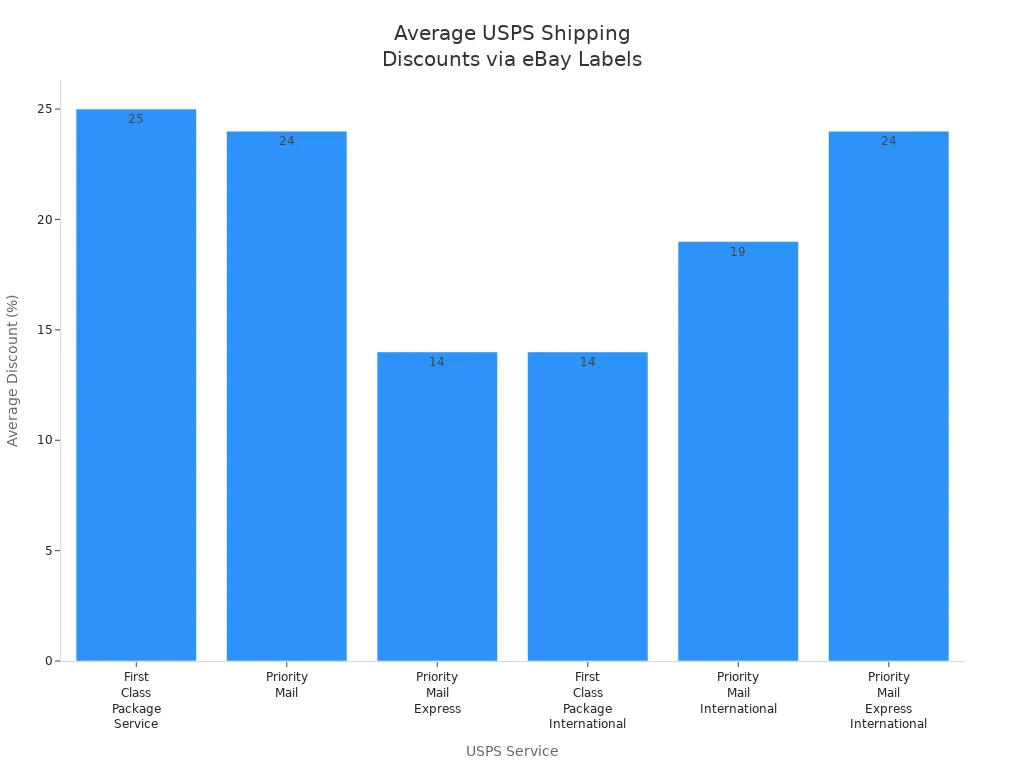
When you purchase shipping labels through eBay shipping labels, you access commercial rates that are not available at the post office counter. Carriers like USPS, UPS, and FedEx offer these lower prices to high-volume platforms. You benefit from these savings automatically when you print shipping labels for your orders. For example, USPS First Class Package Service can be up to 25% cheaper with eBay shipping labels than at retail counters.
How eBay Negotiates Discounts with Carriers
eBay negotiates directly with major carriers to secure exclusive discounts for sellers. These negotiated rates apply to both domestic and international shipping labels. You do not need to meet any minimum volume requirements or sign up for special programs. The savings appear instantly when you buy pre-paid postage labels through eBay shipping labels.
Real-World Savings Examples Using eBay Labels
USPS Priority Mail Savings
You can see significant savings on USPS services by using eBay shipping labels. The table below shows average discounts and price reductions for popular USPS services:
| USPS Service | Average Discount via eBay Labels | Example Price Reduction (Retail to eBay Label) |
|---|---|---|
| First Class Package Service | Up to 25% | $4.05 to $3.12 |
| Priority Mail | Up to 24% | $10.53 to $9.06 |
| Priority Mail Express | Up to 14% | $32.34 to $27.80 |
| First Class Package International | Up to 14% | $17.25 to $14.76 |
| Priority Mail International | Up to 19% | $56.13 to $46.91 |
| Priority Mail Express International | Up to 24% | $69.80 to $53.05 |
UPS and FedEx Discounts on eBay
You also receive deep discounts on UPS and FedEx shipping labels. For example, UPS Ground can be up to 50% off, and FedEx services can be up to 37% off when you use eBay shipping labels. These discounts make a big difference, especially for heavier packages or expedited shipping.
| Carrier | Service Type | Discount Range via eBay Labels |
|---|---|---|
| UPS | Ground | Up to 50% off |
| UPS | Second Day Air | Up to 66% off |
| UPS | Next Day Air | Up to 65% off |
| FedEx | Various Services | Up to 37% off |
Comparing eBay Label Costs to the Post Office
Side-by-Side Price Comparisons
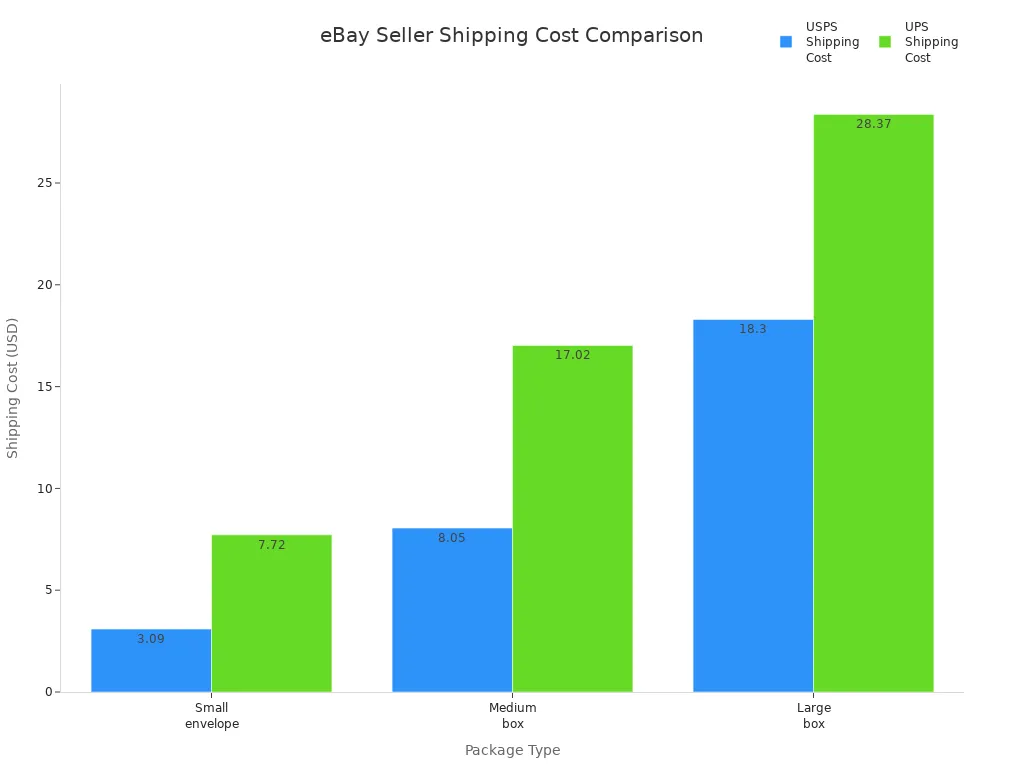
When you compare shipping labels purchased through eBay shipping labels to those bought at the post office, you often pay less on eBay. For example, a small envelope (4 oz) shipped with USPS First-Class Mail costs $3.09 with eBay shipping labels, while the same package with UPS Ground costs $7.72. For a medium box (2 lbs), USPS Priority Mail costs $8.05, compared to $17.02 for UPS Ground.
| Package Type | Weight | USPS Shipping Cost | UPS Shipping Cost |
|---|---|---|---|
| Small envelope | 4 oz | $3.09 (First-Class Mail) | $7.72 (UPS Ground) |
| Medium box | 2 lbs | $8.05 (Priority Mail) | $17.02 (UPS Ground) |
| Large box | 10 lbs | $18.30 (Priority Mail) | $28.37 (UPS Ground) |
When the Savings Matter Most
You see the greatest savings when you ship lightweight packages, use cubic pricing, or send items internationally. eBay shipping labels automatically apply the best available rates, including cubic pricing for eligible packages. However, always double-check your package details. Incorrect settings, such as marking a package as irregular, can trigger extra fees. If you want to maximize your savings, review your shipping labels before purchase and use eBay’s shipping calculator to compare options.
Tip: Always verify your package dimensions and weight before buying shipping labels. This helps you avoid unnecessary surcharges and ensures you get the lowest possible rate.
Who Gets the Best Rates with eBay Shipping Labels?
Small Sellers vs. High-Volume Sellers
You might wonder if your sales volume affects the discounts you receive with eBay shipping labels. eBay negotiates with major carriers like USPS, FedEx, and UPS based on the collective shipping volume of the entire eBay community. This means you gain access to discounted shipping labels, regardless of how many packages you ship each month.
High-volume sellers see the greatest benefit. eBay leverages the massive number of packages shipped through its platform to secure the best possible rates. When you ship dozens or hundreds of packages each week, these savings add up quickly. You can maximize your profit margins by consistently using eBay shipping labels for every order.
Small or casual sellers also enjoy lower rates than they would find at the post office. Even if you only ship a few items per month, you still receive commercial pricing on your shipping labels. You do not need to meet any minimum shipping requirements to unlock these discounts. eBay automatically applies the best available rates when you purchase shipping labels through your seller dashboard.
Note: If you connect your eBay account to third-party platforms like Easyship or Pirate Ship, you may access even deeper volume-based discounts. However, the largest negotiated discounts remain tied to shipping labels purchased directly through eBay.
Here’s a quick comparison:
| Seller Type | Access to eBay Shipping Label Discounts | Potential for Deeper Discounts |
|---|---|---|
| High-Volume Seller | Yes (Best rates) | Yes (with third-party tools) |
| Small Seller | Yes (Standard eBay rates) | Limited |
International Shipping Discounts
You can also save money on international shipments by using eBay shipping labels. eBay passes on negotiated international rates from carriers, so you pay less than retail prices for overseas deliveries. These discounts apply whether you ship one package a month or hundreds.
International shipping labels often include built-in customs forms and tracking, which streamlines your process and reduces the risk of errors. You avoid the hassle of filling out paperwork at the post office. eBay’s system ensures your shipping labels meet carrier requirements for international destinations.
- You receive discounted rates for USPS First Class Package International, Priority Mail International, and Priority Mail Express International.
- UPS and FedEx international shipping labels also come with reduced rates through eBay.
- Promotional and combined shipping discounts apply to both domestic and international shipping labels.
When you use eBay shipping labels for international orders, you improve your bottom line and simplify your workflow. You can focus on growing your business, knowing you are getting the best available rates for every destination.
Built-in Protections and Tracking with eBay Shipping Labels
Automatic Tracking Included with eBay Labels
How Tracking Works with eBay Shipping Labels
When you purchase shipping labels through eBay, tracking automatically links to your order. The system updates the tracking number in your buyer’s account as soon as you print the label. You do not need to enter tracking information manually. This automation reduces errors and ensures both you and your buyer can monitor the package’s journey from shipment to delivery.
Benefits for Sellers and Buyers
Tracking provides transparency for every transaction. You can confirm when a package leaves your hands and when it arrives at the buyer’s address. Buyers appreciate real-time updates, which help build trust and reduce questions about order status. For sellers, tracking serves as proof of shipment and delivery, which is essential if a dispute arises.
Tip: Always use shipping labels with tracking to protect yourself from claims of non-delivery.
Seller Protection Features of eBay Labels
eBay’s Seller Protection Policy Explained
eBay shipping labels offer seller protection plans, especially for international shipments. If you use eBay International Standard Delivery, you receive compensation for damaged or stolen goods. The protection plan covers incidents outside your control, such as storms, theft, or carrier delays. This coverage can help you avoid negative feedback related to shipping problems. eBay labels also let you choose from multiple carriers and methods, giving you flexibility and reliability.
Compared to other platforms, eBay provides broader international shipping options and a more comprehensive protection plan for sellers. For example, Mercari offers shipping protection up to $200, but eBay’s coverage extends to over 100 countries and includes a dedicated seller protection plan for international deliveries.
How eBay Shipping Labels Help Prevent Disputes
Shipping labels purchased through eBay include tracking and delivery confirmation. This documentation helps resolve disputes quickly. If a buyer claims an item did not arrive, you can reference the tracking history. However, eBay often favors buyers in refund claims, especially if tracking does not show delivery. You should always ensure your shipping labels include accurate information and tracking to maximize your protection.
Handling Lost or Damaged Packages with eBay Labels
Filing Claims with eBay Shipping Labels
If a package goes missing or arrives damaged, you must refund the buyer first. Afterward, you can file a claim with the carrier if you purchased insurance with your shipping labels. Many sellers report that claims with carriers are often denied, even when you provide detailed evidence. eBay typically does not intervene in these disputes, acting only as the shipper.
- You are responsible for the item until the buyer receives it.
- Claims for lost or damaged packages may not always succeed.
- eBay gives buyers up to 30 days after the estimated delivery date to report missing items.
What Happens if a Package Goes Missing?
When a package is lost, eBay usually sides with the buyer if tracking does not confirm delivery. You have three days to respond to a missing item report before eBay steps in. Many sellers experience frustration with the process, as they may lose both the item and the sale proceeds. Using shipping labels with tracking and insurance increases your chances of a successful claim, but it does not guarantee reimbursement.
Note: Always double-check your shipping labels for accuracy and consider adding insurance for valuable items.
Peace of Mind for Both Sides
Shipping on eBay can feel stressful, especially when you want to protect your business and keep buyers happy. eBay shipping labels help you manage these concerns by offering built-in features that create a secure and transparent shipping experience. You gain confidence knowing that your shipments have safeguards in place, and your buyers appreciate the clarity and reliability you provide.
Reducing the Risk of Scams
Scams and misunderstandings can disrupt your selling experience. eBay shipping labels help you lower these risks by providing automatic tracking and clear documentation for every order. When you use eBay labels, the system uploads tracking numbers directly to your buyer’s account. This process ensures that both you and your buyer can follow the package’s journey in real time.
You also benefit from features that let you correct mistakes without extra cost. If you print a label with the wrong address or details, you can reprint it for free within seven days. If you need to cancel a shipment, you have up to 28 days to request a refund for the label, depending on the carrier. These options give you flexibility and reduce the chance of costly errors.
For high-value shipments, you can add insurance through eBay. This extra layer of protection helps you recover losses if a package gets lost or damaged. Buyers see that you take their purchase seriously, which builds trust and discourages fraudulent claims.
Tip: Always use eBay shipping labels with tracking and insurance for expensive or rare items. This approach protects your business and reassures your buyers.
Building Trust with Buyers
Trust forms the foundation of every successful eBay transaction. When you use eBay shipping labels, you show buyers that you value transparency and reliability. Automatic tracking updates keep your buyers informed at every stage. They receive email notifications as soon as you ship their order, and they can check the status at any time.
Buyers feel more secure when they see that you use official eBay shipping methods. They know that their package will arrive as promised, and they can contact you or eBay if any issues arise. This transparency reduces disputes and increases the likelihood of positive feedback.
Consider these key features that provide peace of mind for both sides:
- Free reprints of shipping labels within seven days if you make a mistake.
- Up to 28 days to cancel and refund a shipping label, depending on the carrier.
- Automatic tracking uploads and email updates for buyers.
- Optional shipping insurance for added protection on valuable items.
These features work together to create a smooth, worry-free shipping process. You save time, avoid unnecessary stress, and build a reputation as a trustworthy seller. Your buyers enjoy a seamless experience, which encourages repeat business and positive reviews.
Streamlined Process and Time Savings Using eBay Labels

Easy Label Creation with eBay Shipping Labels
Printing Labels Directly from eBay
You can print shipping labels on ebay directly from your seller dashboard. This process eliminates the need to visit a post office or use third-party platforms. When you want to print shipping labels on ebay, you simply select the order, choose your carrier, and print. The system guides you through each step, so you never feel lost. If you wonder how to print shipping labels on ebay, the platform provides clear prompts and instructions. You can use a standard printer or a dedicated shipping label printer for professional results.
Integrating with Your Orders
eBay shipping labels integrate seamlessly with your orders. When you print shipping labels on ebay, the system automatically pulls in buyer information and order details. You do not need to copy and paste addresses or track order numbers manually. If you want to know how to print shipping labels on ebay for multiple orders, the integration makes it easy. The process links each label to its corresponding order, so you always stay organized.
Reducing Shipping Errors with eBay Labels
Auto-Filled Buyer Information
When you print shipping labels on ebay, the platform auto-fills buyer information. This feature reduces the risk of typos or missing details. You do not need to worry about entering addresses incorrectly. If you ask how to print shipping labels on ebay without mistakes, rely on the auto-fill function. It saves time and helps you avoid costly shipping errors.
Built-In Address Verification
eBay shipping labels include built-in address verification. When you print shipping labels on ebay, the system checks each address for accuracy. If there is an issue, you receive an alert before you print. This step ensures your packages reach the correct destination. You can trust the process to catch errors before they become problems.
Faster Order Processing with eBay Shipping Labels
Batch Printing for Multiple Orders
You can print shipping labels on ebay in batches, which speeds up your workflow. Batch printing allows you to process multiple orders at once. This method is ideal for sellers who handle large volumes or receive orders in waves. You eliminate the inefficiency of printing shipping labels individually. Batch printing supports different SKUs, weights, and shipping services together. You can also print pick lists, packing slips, and customs forms at the same time, which further accelerates fulfillment.
- Batch printing enables you to:
- Process multiple orders simultaneously
- Save time compared to printing one label at a time
- Increase productivity and streamline your shipping workflow
If you want to know how to print shipping labels on ebay for many orders, use the batch printing feature. You can connect your account to a shipping label printer for even faster results.
Scheduling Pickups and Drop-Offs
After you print shipping labels on ebay, you can schedule carrier pickups or plan drop-offs. This step saves you extra trips to the post office. You manage your shipping from home or your business location. The process gives you more control over your time and helps you fulfill orders quickly.
Tip: Automate your workflow by using batch printing and scheduling pickups. You will see a noticeable boost in efficiency and customer satisfaction.
Indirect Cost Savings from eBay Labels
Saving Time Equals Saving Money
You know that time is one of your most valuable resources as an eBay seller. Every minute you spend on shipping tasks takes away from other important parts of your business. When you use eBay shipping labels, you streamline your workflow and reduce the time spent on repetitive tasks. This efficiency translates directly into cost savings.
Consider the steps you eliminate by printing labels at home:
- No need to wait in line at the post office.
- No manual entry of buyer addresses.
- No searching for tracking numbers to update your buyers.
Each of these steps can take several minutes per order. If you ship multiple packages daily, the time adds up quickly. For example, if you save just five minutes per order and ship ten orders a day, you reclaim nearly an hour of productive time. You can use this extra time to source new inventory, respond to customer inquiries, or optimize your listings.
Tip: Track how much time you spend on shipping each week. You may be surprised at how much you can save by switching to eBay labels.
You also reduce the risk of costly mistakes. Automated label creation and address verification help you avoid errors that could lead to lost packages or unhappy buyers. Fewer mistakes mean fewer refunds and less time spent resolving disputes.
Avoiding Extra Trips to the Post Office
You can avoid unnecessary trips to the post office when you use eBay shipping labels. Printing labels at home allows you to prepare packages on your schedule. You can then schedule a carrier pickup or drop off all your packages in one visit.
Here are some ways eBay labels help you cut down on travel:
- Schedule free USPS pickups from your doorstep.
- Batch shipments for a single drop-off instead of multiple trips.
- Prepare international shipments with built-in customs forms, so you do not need to wait for assistance at the counter.
Fewer trips mean you save on gas, parking fees, and wear and tear on your vehicle. You also avoid the frustration of long lines and limited post office hours. This convenience becomes even more valuable during busy seasons or bad weather.
| Activity | With eBay Labels | Without eBay Labels |
|---|---|---|
| Print shipping labels | ✅ | ❌ |
| Schedule carrier pickup | ✅ | ❌ |
| Fill out customs forms | ✅ | ❌ |
| Wait in line | ❌ | ✅ |
Note: Reducing your trips to the post office not only saves money but also helps you maintain a more flexible and efficient business routine.
By leveraging eBay shipping labels, you gain more control over your time and resources. These indirect savings can have a significant impact on your bottom line, especially as your sales volume grows.
eBay Labels vs. Buying at the Post Office
Cost Comparison Breakdown for eBay Shipping Labels
Typical Price Differences
You often pay less for shipping labels on eBay than at the post office. eBay negotiates discounted rates with major carriers, so you access commercial pricing automatically. When you buy shipping labels through eBay, you avoid retail markups that you see at the counter. For most packages, especially lightweight or standard sizes, the savings add up quickly. You keep more profit from each sale by using these lower rates.
Hidden Fees to Watch For
While eBay offers lower postage rates, you need to watch for extra fees that can affect your bottom line. Some costs are unique to eBay and do not appear when you buy postage at the post office. The table below highlights the most significant hidden fees:
| Fee Type | Description | Impact on Sellers Compared to Post Office Purchase |
|---|---|---|
| Final Value Fee on Shipping | eBay charges 12%-15% commission on total sale amount including shipping and taxes, plus a fixed fee ($0.30-$0.40). | This fee is unique to eBay and reduces seller margins; not charged when buying postage directly at the post office. |
| Nonstandard Package Fee | $4.00 surcharge for irregular, oversized, or nonstandard packages (e.g., tubes, large boxes). | Additional unexpected cost that sellers may not face when buying postage at the post office if their package is standard size. |
| Optional Add-on Services | Extra fees for insurance, signature confirmation, or shipping upgrades added to label cost. | Optional but can increase total shipping cost beyond standard postage; these are not typically part of post office retail postage. |
| Handling Fee | Seller-added fee to cover packaging or prep time, included in total sale amount and subject to eBay fees. | Increases total fees due to eBay’s final value fee applying to handling; no equivalent fee when buying postage at post office. |
You should review your shipping labels and order details to avoid surprises. These fees can reduce your profits if you do not plan for them.
Convenience and Speed with eBay Labels
Shipping from Home vs. Standing in Line
You save time and effort by printing shipping labels at home. eBay lets you select sold items, enter package details, and print labels from your computer or smartphone. You skip the trip to the post office and avoid waiting in line. This process gives you more flexibility and control over your schedule.
- You print shipping labels at home and avoid extra trips.
- The process is simple and works on both desktop and mobile devices.
- You upload shipping information instantly and provide free tracking.
- You eliminate long waits at the post office, especially during busy times.
Many sellers find that printing shipping labels at home streamlines their workflow and reduces stress.
Tracking and Proof of Shipment
When you use eBay shipping labels, tracking uploads automatically to your order. You and your buyer can follow the package from shipment to delivery. This feature provides proof of shipment and helps resolve any disputes. The post office may offer tracking, but you must enter details manually and risk delays or errors. eBay’s system keeps your records accurate and up to date.
When the Post Office Might Make Sense
Special Cases and Exceptions
You may find situations where buying postage at the post office works better. If you ship unusual items, such as hazardous materials or restricted goods, the post office may offer more options. Some local shipments or oversized packages may qualify for special rates not available through eBay. You should check with your local branch if you have unique shipping needs.
Local Shipping Options and Alternatives
Local delivery services or regional carriers sometimes provide better rates for short-distance shipments. If you sell bulky items for local pickup, you might not need shipping labels at all. In these cases, the post office or a local courier could offer more flexibility. Always compare your options to choose the best method for your business.
Potential Drawbacks and Things to Consider with eBay Shipping Labels
Limitations of eBay Labels
Carrier Choices and Service Options
You may notice that eBay labels do not offer every shipping service or carrier available in the market. eBay partners with major carriers like USPS, UPS, and FedEx, but you cannot always select specialized services or regional carriers. Some package types, such as poly mailers or tubes, may not appear as options when you create a label. This limitation can affect your ability to access the best rates, especially if you rely on cubic pricing or need to ship non-standard packages.
Note: If you ship unique items or require a specific carrier, check eBay’s available options before listing your products.
Restrictions on Certain Items
eBay shipping labels come with restrictions on what you can send. Hazardous materials, restricted goods, and oversized items may not qualify for eBay’s label services. You must review carrier guidelines and eBay’s policies to avoid shipping prohibited items. If you attempt to ship restricted goods, you risk delays, returned packages, or even account penalties.
Common Mistakes to Avoid with eBay Shipping Labels
Entering Incorrect Package Details
Many sellers make mistakes when entering package weight and dimensions. Using an unreliable scale or guessing measurements can lead to overpaying for postage or facing buyer complaints due to insufficient postage. You should always use a dependable digital shipping scale and measure your packages accurately. Incorrect details may also trigger surcharges or delivery issues.
Missing Out on Extra Insurance
You might overlook the need for additional insurance, especially for high-value items. eBay labels allow you to add insurance, but you must select it during label creation. Skipping this step can leave you unprotected if a package gets lost or damaged. Always assess the value of your shipment and consider adding insurance for peace of mind.
- Other common mistakes include:
- Skimping on packing materials, which increases the risk of item damage and negative feedback.
- Not purchasing postage online, resulting in higher shipping costs compared to eBay’s discounted rates.
Tip: Invest in quality packing supplies and always buy postage through eBay or other discounted platforms to maximize savings.
When eBay Labels Might Not Be the Best Fit
Bulk Shipping Needs and Volume Discounts
If you handle large volumes or require advanced shipping features, eBay labels may not meet all your needs. The platform limits single-label dimension input to one decimal place, while bulk label tools allow two decimals. This restriction can cause inaccurate volume calculations and higher shipping costs. Sellers who combine multiple items in one box may also find that eBay’s combined shipping rules do not adjust for larger box sizes, risking profit loss.
Third-Party Shipping Integrations and Alternatives
You may benefit from third-party shipping solutions if you need more flexibility or transparency. Some platforms let you select package types like poly mailers or tubes, which can lower your shipping costs. Others provide clearer information about cubic pricing and up-to-date rate calculations. If you require precise dimensional input, advanced reporting, or integration with other sales channels, consider exploring alternatives to eBay labels.
Summary Table: When to Consider Alternatives
| Scenario | eBay Labels | Third-Party Tools |
|---|---|---|
| Need for poly mailer/tube options | ❌ | ✅ |
| Precise dimensional input (2 decimals) | ❌ | ✅ |
| Bulk shipping with combined items | ❌ | ✅ |
| Transparent cubic pricing info | ❌ | ✅ |
Choosing the right shipping solution depends on your business model and shipping needs. Always review your options to ensure you get the best rates and features for your workflow.
Tips for Getting the Most Out of eBay Labels
Double-Check Package Details for eBay Shipping Labels
Weight and Dimensions Matter
You should always double-check your package’s weight and dimensions before you print shipping labels on ebay. Accurate measurements help you avoid overpaying for postage or undercharging buyers. When you know how to print shipping labels on ebay, you understand that entering the correct weight and size ensures you get the best rate. Mistakes in these details can lead to unexpected fees or returned packages. Consistent accuracy also builds trust with buyers and keeps your shipping process efficient.
Avoiding Surcharges
Incorrect package information often results in surcharges from carriers. If you want to know how to print shipping labels on ebay without extra costs, always verify your data before finalizing the label. Double-check the recipient’s address and choose the right shipping option for each order. This practice prevents delays and keeps your shipping costs predictable. Using a reliable shipping label printer can further reduce errors and streamline your workflow.
Take Advantage of eBay’s Shipping Tools
Shipping Calculator for eBay Labels
eBay provides a shipping calculator that updates with the latest carrier rates. You can use this tool every time you print shipping labels on ebay. The calculator helps you compare services and select the most cost-effective option. If you are unsure how to print shipping labels on ebay for different package types, the calculator guides you through the process. This tool also reflects annual rate changes, so you always see accurate pricing.
Bulk Label Printing Features
When you handle multiple orders, batch processing saves time. You can print shipping labels on ebay in bulk by grouping similar items or destinations. This method keeps your workflow organized and efficient. If you want to learn how to print shipping labels on ebay for many orders at once, explore the batch printing feature. A dedicated shipping label printer makes this process even faster and more professional.
Tip: Organize your packing area with all materials in one place. This setup speeds up your shipping and reduces mistakes.
Keep Up with eBay Shipping Updates
New Discounts and Carrier Changes
eBay updates shipping label discounts and carrier partnerships annually, usually at the start of the year. You should monitor official announcements to stay informed about new rates or service changes. When you print shipping labels on ebay, the system automatically applies the latest discounts.
Staying Informed on Policy Updates
Stay engaged with eBay’s Seller Center and community forums. These channels provide updates on shipping policies and new features. If you know how to print shipping labels on ebay and keep up with changes, you maintain compliance and maximize your savings.
Note: Regularly review your shipping practices and test new packaging solutions. This approach helps you adapt to changes and keep your business competitive.
eBay shipping labels help you save money, time, and effort. You access discounted rates, built-in protections, and a streamlined workflow. When you use eBay labels, you also improve your seller performance:
- Automatic tracking updates and delivery confirmation support higher seller ratings.
- Fewer late shipments and reduced ‘item not received’ claims protect your account.
- Enhanced buyer trust and satisfaction lead to smoother transactions.
Try eBay labels on your next sale. You will see the difference in your shipping process and your results.
FAQ
How do you print an eBay shipping label?
You select the order in your eBay Seller Hub, click “Print shipping label,” enter package details, and print using a standard or label printer. eBay automatically fills in buyer information for you.
Can you use your own packaging with eBay labels?
Yes, you can use your own boxes or envelopes. Make sure your packaging matches the carrier’s requirements and the service you select. Some services, like USPS Flat Rate, require specific branded packaging.
What happens if you enter the wrong address on an eBay label?
You can void the label within the allowed time frame and create a new one with the correct address. eBay refunds the cost of the voided label to your original payment method.
Are eBay shipping labels refundable?
Yes, you can request a refund for unused labels. You must void the label within the carrier’s specified period, usually up to 28 days. The refund appears in your original payment method after carrier approval.
Do eBay shipping labels include tracking?
eBay shipping labels include tracking for most services. The tracking number uploads automatically to your order and your buyer’s account. This feature helps you and your buyer monitor the shipment.
Can you add insurance to an eBay shipping label?
You can add insurance during label creation for most carriers. Insurance protects you if the package gets lost or damaged. Always review the carrier’s insurance options and coverage limits before purchasing.
Is there a way to batch print multiple eBay shipping labels?
Yes, eBay allows you to batch print labels for multiple orders. Use the bulk shipping tool in Seller Hub to select and process several shipments at once. This feature saves you time and reduces manual work.