

You can save money when you choose an electronic price tag that matches your business needs. Many retailers switch to Electronic Shelf Labels for cost-effective innovation and to eliminate price discrepancies. ESL Price Tag solutions automate price changes, reduce labor costs, and minimize errors. The ESL Gateway AP streamlines updates, while Esl Retail stores benefit from less paper waste and improved sustainability.
Common reasons for adopting Electronic Shelf Labels:
| Reason | Description |
|---|---|
| Cost-Effective Innovation | ESLs provide a high return on investment and reduce operational expenses. |
| Eliminate Price Discrepancies | ESLs keep shelf prices up-to-date, reducing human error and mismatches. |
How Electronic Price Tags and Electronic Shelf Labels Save You Money
What Are Electronic Price Tags and Electronic Shelf Labels
When you walk into a modern retail store, you often see digital displays showing prices and product information. These are electronic price tags and electronic shelf labels. You can use these devices to automate price updates, synchronize pricing across locations, and reduce manual tasks. Unlike traditional paper tags, electronic shelf labels connect to your store’s system and update instantly. This technology helps you maintain accurate pricing and streamline operations.
| Feature | Traditional Pricing Methods | Electronic Shelf Labels (ESLs) |
|---|---|---|
| Price Update Method | Manual effort for each price change | Instant updates with a single click |
| Labor Intensity | High – requires printing, cutting, and replacing tags | Low – automation reduces manual tasks |
| Time Consumption | Time-consuming, especially for frequent changes | Quick updates, saving hours of labor |
| Error Rate | Prone to human errors | Error-free pricing |
| Operational Costs | Higher due to labor and reprinting costs | Lower due to reduced labor and no printing costs |
| Efficiency for High Volume | Inefficient for frequent price adjustments | Highly efficient for retailers with many products |
How Electronic Price Tags Reduce Costs
You can save money in several ways when you choose an electronic price tag for your store. Electronic price tags eliminate manual price changes, reducing labor costs by up to 80%. Employees spend less time updating prices and more time helping customers. You also avoid expenses for paper, ink, and printing, which lowers operational costs. Real-time synchronization prevents pricing errors, so shelf prices always match checkout prices. Dynamic pricing strategies allow you to adjust prices quickly based on demand, maximizing revenue. Long-term durability and low maintenance mean you spend less on replacements and repairs.
- Electronic shelf labels reduce the time employees spend on price updates by 80%.
- Staff can focus on higher-value tasks, improving customer service.
- Integration with cloud platforms minimizes pricing discrepancies.
- You save on label management costs, sometimes up to 50%.
Real-World Examples of Savings
Retailers who implement electronic shelf labels report dramatic cost reductions. Large stores can reprice every item in five minutes, compared to two weeks with manual methods. Some businesses have cut labor costs by up to 90%. Stores previously spent over 50 hours a week on manual price updates. With electronic price tags, you can redirect that time to more productive activities. A recent study found a 90% reduction in pricing errors after switching to electronic shelf labels. Fewer errors mean fewer customer complaints and smoother transactions.
Retailers who adopt electronic shelf labels report fewer complaints, smoother transactions, and improved customer satisfaction.
Key Features to Consider When You Choose an Electronic Price Tag
Display Technology and Visibility
When you choose an electronic price tag, display technology plays a crucial role in your store’s success. You want your customers to see prices clearly and trust the information on the shelf. Modern electronic price tags use digital displays that provide real-time updates. This ensures that the price shown matches the price at checkout, which builds customer trust. You can also use these tags to show interactive product details and promotional offers, enriching the shopping experience.
Retailers benefit from high resolution screens that deliver clarity and visibility. Customers see accurate, up-to-date prices without confusion. This reduces the need for price inquiries and streamlines the shopping process. The right display technology allows you to implement dynamic pricing, adjusting prices based on demand and market conditions.
| Benefit | Impact on Sales/Customer Satisfaction |
|---|---|
| Real-time pricing updates | Reduces confusion and enhances trust among customers |
| Pricing flexibility | Allows quick adjustments to market trends, optimizing sales |
| Streamlined shopping experience | Improves overall customer experience, leading to repeat business |
- Digital price tags provide real-time updates for pricing.
- Customers experience clarity and visibility with high resolution displays.
- Interactive features encourage engagement and repeat visits.
You can see the impact of visibility in retail settings:
- Prices update automatically, eliminating manual errors.
- Customers confidently see the best deals.
- Shorter lines and a smoother shopping experience lead to higher sales.
Battery Life and Energy Efficiency
Battery life and energy efficiency determine the long-term value of electronic price tags. You want tags that last for years without frequent replacements. Most modern electronic price tags offer battery life between 5 to 10 years on a single battery. Optimized power management and low-energy wireless connectivity help extend battery lifespan. Minimal refresh cycles mean lower power usage and fewer battery changes.
- Battery life can reach up to 5 years with frequent pricing updates.
- Power consumption increases with more updates, so you should balance update frequency with battery longevity.
- Environmental factors like temperature and humidity affect battery performance.
- Simpler display content uses less energy, reducing costs over time.
You save money by choosing tags with efficient energy management. Fewer battery replacements mean lower maintenance costs and less disruption in your store.
Update Methods and Flexibility
Update methods influence how quickly and efficiently you manage pricing updates. Wireless updates offer the most flexibility, allowing you to change prices across your store in minutes. Manual updates require more labor and time, which increases costs. Automated systems free up staff to focus on customer engagement and store management.
| Retailer / Example | Labor Cost Savings / Time Reduction | ROI / Payback Period |
|---|---|---|
| Large Supermarket Chains | Up to $200,000 annual labor cost savings; up to 80% labor time saved on price updates | Typically 12 to 18 months |
| Maurer’s Market | Price update time reduced from 4 days to under 10 minutes; ~80% labor time saved | 1.5 to 2.5 years |
| Houchens Food Group | Labor and cost efficiencies scaled across multiple stores | ~3.5 years |
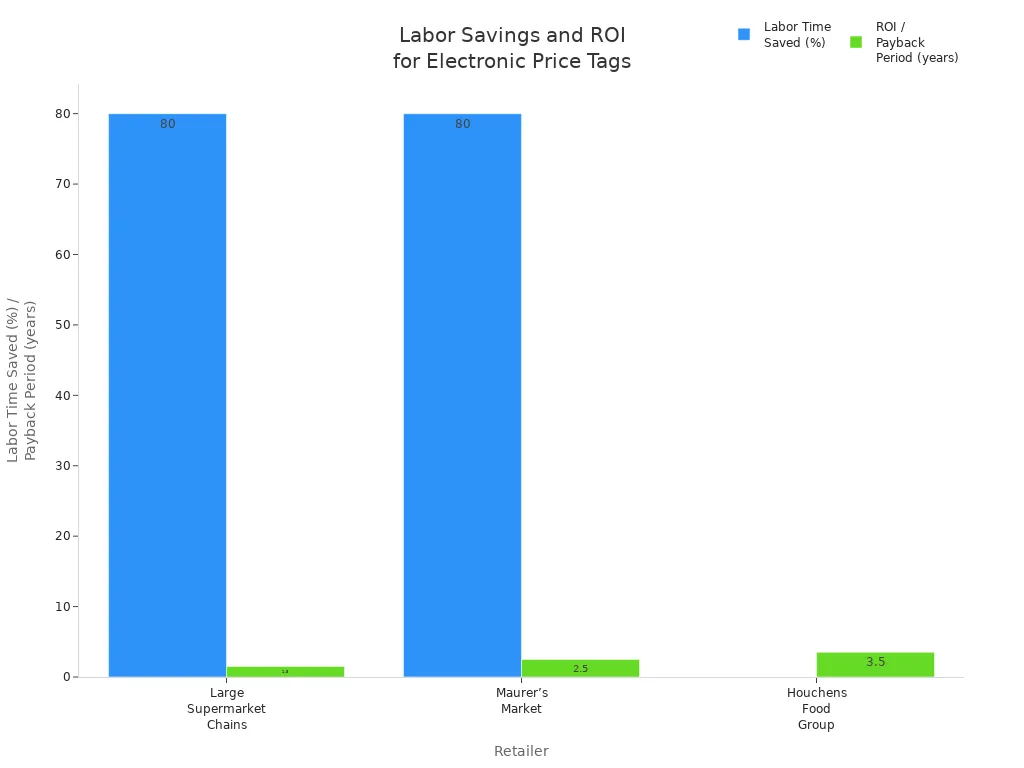
When you automate price changes, you allow employees to spend more time helping customers and managing inventory. This shift leads to better customer engagement and a more responsive sales floor. You also reduce labor costs and improve operational efficiency.
Tip: Wireless update methods provide the fastest and most flexible solution for busy retail environments.
Compatibility With Existing Systems
You want your electronic price tags to work seamlessly with your store’s current technology. Compatibility ensures that your price tags communicate with your point-of-sale (POS) and inventory systems without causing disruptions. Many retailers face challenges when integrating new electronic shelf labels with older systems. These challenges can slow down your operations and increase costs if not addressed early.
Here are some common compatibility challenges you might encounter:
| Challenge | Explanation |
|---|---|
| Legacy System Compatibility | Older POS or inventory systems may lack modern APIs, requiring middleware or custom adapters. |
| Data Synchronization | Price changes must be updated simultaneously across systems, necessitating a centralized management system. |
| Network Infrastructure | Robust network infrastructure is needed for wireless communication between central systems and labels. |
- Integrating electronic shelf labels with existing systems can present compatibility challenges.
- You must ensure seamless communication between digital price tags and other systems.
You should check if your current POS and inventory software support integration with electronic price tags. Some systems require middleware or custom adapters to bridge the gap between old and new technologies. A centralized management system helps you synchronize price changes across all platforms. Reliable network infrastructure supports wireless updates and prevents communication failures.
Tip: Before you invest, consult your IT team or technology provider to confirm compatibility. This step saves you time and money in the long run.
Durability and Lifespan
Durability and lifespan directly impact your long-term savings when you choose electronic price tags. You want labels that withstand daily wear and tear, temperature changes, and accidental impacts. The lifespan of electronic price tags depends on several factors, such as battery technology, usage frequency, display technology, and environmental conditions. For example, labels that update prices frequently may last between three to six years. Labels with minimal updates can last over ten years.
Durable electronic price tags reduce the need for frequent replacements. This means you spend less on maintenance and avoid disruptions on your sales floor. Robust labels can handle exposure to dust, humidity, and cleaning chemicals. You should look for tags with protective casings and water-resistant features if your store environment demands it.
A longer lifespan lowers your total cost of ownership. You avoid the hidden costs of replacing broken or worn-out tags. Investing in high-quality, durable labels ensures your system remains reliable and cost-effective for years.
Note: Always ask vendors about the expected lifespan and durability features of their electronic price tags. This information helps you plan for future expenses and maintenance.
Comparing Costs and Calculating ROI for Electronic Price Tags

Initial Purchase and Setup Costs
When you choose an electronic price tag system, you need to consider the upfront investment. The cost of electronic shelf labels varies based on size and features. Basic monochrome e-ink labels usually cost between $5 and $8 each. Larger, full-color labels with advanced features can range from $15 to $20 per label. You also need ESL management software, which averages about $500 upfront. An ESL gateway typically costs between $300 and $400. Installation costs depend on your store’s size and complexity. Smaller stores may handle installation in-house, while larger stores might spend several thousand dollars for professional setup.
- Electronic shelf labels: $5–$20 per label
- ESL management software: ~$500 upfront
- ESL gateway: $300–$400
- Installation: varies by store size and needs
Ongoing Operating Expenses
After installation, you will face ongoing expenses. These include software licensing fees, battery replacements, and maintenance. E-ink electronic price tags offer long battery life, often up to five years, which reduces replacement frequency. You may also need to budget for regular software updates and staff training. Some retailers report annual maintenance costs reaching significant amounts for large-scale deployments. Integration with your existing systems can also require periodic support.
Retailers in different regions report varying payback periods. Some expect to recoup their investment in less than two years, while others see a return in about three years. This payback period reflects the efficiency and long-term savings electronic shelf labels provide.
Hidden Fees and Replacement Costs
You should watch for hidden fees that can impact your total cost of ownership. These may include:
| Cost Factor | E-Ink Labels | LCD Labels |
|---|---|---|
| Battery Lifespan | Up to 5 years, fewer replacements | 1–2 years, more frequent replacements |
| Maintenance Needs | Minimal, durable and reliable | Frequent, fragile components |
| Operational Costs | Lower labor and replacement costs | Higher labor and replacement costs |
Other hidden costs can include software upgrades, ongoing licensing, and staff training. Integration with your point-of-sale system may require custom software adjustments, which can add to your expenses. By understanding these factors, you can better calculate the true ROI when you choose an electronic price tag system.
How to Calculate ROI When Choosing the Right Electronic Price Tag
Calculating the return on investment (ROI) for electronic price tags helps you make informed decisions and justify your purchase. You want to see clear financial benefits before committing to a new system. Start by identifying all the savings categories that electronic price tags can deliver. These include labor savings from pricing automation, reduced printing costs, time saved during restocking, fewer pricing errors, and increased revenue from better promotions and customer experience.
You can use a simple formula to calculate ROI:
ROI (%) = (Total Net Benefit / Total Cost of Solution) x 100
The following table breaks down typical annual savings and costs for a store with 1,000 SKUs and $5 million in annual revenue:
| Savings Category | Calculation Details | Annual Savings |
|---|---|---|
| Pricing Automation – Labour | 1,000 (SKUs) / 30 (price changes/hour) x 29 (hourly wage) = $967/week | $50,267 |
| Pricing Automation – Printing | 1,000 (SKUs) x 0.15 (cost of paper label) = $150/week | $7,800 |
| Restocking | 28 (hours) x 0.35 (time saving) x 29 (hourly wage) = $284/week | $14,778 |
| Eliminating Pricing Errors | Estimated compliance cost savings = $5,000/annum | $5,000 |
| Margin Optimisation | $5 million (annual revenue) x 0.01 (1% increase) = $50,000/annual benefit | $50,000 |
| Clearer Promotional Messaging | $5 million (annual revenue) x 0.01 (1% increase) = $50,000/annual benefit | $50,000 |
| Better Customer Experience | $5 million (annual revenue) x 0.01 (1% increase) = $50,000/annual benefit | $50,000 |
| Total Net Benefit | $246,345 | |
| Total Cost of Solution | $170,000 | |
| ROI Calculation | $246,345 (Net benefit) / 170,000 (Total cost) x 100 = 145% ROI after 1 year |
You can visualize the impact of each savings category in the chart below:
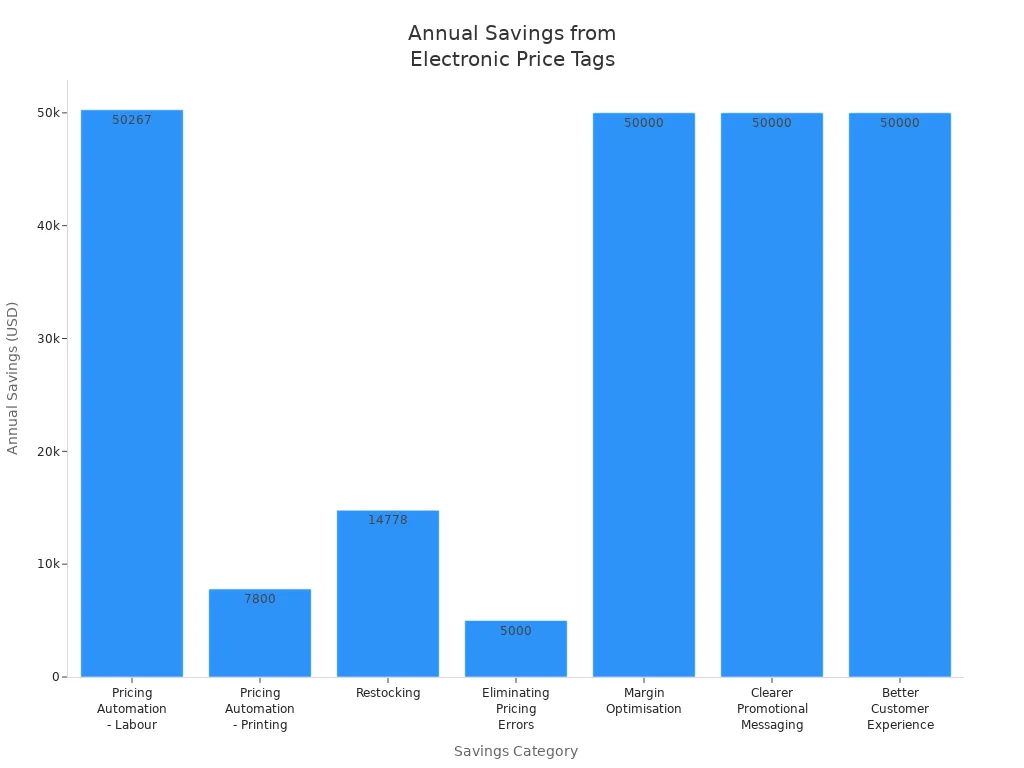
When you add up all the benefits and compare them to your total investment, you see a clear picture of your potential ROI. A 145% ROI after one year demonstrates strong financial value. This approach helps you justify your decision and plan for long-term savings.
Tip: Always tailor your calculations to your store’s size, SKU count, and wage rates for the most accurate results.
Step-by-Step Guide to Choosing the Right Electronic Price Tag
Assess Your Store’s Unique Needs
You must start by evaluating your store’s specific requirements before you choose an electronic price tag system. Every retail environment presents unique challenges, so a thorough assessment ensures you select a solution that delivers value and reliability. Consider the following factors:
- Type: Review digital price tag options such as LCD screens and electronic paper. Each offers different visibility and energy efficiency.
- Compatibility: Confirm that the system integrates with your existing ERP and POS platforms. Seamless integration supports accurate pricing and inventory management.
- Lifespan: Examine battery life and replacement schedules. Long-lasting batteries reduce maintenance and lower costs over time.
- Durability: Inspect materials for resistance to spills and scratches. Certified ratings guarantee the tags withstand daily use.
- Temperature Range: Verify that the tags operate reliably in all store areas, including refrigerated sections.
- User-friendliness: Select intuitive software that simplifies training and daily operations for your staff.
Tip: A detailed needs assessment helps you avoid costly mistakes and ensures your investment aligns with your store’s operational goals.
Prioritize Essential Features
Once you understand your store’s needs, you should focus on the features that maximize cost-effectiveness and operational efficiency. The following table highlights essential features and their benefits:
| Feature | Benefit |
|---|---|
| Automation | Reduces manual tasks, allowing staff to focus on customer service and inventory management. |
| Pricing Accuracy | Enables real-time updates, improving pricing accuracy and reducing errors. |
| Cost-Benefit Analysis | Helps retailers evaluate direct and indirect benefits before investing in ESL systems. |
| Real-Time Data Synchronization | Supports accurate retail display management and reduces manual entry errors. |
| Centralized Management Tools | Simplifies operations and ensures consistency in pricing and promotions across stores. |
You should prioritize automation and real-time data synchronization. These features streamline operations and minimize errors. Centralized management tools allow you to maintain consistent pricing and promotions, which improves customer trust. Conduct a cost-benefit analysis to evaluate both direct savings and indirect advantages, such as improved staff productivity and better customer experiences.
Note: Focusing on essential features prevents overspending on unnecessary add-ons and ensures you achieve the highest return on investment.
Compare Electronic Price Tag Vendors and Models
Comparing vendors and models is a critical step in choosing the right electronic price tag. You need to assess reliability, value, and support to make an informed decision. Use the following criteria to guide your comparison:
| Criteria | Description |
|---|---|
| Pricing & Customer Perceived Value | Evaluating prices helps businesses compare vendors, achieve better terms, and assess affordability while considering the perceived value of the service. |
| Product Quality & Vendor Performance | Selecting vendors with a proven track record ensures that product quality and responsiveness to issues are met, impacting brand reputation and customer satisfaction. |
| Customer Services | Evaluating communication skills, response time, and flexibility of vendors helps ensure a good vendor-client relationship and effective collaboration. |
You should request detailed product specifications and performance data from each vendor. Assess their customer service responsiveness and flexibility. Reliable vendors provide transparent pricing and support, which reduces risk and ensures smooth implementation. Avoid common mistakes such as overlooking technical limitations or failing to factor in long-term savings. The table below outlines frequent errors and solutions:
| Common Mistakes | Solutions |
|---|---|
| High initial investment costs | Factor in long-term savings |
| Technical limitations | Ensure compatibility with existing systems |
| Potential legal risks | Assess legal and regulatory implications early |
Callout: Always verify compatibility with your current systems and review legal requirements before finalizing your choice. This step protects your business from unexpected costs and compliance issues.
Test and Evaluate Before Buying
You should always test and evaluate electronic price tags before making a final purchase. This step helps you avoid costly mistakes and ensures the system fits your store’s needs. You want to see how the technology performs in your real environment. Testing also reveals how well the system integrates with your existing processes.
Start by following these best practices:
- Define your objectives. Decide what you want to achieve with your price tag system. You might focus on faster price updates, improved accuracy, or better inventory management.
- Select appropriate products for testing. Choose items that represent your store’s range but do not carry high risk. This approach gives you useful feedback without affecting your main revenue streams.
- Implement gradual adjustments. Make small, incremental changes to prices. This method lets you observe customer reactions and avoid sudden shocks.
- Utilize a mix of pricing strategies. Try different approaches such as cost-plus, competitor-based, dynamic, and value-based pricing. This variety helps you find the most effective strategy for your business.
- Measure and analyze results. Use analytics tools to track the impact of your tests. Monitor sales, customer engagement, and operational efficiency.
Tip: Testing with a small group of products allows you to identify issues early and refine your approach before a full rollout.
You should also involve your staff in the evaluation process. Ask for their feedback on ease of use and integration with daily tasks. Their input helps you spot potential challenges and improve training plans. By taking these steps, you make a more informed decision when choosing the right electronic price tag.
Plan for Long-Term Savings
Planning for long-term savings requires a strategic approach. You want to maximize the benefits of your investment and ensure ongoing value for your business. Consider the following strategies and their benefits:
| Strategy | Benefit |
|---|---|
| Dynamic Pricing | Adjust prices based on demand to maximize profits and boost foot traffic. |
| Lower Labor Costs | Reduce the need for manual price changes, saving on labor expenses. |
| Elimination of Printing Costs | Remove costs associated with paper and printing labels. |
| Minimizing Pricing Discrepancies | Ensure accurate pricing, reducing customer complaints and compliance fines. |
| Enhancing Operational Efficiency | Streamline operations, allowing employees to focus on more valuable tasks. |
| Real-Time Price Adjustments | Enable instant pricing changes across locations, keeping you competitive. |
You should review these strategies as part of your planning process. Dynamic pricing lets you respond quickly to market changes. Lower labor costs and the elimination of printing expenses add up over time. Accurate pricing reduces the risk of customer complaints and regulatory issues. Enhanced operational efficiency means your staff can focus on customer service and inventory management. Real-time price adjustments keep your store agile and competitive.
Note: Regularly review your system’s performance and update your strategies to maintain savings year after year.
By planning ahead, you ensure that your investment in electronic price tags delivers value now and in the future.
When you choose an electronic price tag that fits your business, you unlock significant savings and operational efficiency.
“Last year we replaced the traditional paper price tags with these new digital shelf labels (DSLs). Before digital shelf labels, doing a store price change took a couple of days and now it takes only minutes.”
Focus on features, compatibility, and total costs to maximize your ROI with electronic price tags and electronic shelf labels.
| Trend | Benefit |
|---|---|
| Dynamic Pricing | Enables instant price adjustments across all digital tags for consistency and accuracy. |
| Real-time Updates | Allows retailers to implement flash sales and markdowns easily. |
| Enhanced Customer Engagement | Provides personalized promotions and detailed product information. |
| Improved Operational Efficiency | Automates pricing updates, freeing staff for other tasks. |
Use the step-by-step guide to confidently select electronic shelf labels that fit your needs and budget.
FAQ
What is the average lifespan of an electronic price tag?
Most electronic price tags last between 5 and 10 years. Battery life depends on update frequency and store conditions. You should check the manufacturer’s specifications for accurate estimates.
Can you reuse electronic price tags if you change product locations?
Yes, you can reassign electronic price tags to different products or shelves. Most systems allow you to update the display and product information easily.
Do electronic price tags work with all POS systems?
Not all electronic price tags integrate with every POS system. You should confirm compatibility with your current software before purchasing.
How do you maintain electronic price tags?
- Replace batteries as needed.
- Clean screens with a soft cloth.
- Update software regularly.
- Inspect for physical damage.
Routine maintenance ensures reliable performance and extends the lifespan of your tags.