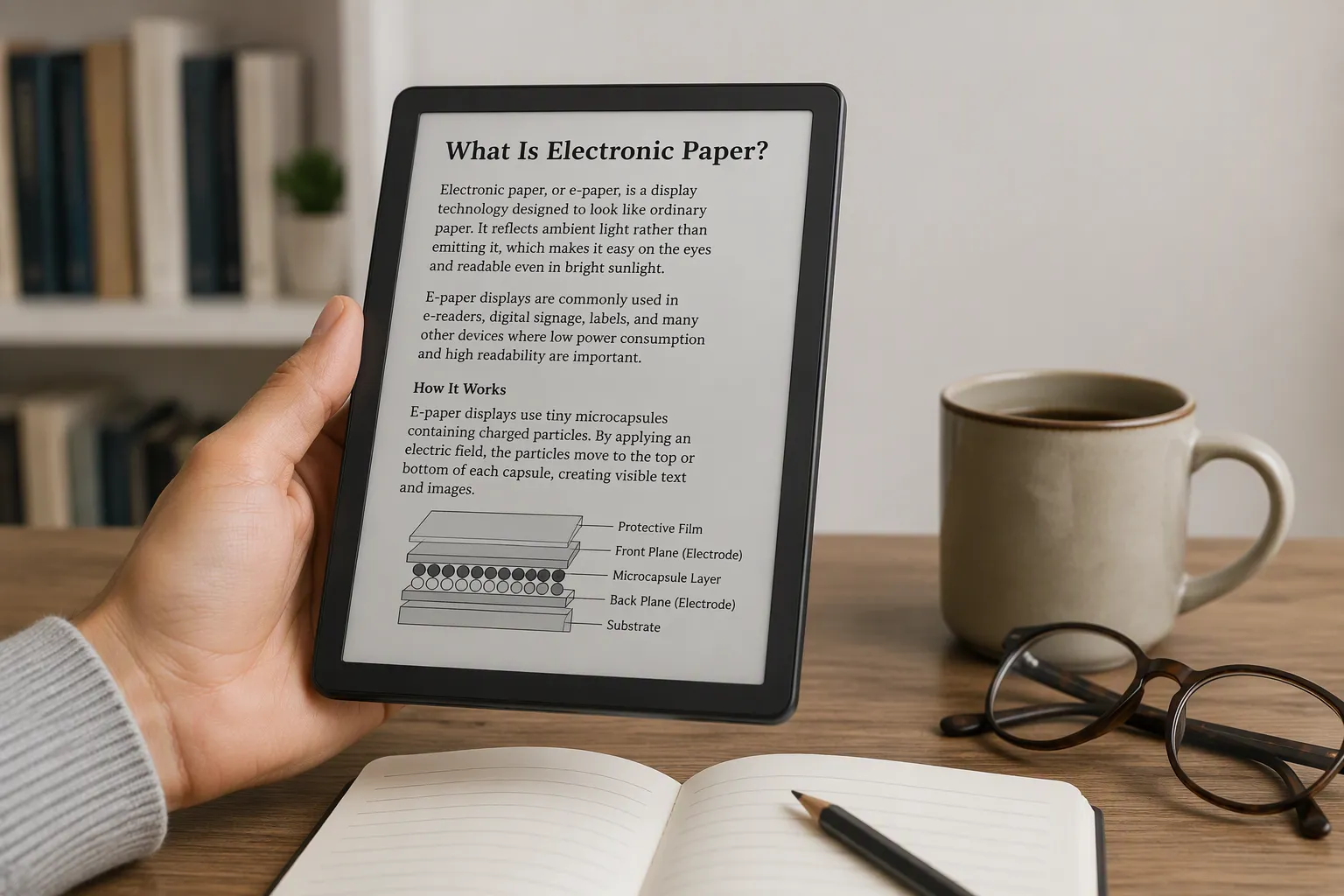
What is electronic paper? You can define electronic paper as a display that looks like ink on paper. This electronic paper technology reflects light instead of emitting it, so you read it like a printed page. People also call it e-paper, epaper, or whatiselectronicpaper, and you find it inside most e-readers. It only draws power when the image changes, not while the image stays on screen. In short, electronic paper is a low-power, paper-like display technology. You also see it in Electronic Shelf Labels, where an ESL Gateway AP updates each ESL Price Tag wirelessly, a common sight in Esl Retail. This introduction to e-paper technology shows you the basics.
What Is Electronic Paper in Simple Terms
The One-Sentence Definition
A display that mimics ink on paper
You can understand electronic paper technology through one clear sentence. Electronic paper is a display that mimics the appearance of ink on paper. This definition captures the essential purpose of the technology. Researchers in display media have long sought to create a flexible, low-cost system that serves as the electronic analogue of paper. The resulting viewing characteristics produce an ink on paper look that feels natural to your eyes.
The display industry defines this technology with precision. According to display industry standards, electronic paper is a display device that reflects ambient light, thereby mimicking the appearance of ordinary ink on paper. This stands in contrast to conventional flat-panel displays, which require additional energy to emit their own light. Many electronic paper technologies hold static text and images indefinitely without electricity.
A screen that reflects instead of glows
The reflective nature of this display sets it apart from every screen you already know. Your phone, laptop, and television all emit light directly into your eyes. An electronic paper screen works differently. It reflects light from the environment around you. This fundamental difference changes your entire reading experience.
A paper-like display relies on ambient light bouncing off its surface, just as ordinary paper does. The matte surface diffuses reflections instead of producing sharp glare spots. This closely mimics the look of matte paper. You see the content the same way you see a printed page. The screen never pushes light toward your face.
Why It Is Called Electronic Paper
It uses electronic signals to form text and images
The name combines two distinct concepts. Electronic signals control the display. Paper describes the visual result. Manufacturers use electronic ink to create text and images on the screen. This electronic ink consists of tiny particles that respond to electric fields. The technology borrows its name from the traditional ink you find in books and newspapers.
According to Pervasive Displays, the terms e-paper, ePaper, electronic ink, and e-ink display all refer to the same concept regardless of manufacturer or corporate strategy. The naming reflects a deliberate imitation of conventional ink on paper. The technology retains images and information with crispness, sharpness, and readability comparable to or exceeding printed paper.
It looks and feels like real paper
The visual quality of this display surprises most people when they first see it. E-paper can display the same clear, highly readable content as the crisp lines of text written on paper with a pen. Deep blacks, bright whites, and high resolution at 300 PPI produce text that looks nearly identical to high-quality printing. You might mistake a turned-off device for a printed page.
The surface texture contributes to this paper-like feel. The matte finish diffuses reflections rather than creating sharp glare spots. This surface treatment closely mimics the look of matte paper. The combination of reflective display, matte surface texture, and high contrast is what makes e-ink feel like paper rather than a screen.
A Beginner-Friendly Analogy
Like an Etch A Sketch that remembers its picture
Think about the classic Etch A Sketch toy from your childhood. You turn the knobs to draw lines on a gray screen. When you shake the toy, the picture disappears. An electronic paper display works in a similar way, but with one major difference. The picture stays on the screen without any effort from you.
The way e-ink works means that it differs from other displays in two key points: it is both bistable and reflective. Just like the sketch in your notebook will remain there until you erase it, the content displayed on an electronic paper display will hold a static image, even without electricity. An electronic paper screen reflects light from the environment and only consumes power when the content on it is changing. This is possible because electronic paper technology is bistable. The tiny particles of an electronic paper display will either be reflective or non-reflective, that is, black or white. Energy is needed to put the color particles in their place, but once they are there, they stay there.
Like a printed page you can rewrite
Imagine a printed page that you can erase and rewrite as many times as you want. That captures the essence of this technology. You receive a document that looks exactly like a printed page. When you want new content, you send a signal to change the page. The old text disappears and new text appears. The page itself never changes, only the content on it.
This electronic paper explained simply is a reusable surface. You do not throw away the page after reading it. You do not print a new one. You simply update the existing display with new information. The technology gives you the best of both worlds: the reading comfort of paper and the flexibility of digital content.
How an Electronic Paper Display Works
You now understand what electronic paper is and why it looks like real paper. The next question is how does it work. The answer lies in tiny structures called microcapsules and the controlled movement of charged particles. This section walks you through the complete process, from the smallest component to the final visible image.
The Tiny Capsules Inside
Microcapsules filled with clear fluid
Every electronic paper display contains millions of tiny microcapsules. Each microcapsule is about the width of a human hair. These capsules are filled with a clear fluid. The fluid allows particles to move freely inside. Manufacturers suspend these microcapsules in a flexible plastic sheet. This sheet forms the front layer of the display. The clear fluid inside each capsule plays a critical role. It lets light pass through when needed. It also allows the particles to shift position quickly.
The microcapsules sit between two electrodes. The top electrode is transparent. The bottom electrode connects to a transistor array. This arrangement creates a sandwich structure. The top layer lets you see inside. The bottom layer controls what happens inside. Together, they form the foundation of e-paper display technology.
Black and white particles suspended inside
Inside each microcapsule, two types of particles float in the clear fluid. One type is black. The other type is white. These particles carry opposite electrical charges. The white particles carry a negative charge. The black particles carry a positive charge. This charge difference is the key to the entire display.
The white particles are made of titanium dioxide. The black particles are made of carbon black. Both types are tiny enough to move quickly. They respond to electric fields. They also stay in place when the field disappears. This ability to hold position is what makes electronic paper displays so efficient.
Moving Particles with Electricity
Positive and negative charges push the particles
You control the display by applying voltage to the electrodes. A positive voltage at the top electrode attracts the negative white particles. It repels the positive black particles. The white particles move to the top surface. The black particles sink to the bottom. The pixel appears white. A negative voltage reverses this process. The black particles rise to the top. The white particles drop to the bottom. The pixel appears black.
When a voltage is applied across a capsule, the electric field attracts one group of particles toward the front and pushes the other group toward the back. When white particles move to the viewing surface, that area appears white. When black particles move to the surface, it appears black.
Each pixel is connected to a thin-film transistor. The transistor applies carefully timed positive and negative voltage pulses that move the pigments. These sequences are called waveforms.
This design allows a single pair of electrodes to control both states of a pixel. A single electrical pulse moves the oppositely charged particles in opposite directions. The table below shows how voltage polarity determines the pixel state.
| Voltage at Top Electrode | Particle Charge | Particle Movement | Resulting Pixel State |
|---|---|---|---|
| Positive | White particles (negative) | Attracted to top | White |
| Positive | Black particles (positive) | Repelled to bottom | White |
| Negative | Black particles (positive) | Attracted to top | Black |
| Negative | White particles (negative) | Repelled to bottom | Black |
How the black and white image appears
The complete image forms through a precise sequence of electrical signals. The process follows these steps:
- The image signal is sent to the active-matrix backplane, where TFT switches scan row by row and apply independent voltage signals to each column.
- A selected gate line enables the pixel electrodes in one row, allowing the source voltage to reach those pixel electrodes.
- The voltage difference between the common electrode and the pixel electrode creates an electric field across the electrophoretic layer.
- The timing and order of voltage pulses, called the driving waveform, control the movement of positively and negatively charged black and white particles.
- The particle positions determine how much incident light is absorbed or reflected back through the top plate to your eye, producing the visible image.
Modern e-ink displays use an active-matrix backplane. Each pixel has its own thin-film transistor that controls the voltage applied to that pixel’s electrode. This allows individual pixel addressing and produces high resolution. The backplane is typically manufactured on a glass substrate using semiconductor fabrication processes. Each pixel electrode connects to a transistor, which in turn connects to row and column lines. These lines allow the display controller to address individual pixels. The voltage applied to each electrode determines the direction and strength of the electric field in the corresponding microcapsule. That field determines the position of the pigment particles.
The image-update operation divides into three stages. During the erasing stage, voltage pulses clear residual charges from the previous image state. This pushes all particles to an extreme state, either full black or full white. During the activation stage, the controller applies inverse pulses to reset particle momentum and equalize fluid displacement. During the final driving stage, target voltages push the precise mixture of pigments to the surface corresponding to the newly rendered frame. The time required for this transition is called the response time.
Display controllers mitigate ghosting using two primary modes. Full Refresh cycles the entire screen quickly between positive and negative biases, clearing all microcapsule residual states. Partial or Fast Refresh repels or attracts only altered pixels using abbreviated voltage pulses.
Why It Only Uses Power When Changing
Bistable technology explained simply
The term bi-stability describes the core advantage of this technology. A bistable display holds two stable states without power. The black state and the white state both remain stable. You need energy only to switch between them. Once the particles reach their target positions, they stay there. The display retains image without power.
This behavior separates electronic paper technology from every other display type. An LCD or LED screen must constantly refresh its pixels. It needs a continuous power supply to keep an image visible. An e-paper display needs power only when the content changes. This difference explains the extraordinary battery life of e-readers.
No power needed to hold an image
You can turn off an e-reader and the page remains visible. You can leave it on a table for weeks and the text stays sharp. The display consumes zero power while the image stays static. Power flows only during a page turn or a content update.
The driver chip selects the appropriate gate line, enabling a specific row of pixels. It applies voltage signals through the source lines corresponding to pixel columns. These voltages create an electric field between the TFT backplane electrodes and the ITO conductive layer on the upper side of the electronic paper film. This electric field acts on the charged ink particles inside the microcapsules, driving them to move in a controlled manner. Inside each microcapsule are positively charged black particles and negatively charged white particles, suspended in a transparent fluid. When the electric field applies at a pixel level, particles respond according to their charge polarity. Black particles move toward one electrode. White particles move toward the opposite electrode. Depending on which particles reach the top viewing surface, the pixel appears black, white, or a shade in between. Once the particles reach their target positions, they remain there without further power input. This allows the image to be retained with zero or near-zero energy consumption.
This is why electrophoretic displays achieve such remarkable efficiency. The technology does not fight against gravity or fluid dynamics. It simply moves particles to a stable position and leaves them there. The bistable nature of the display means that the image persists until you decide to change it.
The Role of Ambient Light
Reflecting light instead of emitting it
You already know that an electronic paper display holds its image without power. Now you need to understand the light source. Every screen needs light for you to see the content. An LCD or LED screen creates its own light. An electronic paper screen borrows light from the room around you. This difference defines the entire reading experience.
A reflective display works like a sheet of paper on your desk. Sunlight or lamplight hits the surface. The surface bounces that light back to your eyes. You see the content because light travels from the source, hits the page, and returns to you. The display never generates light on its own. This simple physical principle explains why e-paper feels so natural to read.
The construction of the screen supports this reflective behavior. Each microcapsule sits beneath a transparent top electrode. Light passes through this clear layer. The light then hits the white particles at the surface. Those particles scatter the light back through the transparent layer. Your eyes receive the scattered light. The black particles absorb light instead of reflecting it. This absorption creates the dark areas of the text. The contrast between reflecting white particles and absorbing black particles forms the visible image.
This design belongs to a broader family of reflective display technology. Engineers build these screens to modulate ambient light rather than produce it. The approach saves enormous amounts of energy. It also produces a viewing experience that matches printed paper. You never stare into a light source. You simply look at a surface that bounces light back to you.
The reflective nature of electrophoretic displays creates one important consequence. The brightness of the image depends on the brightness of your surroundings. A well-lit room produces a bright, clear image. A dim room produces a dim image. This behavior mirrors how a printed book behaves under the same conditions. You would not expect a paper book to glow in the dark. You should not expect an e-paper display to glow either.
Reading in sunlight versus darkness
Outdoor reading reveals the greatest strength of this technology. Direct sunlight makes most screens unusable. Your phone screen becomes a mirror of glare. You cup your hand over the display and still struggle to see the content. An e-paper screen behaves in the opposite way. More ambient light produces a brighter, sharper image. The screen actually improves as the sun grows stronger.
This improvement happens because the display uses the sunlight as its light source. Bright sunlight means more light bounces off the white particles. The text becomes crisp and high-contrast. You can read comfortably on a beach, on a hiking trail, or at a bus stop on a sunny day. No other display technology offers this advantage. The reflective display turns harsh sunlight into a benefit rather than a problem.
Darkness creates the opposite challenge. An e-paper display cannot generate its own light. You cannot read the screen in a completely dark room. The particles need ambient light to reflect. Without light, the screen appears blank. This limitation surprises many new users. They expect every screen to glow in the dark.
Manufacturers solved this problem with a front light. A front light sits above the display surface. It shines light down onto the screen rather than out toward your eyes. The light bounces off the particles and returns to you. This design differs from a backlight. A backlight pushes light directly into your eyes. A front light illuminates the page from the front, just like a reading lamp. You can adjust the brightness of the front light. You can also turn it off completely to save power.
This front light approach preserves the paper-like reading experience. The light does not create glare. It does not produce the harsh blue tones of a typical phone screen. You get comfortable reading in bed at night without straining your eyes. When you finish reading, you turn off the front light. The last page stays visible on the screen. The display holds the image with zero power. This combination of ambient light reflection and optional front lighting gives you flexibility in every environment.
If you wonder how does it work in practice, think about your own reading habits. During the day, you rely on sunlight or room light. At night, you switch on the front light. The display adapts to your environment without changing its fundamental nature. The bi-stability of the screen means the image persists through every lighting condition. You never lose your place because the screen lost power.
Key Features and Benefits of E-Paper
Easy on the Eyes
No blue light and no glare
Electronic paper relies on reflection. A screen using electronic paper reflects ambient light. It does not emit blue light like a backlit tablet. Your eyes therefore encounter less harsh stimulation during a long reading session. Research supports this advantage. A Harvard study in the Journal for the Society of Information Display found that E Ink’s ePaper is up to three times healthier for the eyes than LCD screens. The study compared oxidative stress responses in retinal cells exposed to blue light from emissive versus reflective displays.
| Measure | Backlit LCD | E-ink | Paper |
|---|---|---|---|
| Subjective visual fatigue | Higher | Lower | Lower |
| Blink rate decrease | Larger | Smaller | Smaller |
| Pupil size reduction | Greater | Less | Less |
The table reveals a clear pattern. Backlit LCD screens force your eyes to work harder. You can see why e-paper displays produce a calmer visual experience. An e-paper display delivers this comfort without sacrificing text clarity.
Readable in direct sunlight
This sunlight readability separates e-paper from every glowing screen. You can read under a bright sky without squinting. The screen uses sunlight as its light source. More light creates a more vivid image. This advantage makes e-ink the preferred choice for beach reading, park benches, and patio sessions.
Extremely Low Power Consumption
Weeks of battery life on a single charge
The low power consumption in this display stems from a simple physical property. The display holds its image without a steady energy supply. Engineers call this quality bi-stability. This property allows low-power e-paper displays to run for weeks on one charge. You can carry a device for a month without hunting for a charger. No other screen technology matches this efficiency.
Power used only for page turns
Your e-reader consumes power only when you change the page. The image stays fixed between turns. A tablet must refresh constantly to maintain its display. On such a screen, the particles simply remain in place. The battery lasts because the screen does not waste energy.
Lightweight and Thin
Flexible plastic screens
Manufacturers build electronic paper displays on flexible plastic substrates. These substrates replace the heavy glass used in conventional screens. This construction reduces weight and enables durability. The flexible nature of e-paper display technology opens new design possibilities.
Comfortable to hold for long reading sessions
The key features of e-paper come together in your hands. A thin e-paper display weighs far less than a tablet. You can hold an e-reader for hours without wrist strain. The paper-like surface also reduces glare. These qualities make this display the ideal format for anyone who reads daily. You get the portability of a paperback and the convenience of a digital library.
Durable and Portable
Resistant to scratches and minor drops
You handle a device roughly throughout the day. You toss it into a bag. You set it down on a table. You carry it from room to room. An e-paper screen handles this treatment well. The display lacks the fragile glass layer found in many tablets. Manufacturers build the screen on a plastic substrate instead. This plastic backing bends slightly under pressure. It absorbs small impacts without cracking.
The surface also resists everyday wear. A matte coating protects the display from minor scratches. Keys and coins in your bag may press against the screen. The surface holds up against this contact. You do not need a screen protector for basic protection. The durable construction makes e-paper a practical choice for daily use.
Great for travel and commuting
Portability stands out among the key features of e-paper. A typical e-reader weighs less than a paperback book. You can hold it with one hand on a crowded train. The thin profile slides easily into a jacket pocket or a small bag. You never feel weighed down during a long trip.
Battery life adds to this convenience. You can travel for weeks without a charger. A single charge covers an entire vacation. You do not need to hunt for an outlet at an airport. You do not need to carry a power bank in your luggage.
Sunlight readability helps during commutes. You can read on a sunny bus or a park bench. The screen uses natural light instead of fighting against it. Glare never blocks your view of the page. This advantage makes e-paper ideal for outdoor travel.
The screen also handles temperature changes. Cold weather slows down some electronics. An e-paper display keeps working in freezing conditions. You can read at a ski lodge or on a winter commute. The technology adapts to your environment.
You get a device that survives real life. It resists scratches, drops, and weather. It travels light and lasts for weeks. These qualities make e-paper a reliable companion for any journey.
Common Uses of Electronic Paper
E-Readers
Kindle, Kobo, and Nook devices
You probably know the Amazon Kindle, the Kobo, and the Barnes & Noble Nook. These devices dominate the e-reader market. Each one uses an e-paper display as its screen. The Kindle alone has sold tens of millions of units worldwide. Kobo serves readers in over 100 countries. The Nook carved out a loyal following among American readers. These three brands introduced electronic paper to the general public.
Why these devices rely on e-paper
E-readers depend on e-ink for one simple reason. You can read for hours without eye strain. The screen looks like a printed page. You also get weeks of battery life from a single charge. A tablet drains its battery in a single day. An e-reader lasts a month or more. These advantages make electronic paper the only sensible choice for a reading device.
Digital Signage and Electronic Labels
Store price tags that update wirelessly
Retail stores now use electronic paper displays for price tags. An ESL Price Tag shows the current price on a small screen. An ESL Gateway AP updates every tag wirelessly from a central system. You see this technology in Esl Retail environments across the country. A grocery store can change thousands of prices in minutes. No employee walks the aisles with a label gun. The tags hold their image without power. A single battery lasts five years or more.
Bus stop schedules and information boards
Transit systems use electronic paper for bus stop signs. The display shows arrival times and route information. A solar panel powers the sign. The image stays visible in direct sunlight. You can read the schedule from twenty feet away. Airports and train stations also use these boards. The technology works without a power outlet nearby.
Smartwatches and Wearables
Always-on displays that sip power
Smartwatches face a constant challenge. A small battery must power the screen all day. Electronic paper devices solve this problem. The display holds the time without using power. You glance at your wrist and see the time. The screen never goes dark. This always-on feature works because the display only draws power when the numbers change.
Low power needs for small batteries
A smartwatch battery is tiny. It holds a fraction of the energy in a phone battery. Electronic paper uses almost no power to maintain an image. You get days of use from a single charge. Fitness bands and health trackers use the same approach. The low power needs of e-paper make wearable technology practical.
Digital Notebooks and Tablets
ReMarkable and similar writing devices
You can now find electronic paper devices built specifically for writing. The reMarkable 2 leads this category. It uses a CANVAS display co-developed with E Ink. This screen adds extra surface friction and delivers a writing latency of 21 milliseconds. The screen sits slightly recessed. This design gives you the sensation of writing directly on the display surface. The reMarkable Paper Pure features a third-generation Canvas display. It uses the same textured writing surface as the Paper Pro. Digital ink appears in roughly 21 milliseconds. Navigation, zooming, and page turns are claimed to be up to twice as fast as on the reMarkable 2.
Other brands approach this category differently. Onyx Boox e-readers have a smooth finish. This surface feels unnatural for writing. It feels closer to a regular tablet screen. These devices lack both the paper feel and the low latency found on the reMarkable 2. The contrast shows how much engineering goes into a quality writing experience on e-paper.
Note-taking and sketching on a paper-like screen
A good digital notebook must replicate the physical act of writing. The best devices achieve this through careful hardware design. You get three key characteristics from a quality writing tablet:
- Surface Texture: Subtle grain replicates pen-to-paper friction.
- Rendering Speed: Strokes draw instantly with sub-20 ms latency.
- Pressure Sensitivity: Over 4,096 levels for nuanced line variation.
These features transform a flat screen into a convincing writing surface. One reviewer described the experience this way:
The textured glass surface creates friction that feels almost identical to writing on a stack of high-quality paper. Not the slippery nightmare of an iPad. Not the plasticky resistance of a cheap screen protector. Not the single-sheet-on-a-hard-desk feel of older e-ink devices. Actual, layered, slightly toothy paper friction.
The writing latency is 12 milliseconds with a pen-to-ink distance of less than 1 mm. In plain language: the ink appears under the pen tip so fast that your brain cannot perceive a delay.
You can take notes, sketch diagrams, and annotate documents on these devices. The e-paper screen holds your work without power. You close the cover and return hours later. Your notes remain exactly as you left them. This combination of paper-like feel and digital convenience makes these tablets a practical tool for students, artists, and professionals.
Electronic Paper vs. LCD and LED

How LCD and LED Screens Work
Backlit displays that emit light
You see LCD and LED screens everywhere. Your phone, laptop, and television all use this technology. These displays contain a backlight layer that produces light. The light passes through liquid crystals and color filters. The screen then pushes that light directly toward your face. This design creates a bright, vivid image. The display generates its own illumination at all times.
Light shining directly into your eyes
An LCD screen acts like a flashlight pointed at your eyes. The backlight stays on whenever the screen is active. Your eyes receive a constant stream of emitted light. This constant exposure causes fatigue during long sessions. An e-paper display works in the opposite way. It reflects ambient light instead of producing its own.
The Reading Experience
Glare and eye strain on backlit screens
Backlit screens create glare in bright environments. Sunlight hits the glossy surface and bounces back at you. You tilt the screen and cup your hand to see the content. Your eyes also work harder on a backlit display. The constant light emission reduces your blink rate. This reduction leads to dry eyes and discomfort. Electronic paper avoids these problems entirely. The matte surface diffuses reflections and produces no glare.
Battery life differences in daily use
Battery life reveals another major difference. An LCD screen must refresh constantly to hold an image. It drains power every second the display stays on. A typical tablet lasts ten hours at best. An e-paper display holds its image without any power. You turn a page and the screen uses a small burst of energy. You then read for hours without further consumption. Most e-readers last weeks on a single charge.
Color and Refresh Rate
E-paper is slower and often grayscale
Electronic paper excels at static content. The technology refreshes slowly compared to LCD. A page turn may take a fraction of a second. This speed works fine for reading text. The display also shows mostly grayscale images. Color e-paper exists today, but the colors remain muted. The technology prioritizes readability over visual flash.
LCD is faster and full color
LCD screens win on speed and color. They refresh sixty times per second or more. This speed handles video, gaming, and animation perfectly. The displays also produce millions of colors. You get vibrant images and smooth motion. These strengths make LCD the better choice for dynamic content.
| Feature | E-Paper | LCD/LED |
|---|---|---|
| Light source | Reflective | Emissive |
| Power for static image | None | Continuous |
| Refresh rate | Slow | Fast |
| Color range | Limited | Full |
| Best use | Reading | Video and gaming |
When to Choose Which
E-paper for reading and static content
You should choose e-paper when your primary activity involves reading. Novels, textbooks, and long documents all work best on this display type. The screen reflects light and produces zero glare. You can read for hours without the eye strain that backlit screens cause. The battery also lasts for weeks instead of hours. This advantage matters when you travel or commute. You do not need to carry a charger everywhere you go.
Static content also suits e-paper perfectly. Digital signage, price tags, and information boards change their content only occasionally. The display holds each image without power. A single battery can last for years in these applications. You save money on wiring and electricity. You also gain flexibility in placement. A solar panel can power a bus stop sign with no outlet nearby.
LCD for video, gaming, and animation
You should choose an LCD or LED screen when you need motion and color. Video playback demands a fast refresh rate. LCD panels refresh sixty times per second or more. This speed produces smooth motion without blur. Gaming also requires this responsiveness. A slow refresh rate would make games unplayable. Animation and interactive content fall into the same category.
Full color represents another strength of LCD technology. These screens produce millions of colors with high brightness. You get vibrant images for movies, photo editing, and graphic design. E-paper cannot match this color range today. Color e-paper exists, but the hues remain muted and the refresh rate stays slow.
Your choice ultimately depends on your daily tasks. Pick e-paper for reading, note-taking, and static displays. Pick LCD for video, gaming, and any content that moves. Many people own both types of devices. Each screen serves a different purpose. You do not need to choose one technology for everything.
Limitations of Electronic Paper
Electronic paper offers remarkable benefits for reading and static content. You should also understand its drawbacks before you choose a device. This technology carries real limitations that affect daily use.
Slow Refresh Rates
Not suited for video or animation
You cannot watch videos or play games on an e-paper screen. The display updates far too slowly for motion content. A standard 60 Hz LCD refreshes every 16.7 milliseconds. An E Ink screen needs 250 to 800 milliseconds for a typical page update. This gap makes E Ink roughly ten times slower per refresh. Users also report 15 to 20 seconds to power up completely. The device then needs additional seconds to wake from sleep mode.
| Display Type / Content | Refresh Time | Equivalent Refresh Rate |
|---|---|---|
| E Ink – B&W text (fast page turn) | 200–300 ms | ~3.3–5 Hz |
| E Ink – B&W text (normal full refresh) | 300–500 ms | ~2–3.3 Hz |
| E Ink – Color image (high quality) | 800–1500 ms | ~0.67–1.25 Hz |
| Standard 60 Hz LCD | ~16.7 ms per frame | 60 Hz |
Page turns can feel laggy
You notice the delay every time you turn a page. The screen flashes black before the new text appears. This transition takes several hundred milliseconds. Users accustomed to instant LCD response often find this frustrating. The lag becomes more noticeable on color electronic paper devices. A color page turn can take 400 to 600 milliseconds.
Limited Color Options
Mostly grayscale today
Most electronic paper screens remain monochrome. E-ink pigments can only orient in two ways, which limits the display to black and white. Color e-paper exists today, but it is less prevalent. Advanced Color ePaper panels can produce up to 50,000 colors using cyan, magenta, yellow, and white pigments. This range resembles newspaper or watercolor art. The broader color E Ink category produces about 4,096 colors with a softer appearance. LCD produces 16.7 million colors with high saturation. Color E Ink cannot match LCD for photography, video, or color-critical work.
Color e-paper is still developing
Gallery technology uses multiple colored pigment particles inside each microcapsule. This approach produces richer, more saturated color than earlier versions. The colors remain significantly more muted than LCD. Engineers continue to improve color filters and refresh rates. You should expect better color performance in future electronic paper devices.
Requires External Light
Cannot be read in the dark without a light
An e-paper display cannot generate its own light. You cannot read the screen in a completely dark room. The particles need ambient light to reflect. Without light, the screen appears blank. This limitation surprises many new users.
Front lights are often built in
Manufacturers solved this problem with a front light. LED beads sit along the screen edges. A light guide plate spreads that light evenly across the display surface. The light illuminates the e-ink particles, which reflect it back to your eyes. In complete darkness, the lowest front-light setting still leaves the screen visibly bright. This brightness feels detached from true darkness. Typical devices do not offer continuous fine-tuning. Hisense offers 36 brightness levels without smooth adjustment. Its auto mode tends to be too bright and responds slowly.
Higher Cost for Large Sizes
Expensive to produce large panels
You pay a premium when you want a big e-paper screen. Manufacturing costs rise sharply as panel size grows. The thin-film transistor backplane drives much of this expense. A larger display needs more transistors, more row and column lines, and more complex wiring. Each additional pixel adds cost to the production process.
The microcapsule layer also contributes to the price. Manufacturers must spread millions of tiny capsules evenly across the entire surface. A single defect ruins a large panel. Small screens hide flaws more easily. Large screens expose every imperfection. This reality lowers production yields and raises the price per unit.
The front light layer adds another cost. A large display needs a bigger light guide plate and more LED beads. These components must spread light evenly across a wider area. Uniform lighting becomes harder to achieve as the screen grows. Engineers must solve this problem for every new size.
Flexible plastic substrates create additional challenges. Large plastic sheets bend and warp during manufacturing. Glass substrates offer more stability, but they add weight and fragility. Manufacturers must balance these trade-offs for every large panel they produce.
Limited availability in big sizes
You will find few large e-paper displays on the market today. Most e-paper devices stay small for good reason. An e-reader measures six to eight inches. A smartwatch display measures one to two inches. These sizes keep costs manageable and production yields high.
Large e-paper panels do exist, but they serve niche markets. Digital signage companies offer displays up to 42 inches. These panels cost thousands of dollars. A comparable LCD screen costs a fraction of that price. This price gap limits adoption in most commercial settings.
The supply chain also restricts availability. Few factories produce large e-paper panels. Most manufacturing lines focus on small and medium sizes. You cannot simply order a 55-inch e-paper display from a catalog. You must work with specialized suppliers and accept long lead times.
This situation will likely improve over time. Manufacturers continue to invest in larger production facilities. New techniques promise better yields and lower costs. For now, you should expect high prices and limited options when you shop for a big e-paper screen.
The Future of Electronic Paper
Advancements in Color Technology
Better color filters and richer hues
Color electronic paper technology advances rapidly. E Ink Gallery 3 uses four-particle ink with cyan, magenta, yellow, and white pigments. This system produces over 50,000 colors at 300 ppi. E Ink Kaleido 3 takes a different approach. It uses a color filter array on a Carta black-and-white panel. The table below shows the generational improvements.
| Feature | E Ink Gallery 3 | E Ink Kaleido 3 | Earlier Kaleido Plus |
|---|---|---|---|
| Color resolution | 300 ppi | 150 ppi | 100 ppi |
| Colors displayed | Over 50,000 | 4096 colors | Not specified |
| Standard color mode | 750–1000 ms | Not specified | 10 seconds |
| Best color mode | 1500 ms | Not specified | 10 seconds |
| Color saturation | Not specified | 30% increase | Baseline |
| Black-and-white resolution | 300 ppi | 300 ppi | Not specified |
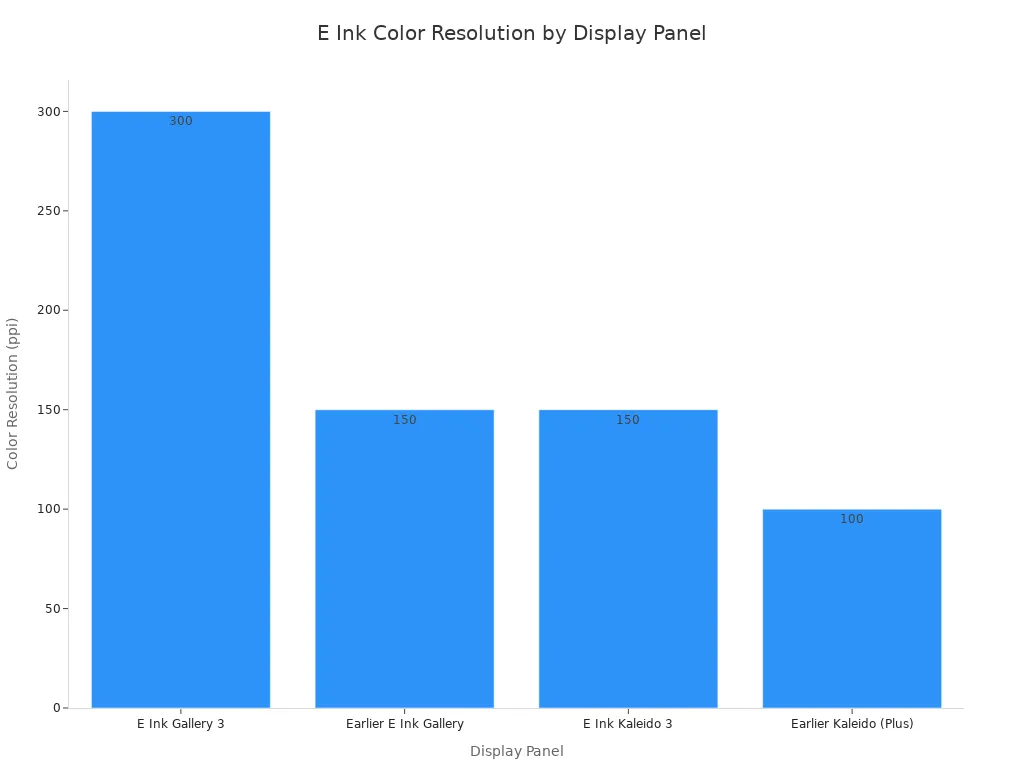
Kaleido 3 delivers 4096 colors with a 30% saturation boost over the previous generation. Gallery 3 achieves true blacks without color mixing. Both platforms push electronic paper toward richer visual experiences.
Faster refresh rates on the way
Speed improvements transform the user experience. Gallery 3 refreshes black-and-white content in 350 milliseconds. Its fast color mode completes in 500 milliseconds. Standard color mode takes 750 to 1000 milliseconds. Best color mode requires 1500 milliseconds. These numbers dwarf earlier panels that needed 10 seconds for color updates. Better ink responsiveness now enables simple animations and video playback on color electronic paper devices.
Flexible and Foldable Designs
Rollable screens
Manufacturers build e-paper on plastic substrates instead of glass. This construction allows the display to bend without breaking. Prototype rollable screens now exist. You can roll a display into a cylinder when you finish reading. Unroll it later to reveal your content again. This flexibility opens new possibilities for portable electronic paper technology.
Wearable displays
The thin, bendable nature of e-paper suits wearable applications. You can integrate a display into clothing or a wristband. The screen bends with your movement while holding its image. Low power consumption ensures the battery lasts for days. Designers envision smart patches that show vital signs or event badges that update wirelessly.
Expanding into New Markets
Architecture and interior design
Architects use e-paper to create dynamic building facades. A low-power exterior panel can change color or display patterns throughout the day. Interior designers install electronic paper walls that alter a room’s appearance. These applications consume minimal energy. The displays hold static images without power, making them ideal for architectural use.
Medical and educational tools
Hospitals use e-paper patient boards to display vital information. Nurses update the boards wirelessly from a central station. Medical electronic paper devices resist moisture and remain readable under bright clinical lights. Schools adopt e-paper tablets because they reduce eye strain during long study sessions. The reusable nature of these displays eliminates paper waste in classrooms. You will see electronic paper become a standard tool in these professional environments.
Now you understand whatiselectronicpaper. It is a display that looks like ink on paper. Electronic paper reflects light instead of glowing. This quality protects your eyes. It also uses very little power. You keep a page visible without energy. Think of e-paper as a reusable, digital piece of paper. E-paper excels at reading and static content, not video. This limitation fades as technology improves. New color and flexible designs arrive each year. The future of electronic paper looks bright.
FAQ
What is electronic paper in simple terms?
whatiselectronicpaper is a screen that mimics ink on paper. You read it like a printed page. It reflects surrounding light instead of emitting its own. This technology powers most e-readers. It uses energy only when the image changes.
How does an e-paper display hold an image?
Electronic ink uses millions of microcapsules. Each capsule contains black and white particles. Electrical charges move those particles into position. Once they settle, they stay there without power. You can leave a page visible for weeks.
Can you read e-paper in the dark?
You cannot read it in complete darkness without a light. The display requires ambient light to reflect. Many devices include a front light. This light shines onto the surface. You can adjust its brightness or turn it off.
Is electronic paper the same as e-ink?
Yes, the terms electronic paper and e-ink refer to the same display technology. The names are interchangeable. Both describe reflective screens that mimic printed paper. Manufacturers use both names for the same product.
Why does e-paper last so long on one charge?
The display draws power only when content changes. Holding a static image requires zero energy. You flip a page and the screen uses a brief pulse. Then it rests. This efficiency gives you weeks of battery life.
Can e-paper show video or animation?
No, it refreshes too slowly for video. A page turn takes hundreds of milliseconds. Motion appears laggy and blurry. The display excels at static text and images. You should choose an LCD for gaming or movies.
Does color e-paper exist?
Color electronic paper exists, but it cannot match LCD vibrancy. Advanced panels show tens of thousands of colors. These hues resemble a newspaper print. Engineers continue improving speed and saturation. You will see better color displays in coming years.
See Also
The E Ink Technology That Powers Today’s E-Readers
The Reason Retailers Are Choosing E Ink Electronic Shelf Labels
A Simple Guide To Electronic Shelf Label Pricing For All