
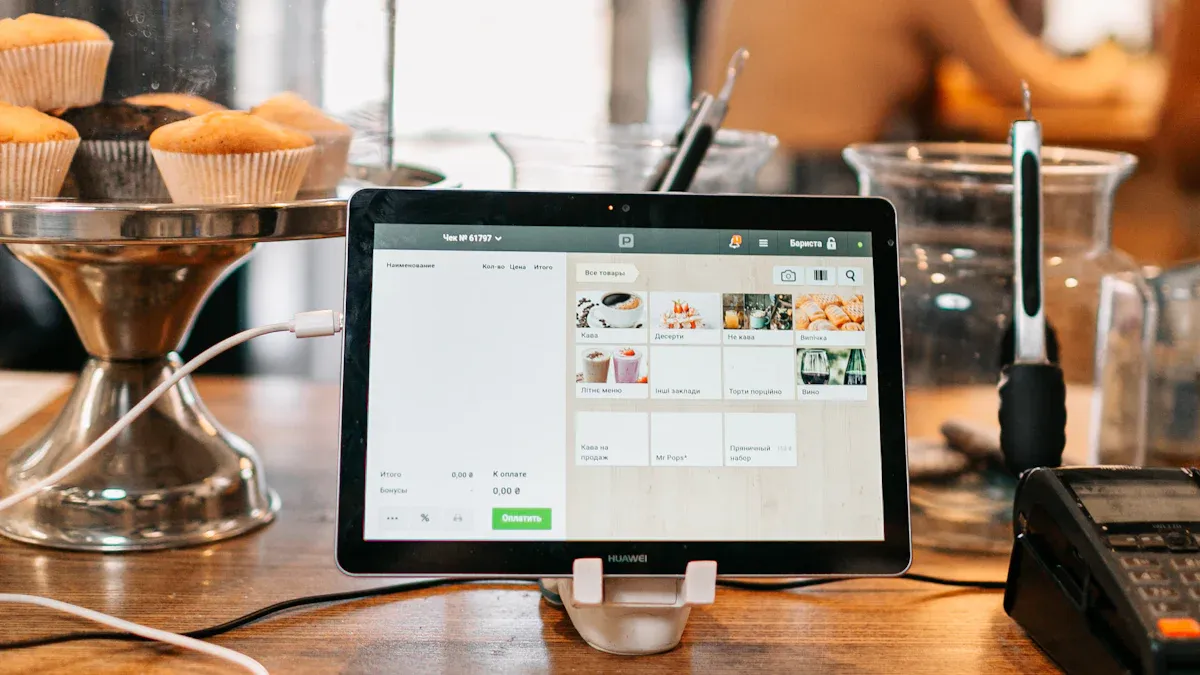
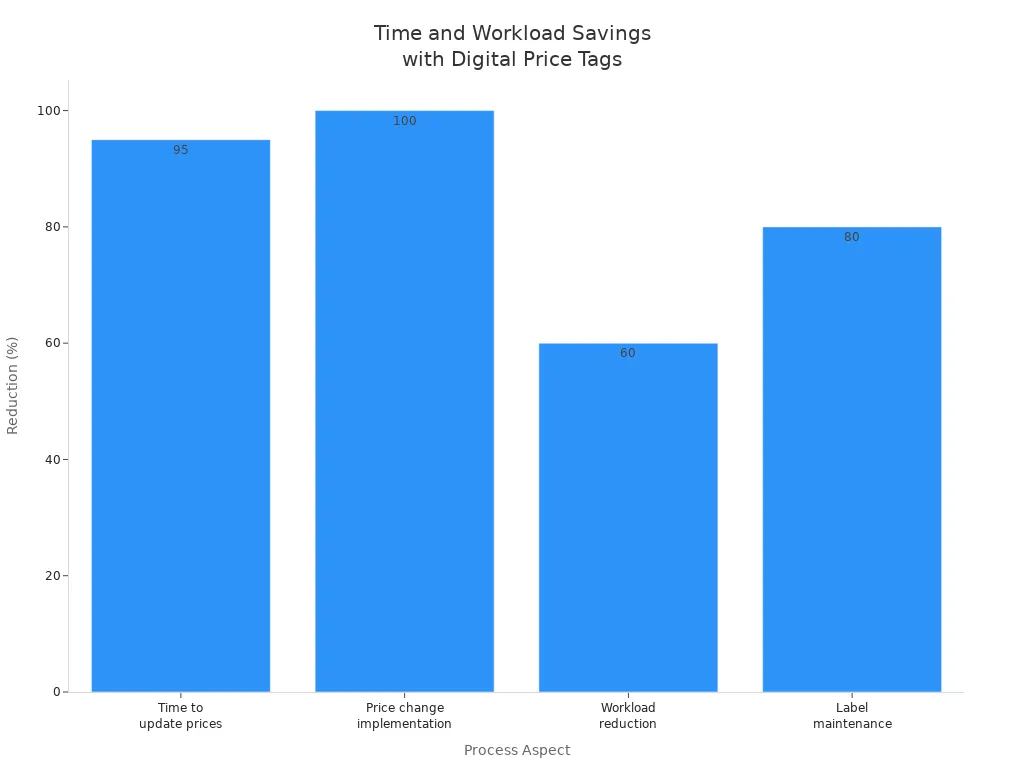
When you use a POS system with electronic shelf price tags, you gain the power to update thousands of digital price tags instantly through batch updates. These updates travel wirelessly from the central system to every ESL Price Tag and ESL Gateway AP in your store. You see dramatic efficiency gains with this approach. For example, retailers like Esl Retail report a 95% reduction in time needed for price changes, and Electronic Shelf Labels can cut workload by up to 60%. The following table highlights these differences:
| Metric/Aspect | Digital Price Tags (ESLs) Impact | Traditional Price Tags Impact |
|---|---|---|
| Time to update prices | 95% reduction in time needed | About 3 minutes per tag, adding up to several hours for large stores |
| Price change implementation | Reduced from hours to seconds | Requires hours for manual changes |
| Workload reduction | Up to 60% reduction in price updates, shelf management, and order picking | High manual labor required |
| Label maintenance time | 80% reduction reported (e.g., Carrefour) | High manual maintenance time |
You ensure real-time accuracy across all digital price tags and Electronic Shelf Labels, making your pricing consistent and reliable throughout the store.
POS System and Centralized Batch Updates
Managing Pricing Data in the POS System
Storing and Organizing Product Prices
You rely on your POS system to manage a vast catalog of products and prices. The system stores product details such as SKUs, barcodes, and pricing information in an integrated database. You can enter products manually or scan them using barcode scanners or mobile apps. This approach supports product variants, including different sizes or colors, and allows you to bundle items for promotions.
Your POS system tracks inventory and pricing in real time as sales occur. When you receive new inventory, you can update prices in bulk, which improves both efficiency and accuracy. Advanced systems even integrate vendor management, so you can create purchase orders and replenish stock directly within the platform. With cloud-based POS solutions, you store data centrally, making it easy to manage pricing and inventory across multiple locations. User permissions help you secure sensitive pricing data and prevent unauthorized changes.
Tip: Use hardware like barcode scanners and RFID tags to streamline product entry and inventory management for your digital price tags.
Initiating Batch Price Changes
You initiate batch price changes in your POS system through manual input or automated triggers. For example, you might schedule a price update for a seasonal sale or respond to market trends with dynamic pricing. The system compiles all relevant product data, including new prices, and prepares it for transmission to your electronic shelf labels. This process ensures that your digital price tags reflect accurate, up-to-date pricing throughout your store.
The main components of a POS system that enable centralized batch updates include:
| Component Type | Description | Role in Centralized Batch Updates and Synchronization |
|---|---|---|
| Middleware Integration | Platforms with pre-built connectors and real-time sync | Enables data mapping, centralized monitoring, and batch or real-time synchronization |
| RESTful APIs | Scalable, cloud/mobile friendly APIs | Supports flexible, real-time data exchange and batch updates |
| Direct API Integration | Real-time data exchange between POS and digital price tags | Allows seamless, instant updates and batch synchronization |
| File-Based Interfaces | Uses files for batch updates | Used for scheduled batch updates when real-time sync is not required |
| Cloud-Based POS Platforms | Provide extensive integration and user-friendly interfaces | Enable centralized management and easy batch processing |
| User Access Controls | Role-Based Access Control, Multi-Factor Authentication | Ensures secure, authorized batch updates |
| Scheduling & Automation | Push-based triggers, automation rules, scheduling options | Enables efficient timing and execution of batch updates |
| Network & Security | Secure communication channels, monitoring, backup and recovery | Maintains integrity and reliability of batch update processes |
Integration with Electronic Shelf Price Tags
Connecting POS to Digital Price Tags
You connect your POS system to electronic shelf price tags using two main integration methods. API-based integration works best for cloud-based POS systems, enabling real-time syncing of label updates without extra software. If your POS system does not support native integration, you can use middleware solutions. These third-party platforms act as a bridge, ensuring your digital price tags receive timely updates.
Before integrating, you should check your POS system’s compatibility, including available APIs and hardware limitations. Middleware becomes essential if you use older checkout stations or on-premise systems.
Role of Label Management Software
Label management software plays a critical role in the integration process. This software manages the communication between your POS system and electronic shelf labels. It handles the scheduling, packaging, and wireless transmission of label updates. You benefit from features like centralized monitoring, conflict resolution, and automation rules. These tools ensure that your digital price tags always display the correct prices, reducing manual intervention and supporting dynamic pricing strategies.
Note: Wireless technologies such as RF, NFC, and Bluetooth Low Energy enable remote updates for electronic shelf labels, making your store more agile and responsive.
Technologies Powering Digital Price Tag Updates
Wireless Communication Protocols
Radio Frequency (RF) for Tag Updates
You rely on robust wireless protocols to ensure your digital price tags receive timely updates. Many retailers use 2.4G wireless communication for seamless, real-time updates of electronic price tags. This protocol supports low error rates and integrates well with enterprise management systems. You can deploy these systems in retail, warehouse, or logistics environments, choosing between cloud or local server-based options for flexibility.
- 2.4G private protocols deliver real-time price changes and strong integration with enterprise systems.
- 433MHz and ZigBee protocols exist, but they often fall short due to lower communication rates and higher latency.
- Security remains a consideration, as some private protocols may lack international standards.
Wi-Fi and Bluetooth Low Energy (BLE)
You may encounter several wireless options, but not all suit digital price tag needs. Wi-Fi, while common, usually proves unsuitable because of high power consumption and cost. Instead, Bluetooth Low Energy (BLE), especially BLE 5.0, stands out as the preferred choice for modern electronic shelf labels. BLE 5.0 offers low power consumption, strong AES-128 encryption, high communication rates up to 2 Mbps, and long communication distances. Over-the-air firmware updates and international standards make BLE 5.0 ideal for secure, scalable deployments.
Tip: BLE 5.0’s anti-interference capabilities and long battery life help you maintain reliable digital price tag operations with minimal maintenance.
Digital Price Tag Hardware
E-Paper Displays and Tag Controllers
You benefit from energy-efficient hardware in your digital price tags. Most electronic shelf labels use e-ink or LCD displays to present price and product information clearly. E-ink technology enables automatic, real-time updates synchronized with your POS system. This hardware ensures pricing consistency and supports inventory management by displaying real-time stock levels.
- Wireless modules such as BLE, Wi-Fi, or proprietary RF systems enable fast data transmission.
- Integration hardware and network infrastructure keep your digital price tags in sync with POS and inventory systems.
Battery Life and Power Management
You need reliable power solutions for your digital price tags. Most tags use batteries, but some stores opt for hardwired or solar-powered options. BLE and e-ink displays work together to maximize battery life, often lasting several years before replacement. Security hardware, including encryption and multi-factor authentication, protects your system from unauthorized access.
Central Management and Cloud Platforms
RESTful APIs and Batch Endpoints
You streamline batch updates using central management platforms and cloud infrastructure. These platforms use RESTful APIs to send batch payloads—often as JSON objects—containing product identifiers and update fields. By grouping multiple update requests into a single call, you reduce network overhead and improve efficiency. This approach supports large-scale, secure, and efficient updates across thousands of digital price tags.
Real-Time Synchronization
You maintain consistency and accuracy across all store locations with real-time synchronization. Centralized control allows you to update prices, promotions, and inventory data instantly, reducing manual errors. Monitoring tools track batch operations, alerting you to failures or delays. Robust error handling and rollback procedures ensure operational reliability and data integrity. This integration empowers you to coordinate rapid updates, improving productivity and customer experience.
Step-by-Step Workflow: Batch Updates from POS System to Digital Price Tags

Price Change Initiation in the POS System
Manual Input and Automated Triggers
You start the batch update process by initiating a price change in your POS system. You can do this manually or set up automated triggers based on your business rules. Manual input works well when you need to update prices for specific products or departments. Automation helps you respond quickly to market changes, scheduled promotions, or inventory adjustments.
Here is a typical process for initiating a batch price change:
- Access your POS system’s secure web account.
- Open the POS settings menu.
- Locate the option to rebatch your price book.
- Choose whether to update the entire price book or select specific departments.
- Enter the required confirmation number and confirm the action.
This workflow ensures that your price changes reach the system efficiently. You can rely on automation to schedule updates during off-peak hours, reducing disruption in your store. By using these methods, you maintain control and flexibility over your pricing strategy.
Tip: Automation in your POS system reduces manual work and helps you avoid errors during price changes.
Preparing and Packaging Batch Updates
Compiling Product Data for Transmission
Once you initiate a price change, your POS system compiles all relevant product data for transmission. The system gathers updated prices, product identifiers, and any additional information needed for your electronic shelf price tags. You can select whether to include all products or only those from specific categories.
The system then packages this data into a batch update file. This file often uses a standardized format, such as JSON, to ensure compatibility with your label management software and digital price tags. Centralized management platforms help you monitor the status of each batch, track progress, and resolve conflicts before transmission.
You benefit from this structured approach because it streamlines the update process and ensures accuracy. Automation tools in your POS system can handle large volumes of data, making it easy to manage thousands of digital price tags at once.
Wireless Transmission to Electronic Shelf Price Tags
Sending Data Packets to All Tags
After preparing the batch update, your system transmits the data wirelessly to every electronic shelf price tag in your store. Modern retail environments use advanced wireless technologies to achieve this quickly and reliably.
- Many stores use 2.4 GHz wireless transmission technology to send updates. This method supports remote price changes and bulk updates, allowing you to refresh prices across your store in less than 10 seconds.
- Bluetooth Low Energy (BLE) 5.0 is another popular choice. With BLE, you can push batch price updates with a single click. Your e-ink price tags refresh almost instantly, and the system minimizes manual work and human error.
- These wireless systems integrate with your retail management software through APIs, ensuring unified price management both online and offline.
- The wireless infrastructure is designed to operate stably in complex retail environments, providing strong anti-interference capabilities.
You can deploy these systems on local servers or in the cloud, depending on your store’s needs. This flexibility allows you to maintain stable operations and keep your digital price tags synchronized with your POS system at all times.
Note: Wireless batch updates not only improve efficiency but also support centralized management and automation, making your store more agile and responsive.
Tag Reception and Display Update
Processing and Displaying New Prices
When your POS system sends a batch of price changes, each digital price tag receives the update through a secure wireless connection. You benefit from a system that ensures every tag displays the correct price almost instantly. The process relies on seamless integration between your central management platform and the electronic shelf labels.
- Digital price tags connect directly to your central system, which enables real-time updates of prices and product information.
- Wireless communication technology, such as BLE or RF, synchronizes each tag with your store’s pricing system. This ensures that new prices appear on the shelf within seconds after you initiate a batch update.
- The system eliminates manual errors by automatically syncing all digital price tags. You no longer need to walk the aisles to check for discrepancies.
- Dynamic pricing strategies become possible because the central system supports instant updates and real-time inventory tracking.
- You can update prices across your entire store with a single command. The system propagates the changes to every tag, ensuring consistency and accuracy.
Note: Automatic syncing across all digital price tags not only saves time but also guarantees that your customers always see the correct price at the shelf.
Confirmation and Error Handling
Verifying Successful Updates
You need to ensure that every price change reaches its destination and displays correctly. Your POS system uses a robust confirmation process to verify successful updates:
- The system runs a batch job that imports the price change file from secure storage.
- It parses the file and attempts to update the master pricing tables.
- The batch process treats the entire file as a single transaction. If any error occurs, the system rolls back all changes to prevent partial updates.
- Upon successful completion, the system moves the processed file to an archive location. This action confirms that all price changes have been applied.
- You can review the status of each batch job in the administration dashboard, ensuring transparency and control.
This approach maintains data integrity and prevents inconsistencies in your store’s pricing.
Managing Failed or Missed Updates
Sometimes, errors can occur during the batch update process. Your POS system provides clear mechanisms to handle these situations:
- If the system encounters an error while processing the batch, it generates a reject file and stores it in a designated folder.
- You receive detailed error messages in the job administration screen, allowing you to identify the cause of the failure.
- To resolve the issue, you correct the data in the original file and re-upload it to the system.
- The system then re-runs the batch process, ensuring that all updates are either fully applied or fully rejected.
- Status codes and confirmation indicators help you track which price changes succeeded, which failed, and what actions you need to take next.
Tip: By using these built-in error handling tools, you maintain full control over your pricing and avoid the risk of partial or incorrect updates on your digital price tags.
Benefits of Batch Updating Digital Price Tags with POS System
Efficiency and Labor Savings
Reducing Manual Price Changes
You gain significant efficiency when you use batch updates for your digital price tags. Manual price changes often require hours of staff time, especially in large supermarkets. With a modern pos system, you can eliminate this repetitive work. Many retailers have reported labor cost savings of up to $200,000 each year by switching to batch updates. Small stores have seen price update times drop by as much as 80%. Large retail chains often recover their investment in digital price tags within three years due to these savings.
- Batch updates allow you to update thousands of tags at once, freeing your staff for more valuable tasks.
- AI-driven automation increases staff productivity by up to 50%. Your team can focus on customer service or merchandising instead of walking the aisles to change prices.
- Integration with inventory systems enables automatic price adjustments, which improves sales conversion rates in price-sensitive categories.
Tip: By reducing manual labor, you not only save money but also create a more agile and responsive store environment.
Accuracy and Consistency Across Stores
Eliminating Human Error
You ensure pricing accuracy and consistency across all your locations when you use batch updates. The pos system enables you to update hundreds or thousands of SKUs at once, which keeps your pricing uniform. An Excel-like bulk edit interface reduces manual errors and improves accuracy. You can synchronize updates automatically across multiple sales channels, such as your online store and physical locations.
Batch updates let you assign categories and attributes in bulk, keeping your product catalog organized. You can also delete outdated products in one step, which prevents confusion from obsolete pricing. This process minimizes processing time and reduces manual errors, so your pricing data remains consistent and accurate everywhere. Consistent pricing builds trust with your customers and helps avoid confusion at checkout.
- You maintain profit margins by applying the same pricing strategies across all stores.
- Bulk updates save time and reduce the risk of mistakes, which improves your operational efficiency.
Real-Time and Scheduled Price Updates
Responding Quickly to Market Changes
You can respond to market changes instantly with real-time and scheduled price updates. Dynamic pricing models use real-time data to adjust prices based on inventory and demand. For example, you can reduce prices on perishable goods nearing expiration to minimize waste. Predictive pricing models help you set optimal prices ahead of events, such as seasonal demand spikes, which improves profitability.
- Real-time price optimization lets you capitalize on demand surges and manage overstock efficiently.
- Advanced analytics and automation process real-time data, ensuring your pricing remains agile and responsive.
- Automated systems reduce manual workload and improve pricing accuracy, enabling rapid promotional pivots.
You gain access to a single source of truth for your pricing data. This alignment helps you make informed decisions quickly and keeps your store competitive. Real-time inventory visibility also helps you clear slow-moving stock before it becomes dead stock, reducing losses and improving cash flow.
Note: Real-time price updates help you maintain a competitive edge by allowing you to react instantly to market trends and customer needs.
Enhanced Customer Experience
Ensuring Price Transparency and Trust
You want your customers to feel confident when they shop in your store. Digital price tags, also known as electronic shelf labels (ESLs), help you deliver that confidence by ensuring price transparency and building trust. When you use ESLs, you provide real-time pricing updates that eliminate confusion and reduce the risk of pricing errors. Your customers see the correct price every time they look at the shelf, which minimizes frustration and prevents disputes at checkout.
Digital price tags do more than just display prices. You can show detailed product information, such as nutritional facts, allergen warnings, and stock availability. This level of transparency empowers your customers to make informed decisions quickly. You also have the option to include QR codes or NFC features on your ESLs. Shoppers can scan these codes with their smartphones to access product reviews, instructional videos, or special offers. This interactive experience not only enriches the shopping journey but also positions your store as modern and customer-focused.
Customers value consistency. When you update prices across all shelves instantly, you remove the risk of seeing different prices for the same product in different parts of your store.
You can use ESLs to highlight promotions and seasonal discounts in real time. Agile pricing allows you to respond to market trends and offer better value to your customers. For example, you can adjust prices for perishable goods nearing expiration or launch flash sales during slow periods. These timely updates give your customers access to the best deals without delay.
Here are some ways digital price tags enhance transparency and trust:
- Displaying accurate, up-to-date prices at all times
- Providing detailed product information, including ingredients and stock levels
- Offering QR codes and NFC for instant access to reviews, videos, and personalized promotions
- Ensuring consistent pricing across all shelves and locations
- Freeing your staff from manual price changes so they can focus on customer service
You also improve the overall shopping environment. ESLs help customers navigate your store by showing inventory levels and product locations. This technology creates a modern, attractive atmosphere that appeals to today’s tech-savvy shoppers. Leading retailers like Walmart and Carrefour have adopted ESLs to deliver exceptional shopping experiences, setting a standard for transparency and trust in retail.
By automating price updates and providing clear, accessible information, you build a reputation for honesty and reliability. Your customers know they can trust your prices and product details, which encourages repeat visits and long-term loyalty.
Challenges in Batch Updating Electronic Shelf Price Tags
Connectivity and Network Reliability
Signal Interference and Range Limitations
You depend on a stable wireless network to keep your price updates accurate and timely. However, several factors can disrupt this process:
- Wireless network dependence can lead to delayed or missed price updates if you encounter weak signals or network congestion.
- Signal interference from other electronic devices or physical barriers, such as thick walls or metal shelves, can disrupt data transmission. This disruption may cause incomplete or outdated price displays on your shelves.
- In busy retail environments, network congestion often results in mismatches between shelf prices and your POS records. For example, one European retailer reported a 15% discrepancy due to network congestion.
- Hardware failures, such as battery depletion or display malfunctions, can leave some tags unresponsive and unable to receive updates.
- Synchronization failures between your electronic shelf labels and the POS system can cause mismatched prices at checkout.
- Power outages or system downtime can interrupt connectivity and halt price update flows. You need backup systems and regular maintenance to address these risks.
Reliable wireless coverage and regular network checks help you minimize these connectivity challenges and maintain accurate pricing.
Integration with Legacy POS Systems
Compatibility and Data Mapping
You may face integration challenges when connecting modern digital price tags to older POS systems. Many legacy systems lack support for modern APIs, making real-time synchronization difficult. To bridge this gap, you can use an internet gateway or middleware that acts as a communication bridge between your electronic shelf labels and your existing retail management platforms.
- Middleware or custom APIs enable you to connect legacy POS systems, allowing for real-time price synchronization.
- You might adopt phased rollouts to minimize operational disruption during integration.
- Selecting ESL platforms with compatible APIs ensures smooth connectivity and reduces technical headaches.
- You maintain data accuracy through bi-directional synchronization and automated validation processes.
- Security remains a top priority. Encryption and multi-factor authentication protect your data exchanges.
- Strong IT support and comprehensive staff training help you manage integration and ongoing system operation.
- Wireless communication protocols, such as Bluetooth or proprietary RF, support flexible deployment and reliable data transfer.
- You may need to deploy multiple gateways to ensure full coverage and stable wireless connectivity.
- Modular systems, middleware, and vendor support help you address high initial investment, technical complexity, and hardware limitations.
Careful planning and the right technology choices make integration with legacy systems manageable and secure.
Maintenance and Upkeep of Digital Price Tags
Battery Replacement and Tag Durability
You must regularly check the battery levels of your digital price tags to ensure uninterrupted operation. Battery-powered tags require periodic replacement, especially in high-traffic areas. Durable tag construction helps reduce the risk of display malfunctions and physical damage.
Software Updates and Support
Ongoing maintenance keeps your system running smoothly. You need to:
- Update firmware wirelessly and test on a small group before full deployment.
- Back up device configurations and data before upgrades.
- Conduct site surveys to ensure strong wireless coverage and minimize interference.
- Verify battery levels and ensure gateways have backup power.
- Test tag responses and network connectivity after updates.
- Prepare rollback strategies in case firmware upgrades fail.
- Confirm firmware compatibility with your device models.
- Perform routine checks on network hardware and monitor performance.
These steps help you maintain reliable operation, minimize downtime, and keep your pricing information accurate across all electronic shelf labels.
Best Practices for Retailers Using Digital Price Tags
Planning and Scheduling Batch Updates
Timing for Minimal Store Disruption
You achieve the best results when you plan batch updates during periods of low customer activity. Early mornings or late evenings often provide the ideal window for these updates. By scheduling updates outside of peak hours, you minimize the risk of disrupting shoppers or causing confusion at checkout. Many retailers use automation tools within their POS systems to set recurring update times. This approach ensures that price changes roll out consistently and predictably.
Tip: Coordinate with your IT and store management teams before scheduling large-scale updates. This collaboration helps you avoid conflicts with other store operations, such as inventory counts or promotional events.
You should also communicate planned update times to your staff. Clear communication prepares your team to monitor the process and address any issues quickly. When you align your update schedule with your store’s operational flow, you maintain a seamless shopping experience for your customers.
Staff Training and Change Management
Ensuring Smooth Adoption of New Systems
You empower your team to manage digital price tags effectively through structured training and ongoing support. Retailers often use a comprehensive video library to guide staff through every technical step. These training videos cover essential topics, such as:
- Editing CSV files for batch price updates
- Binding digital tags to SKUs
- Uploading and managing CSV files
- Updating prices without CSV files
- Verifying shelf prices after updates
This step-by-step approach helps your staff gain proficiency quickly. You also benefit from additional support channels, including email and chat help services. These resources provide immediate assistance when your team encounters technical challenges. By combining video tutorials with responsive support, you ensure that employees can confidently manage and troubleshoot batch updates.
Note: Regular refresher sessions and easy access to training materials help your staff stay up to date with system changes and new features.
Monitoring and Troubleshooting Batch Updates
Using Analytics and Alerts for Performance
You maintain system reliability by actively monitoring batch update performance. Most digital price tag platforms offer analytics dashboards that display the status of each update. These dashboards help you track which tags received updates, identify any failures, and measure update speed.
Set up automated alerts to notify you of issues, such as missed updates or communication errors. When you receive an alert, you can investigate the affected tags and take corrective action immediately. Analytics tools also allow you to review historical data, spot recurring problems, and optimize your update processes.
- Use dashboards to visualize update success rates.
- Enable real-time alerts for failed or delayed updates.
- Review logs to identify and resolve root causes of errors.
By leveraging analytics and proactive monitoring, you ensure that your digital price tags always display accurate, up-to-date information. This vigilance protects your store’s reputation and enhances the customer experience.
The Future of POS System and Digital Price Tag Integration
Advancements in Wireless Technology
Faster and More Reliable Protocols
You will see rapid changes in wireless technology that make digital price tag updates faster and more reliable. Retailers now use dedicated RF frequencies to reduce signal interference and improve communication stability. You can deploy multiple base stations throughout your store to extend wireless coverage, ensuring every electronic shelf label receives updates without delay.
Modern systems use two-way communication, so your ESLs can send real-time feedback about battery status and connectivity. This proactive monitoring helps you prevent downtime and maintain accurate pricing. You benefit from a mix of wireless technologies, including Wi-Fi, Bluetooth Low Energy (BLE), and RF, which deliver efficient, low-latency updates.
Security remains a top priority. End-to-end encryption and authentication protocols protect your data during transmission. With the rise of 4G+ and 5G, you gain access to higher speeds, lower latency, and support for thousands of connected devices. These advancements allow you to update prices across your entire store in seconds, keeping your operations agile and responsive.
Tip: IoT connectivity lets your ESLs integrate with retail management and inventory systems, improving both update speed and accuracy.
AI and Automation in Batch Price Updates
Predictive Pricing and Dynamic Adjustments
You can harness artificial intelligence to automate and optimize your batch price updates. AI agents analyze live market data, such as competitor pricing, local demand, and inventory levels. This analysis triggers real-time price changes across all your stores. You no longer need to rely on manual updates or slow processes.
Platforms now offer centralized, real-time price updates, replacing manual tasks with AI-driven triggers. Dynamic pricing lets you match competitor price drops instantly or apply just-in-time markdowns to reduce waste. AI agents use computer vision and data feeds to monitor store conditions, detect pricing errors, and either auto-correct or alert your staff.
Retailers have seen measurable gains from these systems. Dynamic price adjustments respond to market changes in seconds. Inventory forecasting improves, reducing out-of-stock items. Robotic shelf scanning detects pricing errors and stockouts, increasing efficiency and customer satisfaction. You benefit from faster reaction times, reduced manual oversight, and improved profitability.
Expanding Use Cases for Electronic Shelf Price Tags
Inventory Management and Promotions
You can now use electronic shelf price tags for much more than price display. ESLs connect directly with your ERP and POS systems, providing real-time price and inventory updates. Integration with mobile POS systems allows your associates to update pricing and inventory on the spot, improving both customer service and operational efficiency.
ESLs display interactive elements, such as QR codes and NFC tags, to provide additional product information and engage customers. You eliminate discrepancies between shelf and checkout prices by synchronizing ESLs with your central systems. These tags also support dynamic pricing and real-time promotional campaigns, helping you respond quickly to market trends.
You can display nutritional facts, price per weight, and remaining stock levels right on the shelf. When items are out of stock, ESLs show QR codes that link customers to online ordering platforms. Integration with your inventory systems enables real-time updates, supporting omnichannel retailing and bridging the gap between online and offline experiences.
You gain operational agility and efficiency by using POS systems for batch updates of digital price tags.
- Bulk-product imports and automated data synchronization save time and reduce manual work.
- Real-time stock tracking and automated replenishment help you adjust quickly to demand.
- Centralized management supports seamless workflows across multiple locations.
| Aspect | Impact on Customer Trust and Competitive Advantage |
|---|---|
| Pricing Accuracy | Real-time updates reduce errors, building trust and minimizing disputes. |
| Dynamic Pricing | Instant adjustments let you respond to market changes and stay ahead of competitors. |
| Omnichannel Consistency | Synchronized prices across channels ensure transparency and confidence at checkout. |
You position your store for growth, improve customer loyalty, and maintain a strong edge in today’s retail market.
FAQ
How often can you update digital price tags in batches?
You can update digital price tags as often as your POS system and network allow. Most retailers schedule updates daily or during off-peak hours. Real-time updates are possible for urgent price changes or promotions.
What happens if a digital price tag fails to update?
Your system flags any failed updates and sends you an alert. You can review the error, correct the issue, and resend the update. Most platforms offer dashboards to track and manage these exceptions.
Do batch updates affect store Wi-Fi performance?
Batch updates use dedicated wireless protocols like RF or BLE, which do not interfere with your store’s Wi-Fi. You maintain stable internet access for staff and customers during updates.
Can you schedule batch updates for specific times?
Yes, you can schedule batch updates for early mornings, late evenings, or any time that minimizes disruption. Automation tools in your POS system help you set recurring update schedules.
How do you ensure security during wireless updates?
You protect your data with encryption, secure authentication, and access controls. Modern systems use AES-128 or higher encryption standards to prevent unauthorized access during wireless transmission.
What information can digital price tags display besides price?
Digital price tags can show product names, barcodes, stock levels, promotions, and QR codes. Some models support nutritional facts, allergen warnings, and links to online resources.
Do you need to replace batteries often in digital price tags?
Most digital price tags use energy-efficient displays and wireless modules. You typically replace batteries every three to five years, depending on usage and update frequency.
Can you integrate digital price tags with older POS systems?
You can use middleware or API bridges to connect digital price tags with legacy POS systems. This approach allows you to synchronize pricing data without replacing your existing infrastructure.